🌐 Bridge the gap between wired and wireless like a networking ninja!
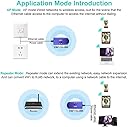
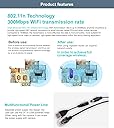
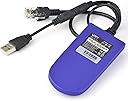
The VONETS Mini WiFi Bridge is a compact, industrial-grade adapter that converts WiFi signals to Ethernet and vice versa, supporting 2.4GHz 802.11bgn/n standards. Powered via USB or DC input, it extends WiFi coverage with repeater and access point modes, making it ideal for professional devices like DVRs, IP cameras, and industrial PLCs. Its smart hotspot auto-reconnect and multi-authentication features ensure reliable, seamless connectivity in demanding environments.


| Brand | Vonets |
| Product Dimensions | 9.2 x 4.7 x 2.1 cm; 60 g |
| Item model number | VAP11G-300 |
| Manufacturer | Shenzhen HouTian Network Communication Technology Co., Ltd. |
| Series | Wifi Bridge |
| Colour | 2.4GHz |
| Wireless Type | 2.4 GHz Radio Frequency, 802.11bgn, 802.11n |
| Voltage | 15 Volts |
| Wattage | 4 watts |
| Operating System | Windows |
| Are Batteries Included | No |
| Item Weight | 60 g |
| Guaranteed software updates until | unknown |
J**3
Great for youview box application
Brilliant little dongle! Bought this when we moved the BT youview box up into the bedroom, as you may know the youbox a wired internet connection and though i would give this a try. Powered by the USB socket on the back of the box and it works a treat. Really simple to setup even for a novice with networking experience, instructions aren't the best but can make out what to do, even a simple youtube search will give a clear video on how to do it.I have tested this for amazon prime streaming and so far it hasn't missed a beat. My router is sat in the living room and we have a solid brick built house so would expect some buffering but so far nothing! Have had this setup for a little over a month. Would recommend if you are looking to get over any hardwired issues and have limited plug sockets at your disposal!
R**Y
Works great in the end.
Bought this to connect my cctv dvr to my virgin media super hub via WiFi.I esed the USB port on the front of the cctv dvr to power the unit and plugged the rj45 into my laptop. ( ethernet port ) turned off the wireless connection on my laptop and opened my browser then typed in on the on the top search bar 192.168.254.254 enter.It brought up the home page for the device and I configured it to search for hot spots ( my virgin media hub ) entered the hub password etc then opened the WiFi repeater tab and clicked on the appropriate tab to connect to the Internet.It stated connected and I logged out.Then unplugged the rj45 ( ethernet plug ) and plugged it into the back of the cctv dvr and went through the cctv systems set up feature and hey presto it's connected to my hub via WiFi. Remember to use the USB on the cctv dvr to keep it powered do not unplug it. Its working great. However s little knowledge of setting up routers would be an advantage.
J**G
Does what it says on the tin
Ok, so I'm far from an Apple fan, but the one thing Mr Jobs got very very right was the user interface. The interface here is as per a bad/ below average switch or router config. Which for us technical peeps is fine, but I would assume this is where many of the bad reviews or people saying the item doesn't work are coming from...its just too technical for some. A proper Interface or even some well worded explanations...or even just a menu button that sets Bridge or Repeater!Otherwise the device works flawlessly so far (have had it plugged in half an hour). Good reliable connection and a great bridge.
A**R
Cannot get it function. Unable to contact vonets.cfg.operating but not connecting for config.
The unit is a great idea but is very difficult to configure. it is impossible to get to vonets.cfg to try and configure the unit. It should be a plug and play unit but does not allow for plug and play. Also it says there is a CD but this was not supplied. Not easy piece of hardware for someone who is not computer literate.
S**A
Quite impressed thus far...
Worked well at first attempt, reasonably straight forward set-up from my iPhone although had to don reading glasses to see the text on the screen, similarly with the "Instructions" booklet. Website has a lot of good documents to help too if you need it.First time it had to re-boot it did seem to get stuck in a loop but a power off and power on sorted it out and it came back on with all the changes applied.I went on to update its firmware and it rebooted without issue on this occasion and all settings were intact and the device fully functional.For the modest cost, this little device is really pretty good.This is just day 1 so let's hope for years of trouble-free service!
K**O
Undetermined opinion
Setting this up was anting to say the least. Issue 1: trying to get my laptop internet explorer software to access the IP address was hit and miss and had to restart my laptop several time.Issue 2: getting the unit to accept my passcode was near on impossibleIssue 3: when I eventually customise the setting and enter my relevant information you have to reboot the unit for it to save the settings. It froze several times on reboot, and had to start from scratch. I have done the unit and got it working, and works very well, but it wasn’t straight forward. I am an experienced network operator, and without prior experience with networking and connection protocols. Would have been lost. It’s good when setup but expect the odd frustrating headache
J**S
Ethernet
Did the job
M**N
Great piece of kit
What a superb bit of kit! I have an old BT / YouView box that was previously connected with a pair of powerline adaptors. One of those started randomly disconnecting. So, faced with having to set that up again I found this. Simple config via a laptop using this device as the hotspot, logging into it then connected to my home wifi. Then, literally disconnected from laptop and plugged into the back of 5he BT box - into the RJ45 internet port and into the convenient USB port (for power).A few seconds later and my box is now seamlessly connected!
Trustpilot
2 weeks ago
2 months ago