


Desertcart purchases this item on your behalf and handles shipping, customs, and support to South Africa.
🚀 Upgrade your connection, join the WiFi 6E elite!
The AX210NGW is a cutting-edge M.2 WiFi 6E module delivering up to 5400Mbps tri-band wireless speeds with Bluetooth 5.3 support. Designed for Windows 10/11 laptops and desktops, it features MU-MIMO, ultra-low latency, and Target Wake Time technology to optimize performance and battery life in dense network environments.
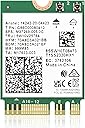
| ASIN | B07SH6GV5S |
| Best Sellers Rank | #51 in Internal Computer Networking Cards |
| Brand | OKN |
| Color | White |
| Compatible Devices | Desktop, Laptop |
| Compatible Operating System Family | Windows |
| Customer Reviews | 4.5 out of 5 stars 2,724 Reviews |
| Data Link Protocol | Bluetooth, WiFi 6E/6GHz |
| Data Transfer Rate | 5400 megabits_per_second |
| Hardware Interface | 802.11 ac/b/g/n |
| Item Type Name | AX210 WiFi Module |
| Item Weight | 4.54 g |
| Manufacturer | UFON |
| Mfr Part Number | AX200 |
| Minimum Required Operating System Version | Windows 10 |
| Model Number | PCE-AX210 |
| Number of Items | 1 |
| UPC | 650728511724 |
| Unit Count | 1 Count |
B**S
Easy install, fast speeds! Great upgrade
Ben says: Nothing like a quick YouTube tutorial to make you feel like a tech genius. I installed this Wi-Fi 6 card in my laptop about a year ago, and it’s been flawless ever since. No drops, no weird disconnects — just solid, fast, reliable internet. The install was straightforward, especially after watching a quick tutorial online, and it immediately improved my connection speeds. If your laptop came with one of those underwhelming stock Wi-Fi cards, this is an easy and affordable way to breathe new life into it.
C**N
WiFi Card Greatly Improved Internet Speed
Card works well and greatly improved my internet speed and connectivity.
R**L
Great speedy upgrade for WiFi signal
I recently got a new Dell Inspiron 15 (Ryzen 5-7530U) laptop, it has nice specs, however I didn’t like some internal components, specially the WiFi card, it came with a Realtek RTL8821CE which only supports 1-stream 802.11ac protocol with a max connection speed of 433Mbps, so I knew I had to upgrade it to a better one like this Intel AX210 card: PROS - Came well protected. - Includes screw and protector plate. - Just plug & play (didn’t need to download drivers on Windows 11) CONS - The main disadvantage would be you need tech skills to install it. If you have doubts, consider someone else to do it for you. MAIN SPECS - Wi-Fi 6E (802.11ax) - 2x2 MIMO streams - Target Wake Time (TWT) to increase laptop battery life. - Bluetooth 5.3 INSTALLATION Installing this card involves: - Removing 8 screws holding the laptop bottom cover. - Locating the WiFi card and removing the screw holding it in place. - Unattach the antennas. - Swap the new WiFi card in. - Connect antennas, consult your computer manual, as there is no standard on the color of the main and aux cables, for my laptop, white corresponds to MAIN connector and black to AUX connector. - Secure WiFi card with protective plate and screw. - Put back the laptop cover and secure it in place. DRIVERS After booting the laptop Windows 11 recognized and installed the drivers automatically, I just had to enter the WiFi credentials again and it connected flawlessly. BLUETOOTH 5.3 I have a BT mouse connected to the laptop and all I can say is that it works. But BT 5.3 offers a more robust, power-efficient, and user-friendly Bluetooth experience compared to Bluetooth 5.0, especially if you use it to connect audio devices. CONCLUSION I now have a speedy 1733 Mbps connection, as I have a WiFi 5 Synology RT2600 Router that I got back in 2017, I’m happy with the upgrade, if I ever upgrade my router I know the laptop will support WiFi 6.
J**E
Affordable Upgrade That's Absolutely Worth It!
My house that I moved into is older and has a lack of cabling/coax jacks, so I setup a nice Wi-Fi 6 mesh network. Issue was that my laptop is a 2015 Dell Inspiron 14-5458. If 802.11ax mode (Wi-Fi 6) is enabled on the network, my laptop could not detect it due to the outdated WLAN/Wi-Fi 5 card. My mom's 2019 Dell Inspiron 13-7375 laptop had a defective card that would randomly be unable to detect any network. I decided to purchase a couple of these cards after verifying they would fit our device models, and needless to say, they work great! I searched for, downloaded, and installed Windows 10 Intel AX210 Bluetooth and Wi-Fi drivers prior to installing the cards. I looked up some diseembly videos and pictures to get an idea of where to install them. Once the laptops were taken apart, I made sure to disconnect the batteries and located the cards. I unclipped the antennae, pulled the cards out of their slots, and popped the new ones in. The toughest part was clipping the antennae back onto the replacement cards because the parts are very small. After around 30 minutes of strenuous effort, sweat, and frustration, I finally got them perfectly lined up to snap into the cards! Thankfully, the process was a bit quicker on my mom's laptop after tirelessly struggling on mine. After the new cards were installed and the laptops put together, I tested them out. My old laptop detected the network without issue and download speeds over Wi-Fi 6 were significantly faster than with the old card! With the new hardware, my mom's laptop consistently detected the network after reboot and when waking from sleep. All in all, this purchase was definitely worth it and for roughly $40, these newer WLAN/Wi-Fi 6 (802.11ax) cards can breathe life into the wireless connectivity and bandwidth speeds for your older laptops!
F**N
Real nice upgrade, but had to remove it.
Do yourself a favor and download both the wifi and bluetooth drivers from Intel FIRST before you change the wifi card out. Then you'll have the drivers ready to install after putting the computer back together. FYI I have a Windows 10 with Core I7 - 7Gen!!, and the wifi card is working great. Update: After experiencing some random BSOD and tracing it back to the date I installed the wifi card, I uninstalled it and no longer get BSOD errors. Perhaps there were complications with the electrical components.
W**J
Big improvement
Worked perfectly to substantially increase my Dell 15 3535 laptop WiFi speed. It is easy to install.
B**M
Works with ASRock Z270 Extreme4 motherboard
A real pain to install. This motherboard has the M.2 E key slot at the top left hand corner partially under a plastic cover. Realistically, I should remove the motherboard. However, that would mean removing the water cooler. I was finally able to insert it in the slot after removing some other parts that were in the way. It doesn't come with cables and antenna. I purchased IPEX MHF4 wires and antenna separately. This kit comes with a small screw to secure the M.2 card. Make sure you don't purchase MHF2 wires by mistake. They are too big. Whoever came up with MHF4 interconnects must have made them for the watch industry. There is enough real estate on the card for MHF2 which are a lot easier to deal with. I tried needle nosed pliers wrapped in masking tape so as not to damage the circuit. I finally was able to snap them into place by pressing with a piece of plastic. Both the WiFi-6 and bluetooth 5.1 work out of the box in windows 10 without additional drivers. The WiFi is extremely fast. The bluetooth is audio quality. I was able to pair it with an external stereo system with no audible sign of distortion. I tested it with Fedora, Arch Linux, Centos, and Ubuntu. It works out of the box. Could not get it to work in Debian, but that's more to do with debian than the card.
R**E
Works as >intended and easy to install
This works as intended. I replaced my old card from the Dell 8930 desktop after I got fiber internet and Wi-Fi router. The speeds jumed up from 30-40 Mbps to over 300 Mbps. Very easy to replace the card as well.
A**ー
とても小さいが働きは最良
今までついていたものを取り外し、接続されていた極小のコネクタを抜いてアンテナ線2本をこちらに接続した。 この作業は初めてだけれど、コンピューターを起動して、パスワードを入れたらすぐ繋がったのでホッとした。電波の強さは最大と表示され、帯域が広がって速度が速くなり換装はうまくいった。
F**A
Funciona excelente y cuenta con Bluetooth 5.3
Esta tarjeta de red ha superado mis expectativas en varios aspectos. En primer lugar, ha mejorado considerablemente la calidad de la señal, lo que ha permitido una conexión estable incluso a una distancia de unos 20 metros, incluso con mi propio módem. Aunque aún no he tenido la oportunidad de probarla con un módem WiFi 6E, hasta el momento no ha surgido ningún problema de compatibilidad. Tenía algunas inquietudes acerca de su funcionamiento con una sola antena, pero me alegra decir que estas preocupaciones se disiparon. La tarjeta se conectó sin dificultades utilizando la única antena en el conector "1 (AUX)" IPEX MHF4, y el rendimiento fue impecable. Además, debo mencionar que la entrega fue sorprendentemente rápida, llegando incluso un día antes de lo esperado. Esta tarjeta de red no solo es eficaz en términos de funcionamiento, sino que también cumple con todas las características esenciales. Estoy particularmente satisfecho por la inclusión de Bluetooth 5.3 (LMP 12), ya que era una preocupación clave para mí. En general, puedo afirmar con confianza que esta tarjeta de red ha sido una excelente adición a mi configuración y ha mejorado significativamente mi experiencia en línea.
H**J
Useful
Brand new WiFi 6 for my Dell laptop high recommend and easy to install.
P**Z
Buen producto, empaque de primera.
Es lo que dice que es, trae un qr que te lleva directo a los drivers y viene empaquado muy bien (caja de plástico y empaque antiestático), el producto funciona como debería y además trae un mounting bracket y tornillo extra por si acaso, es mi primera vez comprando tarjetas de internet así que supongo que eso no es la norma.
K**I
ThinkPad E14 gen6で使いました
最初に入ってたからRealtek 8852CEからこちらのIntel AX210に交換しました。 うちはWi-Fiは問題なかったのですが、Bluetoothマウスの接続が頻繁に切れる、というあまり遭遇しない症状に見舞われたためです。 交換後は全く問題なく動作しています。AMDモデルでもこれを最初から選ばせて欲しい。 カードの交換自体は簡単ですが、アンテナ端子の形状が微妙に違うのか、なかなか刺さらずちょっと焦りました。
Trustpilot
2 weeks ago
2 days ago