



Rocketbook Fusion
Product ID: 138536533
Details
- BrandRocketbook
- Calendar TypeMonthly
- ColorBlack
- Cover MaterialPaper
- FormatNotebook
- Item Weight3.2 ounces
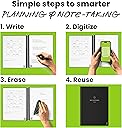
📅7 versatile planning templates
📱App-enabled cloud sync
♻️Reusable erasable pages
Desertcart purchases this item on your behalf and handles shipping, customs, and support to South Africa.
♻️ Plan Smart, Write Smooth, Stay Ahead 🚀
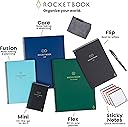
The Rocketbook Fusion Executive 6x8.8 is a premium hybrid planner notebook featuring 42 reusable pages with 7 versatile templates for calendars, to-do lists, and notes. It pairs with the Rocketbook app to digitize and organize your handwritten content across major cloud platforms. Designed with durable materials and a waterproof cover, it offers a sustainable, stylish, and highly functional solution for professionals seeking to streamline planning and reduce paper waste.


| ASIN | B07RSH69HC |
| Best Sellers Rank | #4,249 in Office Products ( See Top 100 in Office Products ) #132 in Planners (Office Products) |
| Binding | Office Product |
| Brand | Rocketbook |
| Brand Name | Rocketbook |
| Calendar Type | Monthly |
| Color | Black |
| Cover Material | Paper |
| Customer Reviews | 4.4 out of 5 stars 23,763 Reviews |
| Format | Notebook, Organizer |
| Global Trade Identification Number | 00850007403034 |
| Item Dimensions L x W | 8.8"L x 6"W |
| Item Dimensions L x W x Thickness | 8.9"L x 6"W x 0.6"Th |
| Item Weight | 3.2 ounces |
| Manufacturer | Rocketbook |
| Material | Paper |
| Model Number | EVRF-E-K-A |
| Model Year | 2020 |
| Number of Items | 1 |
| Number of Packs | 1 |
| Pages | 42 |
| Paper Dimensions | 8.89 x 6 x 0.59 inches |
| Paper Size | 6 x 8.8 Inches |
| Part Number | EVRF-E-K-A |
| Recommended Uses For Product | Planning and organizing tasks, note-taking, goal setting, and project management for both personal and professional use. |
| Ruling Type | Dotted |
| Special Features | Soft cover |
| Target Audience | Adult |
| UPC | 850015045103 850007403034 |
| Unit Count | 1 Count |
| Year | 2020 |
A**R
Versatile & Easy to use
I've been using my Rocketbook since 1/1/2021 and I'm loving it. I was burdened by all the filled notebooks that I had and needed to keep, just in case I needed to refer back to my work notes. It's hard to find something you know might be in there without knowing when it might be. Enter Rocketbook. I can OCR my notes (with some corrections) and if I need something Windows can find it. I tested this feature out after accumulating a couple of weeks notes (saving each day as a separate file) and then asked Windows to find a particular phrase. It worked beautifully and finding multiple instances of that phrase--one I didn't even remember writing down. Ideally I would scan and OCR my notes daily, but in reality I do it about once a week. This means I have to set aside a little more time to correct the OCR translation of my not so great handwriting, but well worth it in the end. Though I bought a variety of Frixion pens, the ones I use every day are the ball clickers (.7mm). They write fairly well and scan easily--even the pink pen comes up well in the scans. I haven't used the markers as much for everyday notes--too thick. It's recommended that you use a spray bottle & a micro cloth for cleaning. I do that, but for everyday mistakes that's a little hard. It is NOT recommended to use the erasers that come on the pens--they not only smear, but the can remove the coating from your Rocketbook pages. I've found that using a water pen & a Q-tip works great for correction in little areas. The pen I use is: Pentel Japan Aquash Waterbrush Water Brush Pen, Fine. It gets into small areas with precision; I then use both sides of a Q-tip--one for absorption of the water & ink, and the other to dry. This allows me to make quick corrections and continue on without "waiting for the page to dry." When I do my mass cleanings (about every 2 weeks), I use a soft wet rag and a dry micro cloth. I wholesale wash down the pages and dry them. This process is a little slow as the drying does take time. I've tried it with the pages bound and unbound and have only seen a little improvement on the drying time of the unbound pages. One note I have is that right after I've cleaned the pages and they are dry there appears to be light impressions from the pen that are still there after cleaning, but after a couple of days those impressions disappear. My first (two) Rocketbooks were of the Fusion variety, as I didn't really know what I wanted. I like some of the planner pages and the lined pages, but only used the dotted pages when I ran out of lined pages. I have created some two page calendar pages using the dotted pages, but for me they weren't as useful. When I originally got the Fusion book it was the only one with lined pages; at that time the Core only came with dotted pages, but now they have a version that is all lines. I've added one of those to my inventory. If I had to go back and could do the purchases again, I'd probably still get the Fusion for the versatility, but my other book would be a Core lined. At the bottom of every page are 7 icons. You can program them to be locations to where you want your scanned pages to go and what actions you want taken. For instance, I have two set up for personal notes/scans--one for email & one to go to my G-drive--both with OCR. I also have two set up for work notes/scans, but in this case they are going to my work email and my work based OneDrive--again both with OCR. If you were in school and part of a study group, you could make one of the icons go to a group email or to a group accessible cloud storage. The versatility here is endless. All in all I'd recommend the Rocketbook. At $35 for 42 pages it might seem high, but think about some of the other alternatives and their expense. I tried several more expensive options, and none of the others worked like I do or made it as easy to see and retrieve my notes.
B**Y
The BEST way to take notes
I am a teacher and I am constantly looking for a way to plan lessons, take meeting notes, write down notes on students, and keep a planner going. I'm also a Master's student so I need a place to take class notes and keep track of assignments. I am really bad at keeping notebooks organized and tend to write down my notes on scraps of paper, random notebooks, and legal pads. I even bought an iPad Pro and tried using various apps to keep myself up to date. The only thing that has kept me on track and up to date on all my assignments has been this book. Its reusable, easy to erase, easy to use, and easy to keep yourself on track. The pens work well and its mind blowing how the erasing work. One of my favorite things to do is show people how I scan, save, then erase my notes. I've recommended this book to about 20 people and counting. The app is easy to use and navigate. I was able to get it setup and ready to use in about a minute. It keeps all my notes organized with the easy tagging system. I like handwriting my assignments so I frequently use OCR to transcribe my notes and get the notes typed for me. I send it to my email then copy and paste it to Canvas or Blackboard to submit it. I chose the Fusion because of all of the pages that are available. The first page is a project/task manager that I use to keep track of all of my assignments and their due dates. The next two pages are weekly calendars where I keep my planner. The next page is a monthly calendar. The page after that is a planner of some sort. It has 4 boxes, 1 for objectives, 1 for key results, 1 for action plan, and 1 for reflections. I find this to be really helpful for lesson planning for the day. The next page is another planner with space for an idea, rating, next step, and inspiration. I use this page when planning for projects and assignments for my students. After that there are 18 pages front and back for grid dots and lined pages. 9 for dots and 9 lined which come out to 36 pages total. It is a handy little book and I highly recommend it.
A**Y
BEST NOTEBOOK EVER!!! But…
I don’t always take the time to write reviews like I probably should but I felt it was necessary on this product for a couple reasons which I will explain below. 1. The whole concept of a eco/environment friendly, RE-USEABLE notebook is just plain awesome! I have tried to switch to my iPad and Apple Pencil for note taking when it first came out, even tried fancy screen protectors with texture to feel more like paper but nothing will ever come close to the “pen to paper” feel to which I love when it comes to taking notes. Not to mention if you need to quickly jot something down, grabbing a pen and paper is much faster then your iPad - unlocking it and opening an app, a new note or notebook/page, etc… 2. This notebook by far meets my needs when it comes to a “pen to paper” feel especially considering it is re-usable and scannable to so many platforms. Speaking of platforms, there are so many to choose from. I love that this company didn’t limit you to using and having to subscribe to their own service because that would have been less appealing and probably a no go for me. The app also can transcribe your notes if you choose making it easy for you to search for things. Oh how I spent hours looking through pages for a note I wrote down, “I know it’s here somewhere…” only to never have found it… Bonus points @Rocketbook! 3. Microfiber Cloth: I am impressed at the quality of the microfiber cloth that was included. They could have easily given some thin crappy material that would have quickly deteriorated but nope, they spent the big bucks and included an extra thick and plushy cloth that makes me wish I had a bath robe or blanket made out of it! More bonus points @Rocketbook! 4. Packaging: Cute packaging however, given the nature of having an environment friendly, re-usable notebook I would think the company would at least have recyclable packaging, this should be an easy change. @Rocketbook. Lots of pro’s and bonus points being thrown around I suppose it’s time to get to the nitty gritty, the “but…” Specifically pertaining to quality control, or is that even a thing @Rocketbook? 1. Page cut quality… If you have ANY amount of OCD, this might be a problem. I am particular about what things I have OCD about, lol. Might sound silly but this bothers me a little for a couple reasons, mainly cause the company got everything else on point and let me down at something so simple to fix for an item they want to charge an amount that seems high to most, but I am willing to pay for so is it wrong that demand perfection? I made two separate purchases of Rocketbooks (one with 2-letters sizes and one with 1-executive), two different sizes, different colors, and one being the NEW “Fusion” which contains a few different page styles and all 3 books have flaws in the cuts of pages and some in the book covers (corners). Now, hear me out… a $2 notebook from where ever can give you straight pages, please tell me why when I am spending $34 (1 executive) or $68 (2 letters) I can’t get a notebook with straight pages??!?!?!?! I am supposedly going to have this thing for forever right? This is ANNOYING and a total let down. @Rocketbook - You need to redeem yourselves! *Photos provided. Tips: Clean up old paper notes by laying them on a Rocketbook page, add a title to the top in between double hashtags (## TITLE ##) so that it is searchable later (OCR must be enabled in settings), cross off your designated location at the bottom of the page, scan using the Rockbook app, and throw out your paper notes!!!
J**R
Great GREEN Solution for Organization and Note Retrieval
Some background: I have been using various forms of bullet-journaling for about 5 years. Regardless of how elaborate I make my journal, one thing always sticks: the bulleted task list. I also take notes on everything at work. I work full time in a managerial role, go to school full time for an advanced degree, and am a single mom. Organization is essential for me. I bought the exec size. I’ve already bought a letter-size panda planner that I haven’t received yet because I love it so much. This is the BEST way I’ve ever found to take all the notes I take and store them in a way that I can easily search and retrieve. So here’s what I love about this notebook: 1. I love that it comes with a few pre-built tools like a monthly calendar, goals list, smart list, etc. 2. Overall size and style. This is thin with a poly cover in a muted color (I got the teal-ish one) that is good quality, attractive, professional looking, and not too bulky to keep me from packing it all the time. 3. Pages are thick and durable. 4. Auto-send features are so convenient! 5. ## DOCUMENT TITLE ## Brilliant!!!! 6. Wide variety of pen/highlighter/marker styles so I don’t feel limited if I want to be more creative. I have multiple colored ball point pens, fine line markers, and highlighters! 7. Truly and fully eraseable both with PRN erasers and damp microfiber cloth included. 8. The pens can be used on normal paper so I don’t need more office supplies! (And they erase just fine on regular paper, too.) 9. GREEN GREEN GREEN 10. Well-priced for what you get and what it does. Things I don’t like or took a bit to figure out: 1. To use with cloud drives or one note, you have to grant access to all files in your drive or one note. I work for an organization that has strict information security. I will never be able to send directly to my drive or one note so will always have to use email to save notes. It’s workable, but it took a minute to figure out the best workflow to make this as efficient as possible. I use Office 365 primarily. 2. The lines on lined pages and dots on dot matrix are really faint. They seem much lighter than the pre-made pages like the calendar and smart list. It can be harder to use if you don’t have great lighting. (Or maybe I’m just old and have bad eyes.) 3. Some colors don’t scan well (yellow, pink) if lighting isn’t good. If you use them in a smart list, you can’t see them at all because it does this pink background? 4. I feel like I am not using all the smart list functionality. I’m sure that pink background means something and does something, but I haven’t figured it out yet. Which leads me to.... 5. Pretty sparse instructions. I feel like the instructions it does contain are on the more intuitive features and what I really want is instruction on more advanced uses. 6. I have poor WiFi in my office. My scans there sometimes don’t work or take a really long time to send to the assigned destination. Other tips: I’ve added adhesive notebook tabs to a few pages to make finding the section I want a bit easier. Definitely use the ## Title ## feature! It really save a ton of time. Ungroup scans when setting up destinations.. Buy a little travel size misting sprayer to keep at your desk to wet your microfiber.
C**S
GENIUS - I can't say enough great things about the RocketBook!
My only regret is that I didn't try RocketBook years ago! I waited to write a review to see if I would use this regularly. It's been nearly a year now and I still use it ALL the time and love it! I was tired of carrying around multiple notebooks to write down and track important information. I have several projects moving forward at a time and needed to have access to notes about phone conversations, decisions and such available any time and any where. This is the perfect solution. A couple of minutes when the notebook starts to fill and I'm organized into folders in my iCloud Drive that I can access any time from my iphone. I ordered the 6x8 size and it fits in most of my purses so I can grab it whenever I need it. The pages erase really well even after nearly a year. I've also created a couple of "forms" for myself with a Sharpie so I have a standardized format for items I track repeatedly. I love that RocketBook didn't patent its own pens to use too. I can order erasable pens that I like and even in multiple colors. I've also printed a "template" of just the QR code, black border, and file selector symbols on a transparency sheet (Staples does this) so I can easily scan in any piece of paper someone hands me and file it away in my iCloud Drive too.
C**O
The most useful thing I’ve gotten in years
This is actually my second Rocketbook. About two months ago, I purchased the Rocketbook Everlast, and I was thrilled with it but I decided I wanted to use it for bullet journaling. I know how I am though, so I decided that I would get an executive sized one... then I found out about the fusion. What a godsend. So, the Fusion has pre-formatted pages for lazy folk like me who want to benefit from BuJo but don’t have the time. I was happy with my Everlast, so naturally I chose another Rocketbook. Things I love: Size - the size is perfect. It fits into my bag with no issues. It doesn’t feel too small to write in. I find myself hitting down everything with it. Reusability - one of the biggest draws is the fact that you can use it infinitely. Write, wipe, repeat. This is awesome. The only tiny issue I have is the smudging if you’re impatient like me. The ink needs a couple seconds to bind. Ease of use - it’s very straightforward. It’s a notebook at its core, so you write in it. On the bottom of each page is a QR code and some symbols for places you can specify for the page to go to. You use the app to do this. The app is very simple to use. When you’re done setting it up, just point and shoot. Things I’m not fond of: OCR - this is a thing where it will try to take what you write and translate it to text. It’s iffy at best. I write for a hobby and I write snippets in my books and it helps to have ocr come and transpose (transfer.... whatever) the text. But I spend more time correcting the mistakes than time I save so... I don’t use it that often. But I don’t think that’s Rocketbook’s fault—it’s a limit of our technology. Smudging: i mentioned before that you have to wait for ink to bind before you can move on, and while maybe it’s not a problem if you’re writing notes, but if you’re jotting something quick, it might not be the best. It’s a minor issue and this is worked around just being careful and patient. Here is something else I will say because I noticed it’s not been mentioned much: if you are left handed, and you write by curling your wrist 1) stop that, it’s not healthy 2) your writing will smudge. As a left handed person, what I do is turn the book a little so it’s slanted. It’s easier to write and reduces smudging. This isn’t even just unique to the Rocketbook, that’s a tip for my lefties in general. All in all, I highly recommend this product. I love my Rocketbook and even though it was pricey and I had to really talk myself into getting another I don’t regret it.
C**J
Both the notebook and the app technically work, but they could both use improvement. - 5/1/21 Update
Pros: * It technically does what they say it does. * It looks pretty stylish, and it would work in a professional setting as long as the people that you're talking to can't see the huge product name and company logo on the front cover. * By including the pen and the microfiber cloth, they allow you to fully test the notebook without having to spend even more money, which I appreciate. * Personally, I feel like there's a good balance between page types in the notebook, and since I'm generally only using it for one thing at a time, there seems to be enough of each type of page for my needs. Cons: * The notebook is incredibly flexible, and feels REALLY flimsy. I'm afraid that I'm going to break it a lot of the time, and it's hard to get straight lines when scanning it into the app unless it's on a completely flat surface when you're taking the picture. However, since it is plastic, I seriously doubt that I'm going to hurt it - it just feels like I am, and that's a pretty uncomfortable feeling. Update: You sort of get used to it. * The pages are really thin, so you can see the shadow of the front-of-the-page text when looking at the back of the page. * When you erase what you've written using the pen, you have to wait for the ink to dry first, or it will just smear it all over the paper. Then, once it's dry, you can use the eraser, but it will leave a ghost of what you erased behind. You can remove the ghosting with water, but spot cleaning with water is not easy, tidy, efficient, or ideal in any other way either. * When you erase what you've written by wiping it off with water, even if you can't see where it was when looking directly at the page, you can see a ghost of what you've written in the shine created by the light hitting the page. Update: You can remove the ghosting by "scrubbing" extra hard multiple times after wetting the paper and wiping off the ink. It's still inconvenient, but at least you can get rid of it. :) * The included pen works pretty decently, but it randomly cuts out in places, and feels a lot like trying to use a regular pen on plastic, which is basically what this is. Update: This might be because of the type of pen that's included with the notebook. I have since found that the clicker pens write much better. * The app needs work. It's a little confusing at first, especially since the directions tell you how to do things based on a previous version of the app. * The app gives you the option to rename your image before it's sent out, but even if you tell it to rename, sometimes it doesn't. * Sometimes when you tell the app to delete an image, because you don't want to send it, it won't delete the image no matter how many times you hit the delete button. * You have to enable the option to transcribe the text from your images when they're sent to you. It only works with e-mail, no other storage method, and it's buggy at best. It does say that the transcription mechanism is still in progress, but it seems to have a roughly 60-70% accuracy right now, and sometimes it just doesn't transcribe at all. Having my lists already transcribed when they're sent to me is a good chunk of the reason that I got this in the first place, and the functionality just isn't there yet. * It's a little frustrating to keep seeing videos about their in-progress projects in making new types of books, when what they've already created doesn't entirely work. They need to fix the problems with what they have before they build something new. Suggestion: Something that would help this product significantly is if we were able to add and remove whichever pages in whatever number we wanted. So, for example, if I felt like the notebook needed more graph paper, I could order graph paper from them, and slip it into the notebook wherever I wanted it. This is not a new concept. There are paper notebooks that do this, and there's at least one whiteboard notebook that does this on Amazon. This would be really useful for when you accidentally switch pens and use a permanent pen on one of the pages, or you manage to mess up a page in some other way. It would also be useful if your job required you to take more notes on one type of paper than another, and your current notebook didn't have enough of that type of paper. And it would be useful if you've taken a whole bunch of notes, and feel like you need to rearrange them. It's a lot easier to pull out a piece of paper and stick it back in behind a different sheet of paper to change the order, than it is to completely erase everything and rewrite it, or scan it all in and then try and figure out how to rearrange everything, especially when the transcription feature doesn't work very well. Conclusion: So, all in all, it technically does what it says it does. I feel like it's an okay product for maybe $15-$20, but it could be so much better, and it could do so much more. This really could be an amazing product, they just have to fine tune that last 10%. :)
R**C
Promise Delivered
I saw ads for this product on Facebook and was not sure it was going to work as promised. The reason for that is, I have bought other products I have seen on Facebook only to be extremely disappointed in what I received. Finally, I caved in and decided to give it a try. I am thankful to say that what Rocketbook promised is what Rocketbook delivered! I purchased the Executive-size Rocketbook only because I thought the full-size would be too big for my needs. I travel a bit for work, so the smaller an item I have to carry with me, the better off I am. The Executive-size is just right for me. I have plenty of room to write and can carry it around with me all day while on-site with the client. There are more pages in the book than I can ever imagine using at one time. I usually write, upload, and clean almost every day. I have used electronic note taking devices. They just do not write like writing in paper. My notes were often hard to read, and I really dislike writing in a screen. With Rocketbook, I am writing on paper and it truly feels like writing on paper! Before purchasing the aRocjetbook, I read reviews on Amazon that said it didn’t work. All I can say is, I don’t know what those people were doing wrong but mine works exactly as was promised! My only “complaint” is that the pen that came with the book is 0.7 (medium point). This is not an issue with the product I received; it’s an issue with my handwriting, so no fault to the product on this. My handwriting is small, so letters tended to be filled in and hard for the OCR to distinguish with the thicker pen. I fixed this issue by ordering some fine point (0.5) pens to use with my Rocketbook. Now, everything is much more legible and easier to read once scanned. I am sure the OCR conversion will now have an easier time with distinguishing one letter from another. I work as a Senior Implementation Consultant, so good note-taking is a must. Being able to quickly retrieve those notes I have written is also a must. The Rocketbook really helps me meet both of those “musts”. I like this product so well, I am considering buying for co-workers in the near future (dependent upon a possible promotion for me). In my opinion, anyone who has to take notes throughout the day will benefit from using a Rocketbook. A definite win for whoever came up with this product!! Great product, guys!
R**A
Great tool for students!
Bought it as a gift for my boyfriend and he loves it! Great tool for notetaking and very environmentally friendly. Would highly recommend for anyone uses lots of paper ;) Also great for studying anywhere as long as you have your notes uploaded on cloud!
K**C
A little bit of fun.
I use this for tracking things like items I'd like to buy, chores that need to be done and notes to family that don't need to be kept so they can be erased and the paper re-used. It's pretty cool and a bit of fun. I don't really use the sections in it as they don't fit me but the others didn't either so I created my own formats on the extra pages.
A**A
Difícilmente habría uno mejor
Es un producto que da mucho más de lo que cuesta, en términos de productividad y economía de tiempo.
T**D
Ecológico
Es el cuaderno perfecto. Puedes llevar un diario secreto, escribes una página, la escaneas a un archivo tuyo, Y LA BORRAS. Nadie podrá leerlo. Puedes también dibujar, hacer contabilidades… ¡Me encanta!
U**T
Good Product.
The binding coil could be better but the product is great.
Trustpilot
1 week ago
4 days ago