


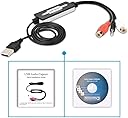


Audio Capture Card
Product ID: 133976401
Details
- BrandDIGITNOW
- Hardware Interface3.5mm Audio
- Operating SystemVista Mac Os 8
- Recommended Uses For ProductAudio
- Special Featureaudio and
🎵Analog to Digital
💻Broad OS Compatibility
🔌Plug & Play
Desertcart purchases this item on your behalf and handles shipping, customs, and support to South Africa.
🎶 Capture the Soundtrack of Your Life!
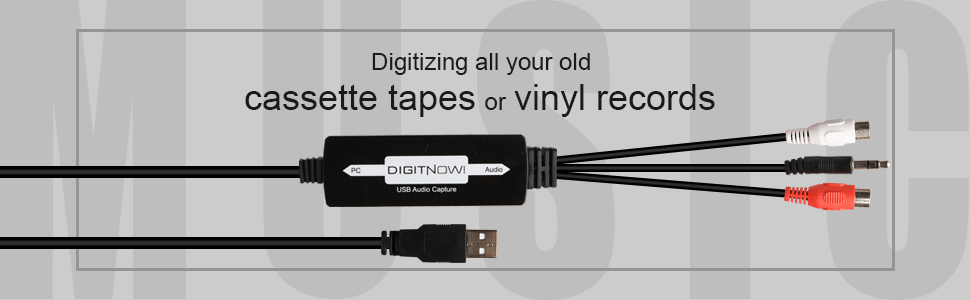
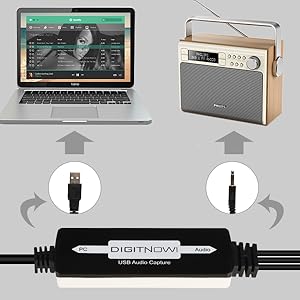
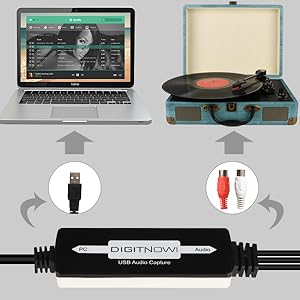
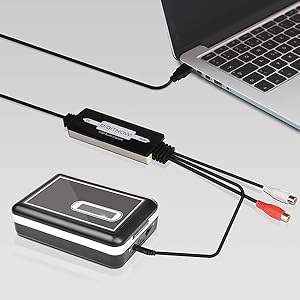
The DIGITNOW! USB 2.0 Digital Audio Capture Card is a professional-grade audio grabber that allows you to easily convert analog audio sources like cassette tapes and vinyl records into digital formats such as MP3 and WAV. With its plug-and-play functionality, broad compatibility across various operating systems, and included audio editing software, this device is perfect for anyone looking to preserve their audio memories with ease.


| ASIN | B07RBCDPSB |
| Antenna Location | Audio Recording |
| Best Sellers Rank | #348 in Internal TV Tuner & Video Capture Cards |
| Brand | DIGITNOW |
| Built-In Media | Capture Card |
| Compatible Devices | Cellular Phones, MP3 Players, Personal Computer, Tablet |
| Customer Reviews | 4.2 4.2 out of 5 stars (128) |
| Hardware Interface | 3.5mm Audio, USB |
| Item Dimensions | 3.54 x 0.98 x 0.43 inches |
| Item Weight | 0.12 Pounds |
| Manufacturer | DIGITNOW! |
| Mfr Part Number | BR605-111 |
| Minimum System Requirements | Operating System: Windows 10 / 8.1 / 8 / 7 / Vista / XP, Mac OS 10.7-10.14 (Not support Mac OS10.15) Processor: Not specified Memory: Not specified Graphics: Not specified DirectX: Not specified Storage: Not specified Sound Card: DirectX compatible sound card (implied by Audacity software requirements) |
| Model Name | DIGITNOW USB Audio Capture Card Grabber |
| Model Number | BR605-111 |
| Operating System | Vista,Mac Os,Win7,8 . 1,Mac,Windows 10 |
| Other Special Features of the Product | Analog-to-digital audio conversion and broad operating system compatibility |
| Platform | Windows, Windows 10 |
| UPC | 791300602673 |
| Unit Count | 1 Count |
G**Y
Works with Audacity software
Initially I felt it did not handle stereo and that I had wasted my money. That turned out to be an old DAK 2800 PC pre-amp of mine with one bad output channel. Rather than purchasing a used pre-amp, I happily discovered it was possible to transfer vinyl LPs and cassettes directly from my receiver through this device to the PC. While it came with a mini CD to load a version of Audacity, I already had that s/w on my PC. Plus, the CD/DVD drive on my new PC could not read that mini CD. Easy to find and download the s/w for free. Result sounds great! Worth the money! Takes some experimenting and practicing to learn all the many features of Audacity for best output, but that is a separate issue from this product. I like that s/w product as well.
R**D
Nice device, but not may not be suitable for digitizing vinyl
I have a large '70s vinyl collection and want to digitize some of the old favorites. I purchased this device when a phono preamp / USB converter I got 10 years ago lost the left digital output channel. This unit works well and is easy to use, but it does not adequately amplify the fairly weak signal coming from most magnetic phono cartridges. There is no gain adjustment. The result (when using Audacity) is a weak digital input, maybe 18 db below the desired record level. So, although it works and is easy to use, I need a device that provides additional amplification before digitizing. It turned out that the analog output from my old USB converter still work, but not the digital output. So, I used the analog output from the old preamp unit as the input to this device, which then digitizes the amplified signal just fine.
F**N
Easy way to digitize audio memories
Easy "plug & play" setup and connection for transferring audio, computer detected usb input device in Windows 7 without issues 😀
S**T
True Plug and Play!
This adapter was a breeze to install. On the audio input side there is a pair of female RCA fittings and a 3.5 mm male stereo head phone fitting. The unit comes with two audio cable adapters: One adapter has a 3.5 mm female head phone fitting on each end. If the feed from you audio device has a male headphone plug, this adapter provides a female interface to the capture device. The second adapter has two male RCA plugs on one side and a 3.5 mm female headphone socket on the other side. With these two adapters you should be able to solve most connection interface issues. If your audio device doesn't have an audio out cable, you will need to get one. I plugged my phonograph into the provided headphone style fitting using the first adapter mentioned above. Then I plugged the USB side into my computer and I was ready to record! It comes with a mini CD that contains Audacity sound capture software, but it is an old version of Audacity. It would be better to go directly to the Audacity web site and get the latest version.
S**P
Plug and play on Linux. Good sound quality.
Prior to buying this, I only had the capability to record in mono. This meant creating sound files in Audacity then doing some creative tweaking to make them sound like they were recorded in stereo. And, while I could run multiple mics into my mixing board, all of the output ended up being mono when recorded through my previous USB sound card. So, this seemed to solve all of those problems. At first I was hesitant to get it because I use Linux primarily, but I went ahead, figuring I would return it if there were problems. Got it yesterday. Plugged it in, ran the cord from my mixing board into it, and viola. Recording in stereo! No muss, no fuss. Sound quality so far seems good, but I'll have to mess with it a bit. Only recorded a bass track with it so far, but it seems to be just fine. And, it was 100% "plug and play" with Linux (Mint 20, kernel 5.4). I would think that this means that the driver software is incorporated into the kernel, so no extra drivers needed. Audacity found it no problem, plus, my original sound output still works. Everything functions just as it should. I will update if I notice any issues, but I'm happy with this so far.
Y**.
It works!
We plugged this into a Windows 10 computer and connected the 2 cables from an amp to the like-colored connectors on the DigitNow, and bingo, we were recording LPs to the computer as MP3 files. The included software is Audacity, a free audio recorder/editor/mixer. I had used Audacity for a few projects years ago, so it was easy to use for me. My only complaint is that the input levels were too high. If I were the end user, I would figure out how to adjust this for better sound quality, but the end user said the recordings were okay, so I didn't invest any more time into it.
A**P
Works great with iMac M1
I bought this to connect my Kenwood P-110 turntable to my iMac through a USB port. A USB A (female) to C (male) converter is required . This turntable does have a pre-amp which is also required. I did purchase the more powerful VinylStudio software for Mac to use instead of the software included with the DigitNow device. So far I am happy with the setup and process, which does take a couple of albums to master. I think the quality of a wired connection for the vinyl conversion is probably better than a bluetooth connection.
L**M
Too complicated, and the help forums are aimed at pros or semi-pros
It's not the device which doesn't work, it's the software which I found too complicated for my needs. Works well with my cassette player, which has its own volume controls, but I can't figure out how to get more volume from my turntable, which obviously has no volume controls. There is no help from Audacity except online forums. This device is not plug and play, sadly.
Trustpilot
3 weeks ago
1 month ago