


Desertcart purchases this item on your behalf and handles shipping, customs, and support to South Africa.
🖱️ Lefties, level up your game with precision and comfort made just for you!
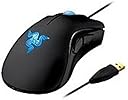
The Razer DeathAdder Essential Left-Handed Gaming Mouse delivers pro-level precision with a 3500 DPI 3.5G infrared sensor and ultra-responsive 1ms polling rate. Designed exclusively for left-handed users, its ergonomic form reduces fatigue during extended use. Featuring five programmable buttons and durable build quality, it’s the ultimate wired gaming mouse for lefties seeking comfort and competitive edge.
| ASIN | B003EUPCZG |
| Additional Features | Ergonomic Design |
| Antenna Location | Gaming |
| Best Sellers Rank | #28,226 in Video Games ( See Top 100 in Video Games ) #972 in PC Gaming Mice |
| Brand | Razer |
| Button Quantity | 5 |
| Color | Black |
| Compatible Devices | Personal Computer, Laptop, Gaming Console |
| Connectivity Technology | USB, Wired |
| Customer Reviews | 4.2 out of 5 stars 646 Reviews |
| Enclosure Material | Plastic |
| Global Trade Identification Number | 00191120006185, 08886419330172 |
| Hand Orientation | Left |
| Hardware Platform | PC |
| Included Components | USB cable |
| Item Part Number | rz01-00151700-w1m1 |
| Item Weight | 5.28 ounces |
| Manufacturer | Razer USA |
| Mfr Part Number | RZ01-00151700-W1M1 |
| Minimum Required Operating System Version | Windows 11 |
| Model Name | DeathAdder Essential |
| Model Number | RZ01-00151700-W1M1 |
| Mouse Maximum Sensitivity | 3500 dots_per_inch |
| Movement Detection | Optical |
| Movement Detection Technology | Optical |
| Number of Buttons | 5 |
| Operating System | Windows |
| Power Source | Corded Electric |
| Range | 8.0 meters |
| Special Feature | Ergonomic Design |
| Style Name | DeathAdder Essential - Left Hand |
| Theme | Gaming |
| UPC | 803982982896 191120006185 732444766661 777785829484 897126000904 168141473029 807320188339 |
| Unit Count | 1 Count |
| Warranty Description | 2 years |
R**O
A real ergonomic mouse for left handed people. Thank you, Razer.
Razer deserves significant respect for putting this product out there. There are next to zero options for left handers on comfortable mouses, mostly because it's "not profitable" or something. This is a very comfortable and satisfying mouse to use and I appreciate Razer treating us like regular people instead of some genetic mistake that needs some weird nonsensical vertical mouse design. A great mouse with a few slight flaws. Pros: 1- It's ergonomic, it's left handed, and great compared to the ambidextrous designs. 2- I don't do MMOs, online FPSs, or other fast paced quick reaction time games, so I can't comment on speed but I've had zero problems using the mouse or with it's response time. 3-Two buttons on the side for some degree of customization. 4- Haven't had anything break or problems with the LEDs or mouse wheel. Seems durable to me. Just don't smash it on the desk, that's why I'm on my second one. Cons: 1- The oil from your hands builds up quickly on this and I clean it at least twice a week. Make sure you only use water. I tried using a cleaning wipe on my old one and I think it stripped the finish off. 2- Out of the box it comes with the mouse buttons switched, so left click is right and right click is left. You need the software to fix it and if for some reason you can't load the software...it won't remember your settings. I've since turned off automatic updating ever since they had an incident and my mouse was stuck reversed. 3- Only blue lighting options, oh, and the logo pulsates slowly. Kind of clashes with my red LED only keyboard but oh well, doesn't bother me. 4- No wireless option.
R**L
Finally a mouse that's made for us lefties!
What can I say? This is the Deathadder you know and love, but mirrored so left handed people can enjoy that contoured feeling too. :) I love this mouse so much, to the point where I almost considered dragging it to work every day so I would have a nice mouse there too. I noticed two things that are so minor they don't affect my score but are things you should be aware of before buying: 1) My hands are pretty small and sometimes the mouse feels a tad over sized, but it's nothing compared to the discomfort of a right handed or symmetrical mouse. I doubt anyone other then very small-handed people would even notice this and unless I hold the mouse in one really particular way, I don't either. 2) Even though I'm left handed, I've used a right handed button configuration all my life (aka left mouse button is primary, right is secondary). However, the left handed Deathadder is designed for people who have swapped the buttons (so left is secondary and right is primary). When I first used it, it felt wrong and kind of uncomfortable to use the left mouse button and my middle finger as the primary mouse button/finger so I swapped it in Windows 7's settings. I was expecting a huge learning curve after the change, but not so! The mouse is contoured so nicely that after a few hours, I was using my index finger and the right button as the primary button like a pro. (Though, good luck transitioning back to the other configuration at work/public computers, but at least it's an easy setting to change.) The mouse worked immediately after plugging in on Windows 7 box, with no need for Razer's drivers. I've used it for gaming as well as web browsing for hours on end with no discomfort after the intital learning phase (mentioned above). As with all Razer mice, the buttons and tracking are responsive and the mouse texturing/shape is comfortable. The side buttons seem nice but I haven't used them very much yet, as I'm not used to having side buttons at all! Overall, I couldn't be happier with this purchase. If you need a left handed mouse for any sort of serious computer using, this is the one for you!
T**L
Great mouse for left handers
The mouse arrived in a timely manner packaged in its retail package. The mouse was a snap to install, I plugged it into the USB port it was recognized quickly. Downloaded the software and set up buttons with no problems. I have large hands and it fits and is not uncomfortable to use for long periods. the buttons are easy to reach and the scroll wheel works as it should with good indents. I am very happy with my purchase. On a side note and nothing against razor I would have preferred the 4th and 5th button on the left and right side of the mouse. This build has them under your thumb on right side (left handed mouse) I understand their logic for designing the mouse this way; it is easy for all size hands to use effectively and comfortably. I will purchase more products from razor because this mouse executes good design and a solid feel to it over all I am very pleased and hope to get long service life out of the mouse. If any problems arise I will update this post.
H**S
Great Left Handed mouse
A little background: Though I write with my right hand, I have always gamed with the mouse in my left hand. Finding left handed mice is difficult and I have been a Razer user for years, I started using them because of their ambidextrous design, back with the original Razer Boomslang, then a Boomslang special Edition CE. I loved both of these and would buy another one in a heartbeat. They stopped updating the drivers for the Boomslang CE, so I started having problem with the mouse not working properly with the latest games. I then tried a Razer Ourobouros,(ambidextrous again) but the one I got would not work wirelessly, only wired. Returned it, since it is a very expensive mouse, and instead of getting a replacement I was reimbursed for the cost. The side buttons on the Ourobourous were awkward to use so I decided to look for something else. Review: This is my first "from the ground up" lefthanded mouse and I have been very pleased with it. The form fit is good for my (large but not huge) hand, the side buttons are within easy reach for my grip (I use a "palm" grip, see the razerzone.com website for an explanation of the three basic grip types). The mouse is very responsive and works well with the type of games I play (BF4 lately) I would have preferred green lights rather then blue but that is no big deal. I use a Razer Vespula mousepad and this mouse works very well with it. The only reason it does not get five stars is the user interface. I have not had any technical issues with the synapse software, but making any changes on the buttons for the lefthanded mouse is counterintuitive to say the least, but you could easily call it damn annoying. Once you have made the changes there is little reason to mess with it again (I don't use multiple profiles, I have no need for it). So for a mouse that is one third of the price of the Ourobouros I am very happy.
L**N
The only sensible choice for a lefty
As a left handed gamer, it's extremely difficult to find a mouse that caters to your needs. There are many ambidextrous mice out there that can be comfortable enough for browsing the internet but when it comes to gaming (and likely spending a few hours at a time doing so) you need something that is comfortable the entire time. This mouse is not only comfortable but it provides you with the right amount of buttons on a mouse for most games, but most importantly it puts them in a location that doesn't feel awkward to use. It also is a good size and has a fairly solid (decent weight) feeling to it. I've read some reviews about the quality of this mouse not being up to par. YMMV, but I purchased this mouse in 2011 and it's still going strong. The only thing I might do is purchase new skates for the bottom of it or purchase a backup mouse to have in case this one does break one day and they quit making it. There is no other mouse, in my experience, that works as well as this one for a left handed gamer. I primarily play competitive CS @ 400 DPI and have had no issues. Pros: Comfortable Durable Good button placement Quality cord Large Cons: Only 1 color choice for LED's (these can be turned off though, which I find nice) No improvement since initial release in 2010 The software conflicts with some streaming programs (OBS)
B**D
Sign in and connect to a server to use your mouse
I don't give 1 stars lightly; this product merits it. To program the mouse buttons, I went to the razersupport webside for the 3.5g deathadder drivers. They only offer legacy drivers years old and one new bit of software called razer synapse 2.0. It is an 'online cloud device updater and profile storage' application. I get it grudgingly thinking I can uninstall it after it grabs the latest drivers. Sadly, this is not to be. Using the tool requires creating an account and validating it with an email address. So I use a honey pot email address and sign up. I run the synapse application, and log in to the server to get the drivers for the mouse. It does so without a hitch and now it is time to change the default mouse settings. I swapped the default left and right mouse buttons(since I'm used to ambidextrous/right handed configs, I don't need left handed config for individual buttons ... I just want to hold the mouse in my left hand is all). I don't know why they have the left and right mouse buttons swapped by default but that is a one time fix, so I thought. They have an annoying visual of the mouse that can be switched from a left handed edition to a right handed addition. This is unnecessary but would not be a big deal except that it complicates my future troubleshooting I will get to below. So I have finished tweaking things(and turning off the silly lights inside the mouse) and it feels great. I close the app thinking I'm done. Immediately the changes revert and I am fumbling to restart the app and see whats going on. I fight with the settings for a bit and then give up and look online. Turns out you must have the app running and the only thing you can do is turn it to 'offline' mode to stop the cloud sync; so much for getting rid of the bloat ware but at least it is only a one time thing right? Wrong. Every time you start your machine, you have to sign in. You can have it remember your credentials and sign you in automatically but you still must sign in. Even in offline mode, this is the case. Now, some people don't really care about these things. I do, so I am rating it based on my preferences. I find this product abysmal. If my reasons why don't matter to you, disregard my rating. However, if you find these connection requirements unacceptable like I do, I strongly recommend not buying this. It is a fine mouse, but the supporting software as bad as any design decision I've seen in software.
T**Y
Finally some love for the lefties!
Like most left handed people I have used a standard multi-dexterous mouse for over 15 years, until I finally seen this one on Amazon! This is the first Razer product I have ever owned and I have to say I am impressed. The mouse comes in a sleek windowed black box that opens on the right side for us lefties (a nice touch) and looks great if given as a gift to your favorite left handed person. The mouse itself is of high quality construction. It has a rubberized texture on top of the mouse for a no slip grip, it also features a strong braided cable design and a gold plated usb plug. The mouse has a blue LED scroll wheel and a blue lit Razer logo in the middle of the mouse that pulses blue. As others have noted by default the mouse is configured for a left handed person meaning the two mouse buttons are switched, however you can easily change them back if you so desire using the Razer driver utility that can be found at [...] Make sure you download the drivers and firmware for the 3500 dpi deathadder. Also be sure to installed the updated driver first and then the firmware update. The driver utility also allows you to tune just about every aspect of the mouse including the dps, scroll speed (even down to each specific x/y degree). The mouse also includes a quick profile change button on the bottom which would allow you to have a standard setup and a high dpi slow movement profile for something such as snipping in a game. My only complaint and it's a small one is I wish the non-slip grib had been extended down the sides of the mouse onto the button area (and the buttons to for that matter). Overall this is an awesome mouse with great features. Thanks to Razer for showing us lefties some love!
M**A
Brand-new 20 year old mouse works like I remember it <3
In this photo, the new one is on the left, my original is on the right. I have had this mouse for about 20 years and it has served me well. Unfortunately for the market options, I am a strictly left-handed gamer with zero intent on changing my setup. However, Epic Computers & Electronics had this baby brand-new and price was of no object to my need for left-handed gaming. It's lasted me for 20 years and I expect I'll get another 20 out of this guy too! Handfeel is the same--wonderful, a perfect fit. It is a real shame Razer does not make this mouse anymore. Left-handed gamers need love too. I'm so grateful to Epic for having it and I will make my niche and perhaps not-so-niche PC purchases with them going forward.
S**A
Kuromi is cute
Works great, easy set up and adjustment.
A**U
so cute!
super cute mouse and works great! macros on it are super useful!
S**M
Excellent mouse, must-have for lefties.
I bought this because I find it very annoying when there is no option in programs to switch the buttons over for left handers - forcing you to use the right click as your main button. This obviates that option as it's set up so that the left button is your main button anyway. This in itself, for me is worth the purchase. I also find it very pleasant to use. It has a nice feel to it, the buttons are light to touch but very responsive. The wheel in my old mouse was a little wild when scrolling, this one much more precise. The extra buttons are also very useful. They function as back and forward when browsing which is easy and I now use all the time and, better yet, you can macro them for games to obviate extra keyboard hotkeys. In sum, this is an excellent mouse and having a left-handed version makes it all the better.
B**A
Ottimo
A distanza di quasi 7 anni dall'acquisto continua a funzionare perfettamente. Esteticamente si è (ovviamente) un po' rovinato ma l'elettronica funziona ancora alla perfezione.
J**N
Gaucher, foncez, cliquez !
J'utilisais des souris pour droitier depuis mon premier pc et je voulais vraiment tester une souris adaptée aux gauchers et je ne suis pas déçu du tout ! Tout d'abord, l'ergonomie de la souris est tip top.. J'ai de grandes mains et je redoutais que la souris soit trop petite (j'utilisais la royale mx 518 jusqu'ici). La manette prend bien la forme de la main et on redecouvre de nouvelles sensations. On redecouvre également de nouvelles sensations avec l'inversion du click. Ça peut paraître être gênant de prime abord, mais en réalité la transition en douceur puisque la main est positionnée correctement et que l'index, du coup, se trouve sur le clique droit et non plus machinalement sur le clique gauche comme les gauchers ont l'habitude de le faire sur les souris de droitiers ( ;) ). C'est également un réel plaisir de pouvoir, enfin, utiliser les boutons latéraux de la souris. OEn somme, cette souris est un pur bonheur et, malgré une petite adaptation, elle sera le prolongement de la main du gaucher
Trustpilot
1 month ago
2 weeks ago