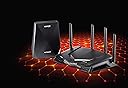
🎮 Dominate your digital domain with Nighthawk Pro Gaming Wi-Fi!
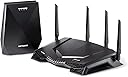
The NETGEAR XRM570 Nighthawk Pro Gaming Wi-Fi Router and Mesh System combines tri-band Wi-Fi with a dedicated backhaul to deliver up to 2.6 Gbps speeds and extensive whole-home coverage. Featuring smart roaming and a single Wi-Fi name, it ensures seamless, lag-free connectivity for gaming and streaming. Pre-paired for quick setup, this system is designed for professionals and gamers seeking reliable, high-performance wireless networking.


| ASIN | B07SFPNLSW |
| Antenna Location | Gaming, Home |
| Antenna Type | Internal |
| Box Contents | 1x 5PT Gaming WiFi Mesh System |
| Brand | NETGEAR |
| Brand Name | NETGEAR |
| Colour | Black |
| Compatible Devices | Laptop, Personal Computer, Smart Television, Smartphone, Tablet |
| Compatible devices | Laptop, Personal Computer, Smart Television, Smartphone, Tablet |
| Connectivity Technology | Wi-Fi |
| Control Method | App |
| Controller Type | Push Button |
| Customer Reviews | 3.8 out of 5 stars 94 Reviews |
| Data Transfer Rate | 2533 Megabits Per Second |
| Frequency | 1.7 MHz |
| Frequency Band Class | Tri-Band |
| Frequency band class | Tri-Band |
| Global Trade Identification Number | 00606449143829, 10606449143826 |
| Is Modem Compatible | No |
| Item Weight | 2.89 Kilograms |
| LAN Port Bandwidth | 2533 Mbps |
| Manufacturer | NETGEAR |
| Manufacturer Part Number | XRM570-100EUS |
| Maximum Upstream Data Transfer Rate | 1266 Megabits Per Second |
| Model Name | Netgear Nighthawk XR500 |
| Model Number | XRM570-100EUS |
| Model name | Netgear Nighthawk XR500 |
| Number of Ports | 6 |
| Operating System | Linux (Netgear) |
| Other Special Features of the Product | Indicator Light, Indicator Lights, Reset button. |
| Product Warranty | 2 year manufacturer |
| RAM Memory Installed | 512 MB |
| Security Protocol | WPS |
| Special feature | Indicator Light, Indicator Lights, Reset button. |
| UPC | 606449143829 |
| Wireless Compability | 802.11ac |
| Wireless communication standard | 802.11ac |
M**T
Fantastic piece of kit once you get it all set up correctly
I’ve had this router and mesh combo in the house for a fortnight now and after a bit of difficulty with initial setup, all is working great. I’ll break down the review into different sections. Background. I have a FTTC VDSL (BT) line that runs into the house, max 42mbps download and 11mbps upload. Current contract is with Plusnet fibre, previously BT, so I have both routers. The problem with that setup was the signal kept cutting out at random times (likely when the LAN was under load), randomly rebooting and black spots in certain areas of the house. I have 20+ devices connected to the network and a Hikvision NVR so the capabilities of the router is important. Tried both of the routers supplied by ISPs but both failed. Ordered a TP Link AC1600 which worked a little better in terms of range but still, some random resets and dropouts happened. The main issue was that the port forwarding of the Hikvision NVR would not work, after many updates and changes. So, a bigger and better router was needed. In comes the XRM570. The budget is significantly more than the TP Link router (over double at the time, at £255) but it comes with the mesh extender to give better overall coverage. My house is a 4 bed detached, with the router location in a central spot on the ground floor... so on the outer edges of the house the reception is limited. Initial reaction: huge piece of kit. It's big in terms of size, but bigger the better right? The router was easy to setup - 4 antennas screwed in and RJ45 cable into the WAN port. Then comes the first issue I encountered. Unfortunately, I had assumed that the PN or BT router had modem-only/bridging modes but they don't. Unfortunately this can cause some networking issues within the network which I was able to bypass temporarily before the long term solution was made. Googled a bit and the only real answer was to purchase an individual modem - so I ordered a BT Openreach FTTC modem from [insert popular auction site] which can be found for £12-14. I had considered returning the XRM570 and purchasing the Nighthawk D7800 but then there's no DUMAOS, and when packaged with a mesh extender, it came in more than all the individual pieces of kit altogether. Temporary solution. Connect the PN router from the filter to DSL port, and set the router with my Plusnet login. Set the router to 192.168.1.X as the IP, with wifi bands switched off and DHCP on (tried turning this off and no internet connectivity worked). Other settings like firewalls etc OFF as I wanted the XR500 to handle all that. LAN cable from port 1 to the WAN port of the XR500. As it's technically on a different network, I had to set the XR500 to 192.168.0.X, so a different network to the PN router. This effectively causes a double NAT, reducing efficiency of your connection (think of it as having to pass through 2 toll booths on the motorway instead of 1). I set up the mesh extender in the same room (just turn on and add it to the network as per instructions) and then moved it to my Hikvision NVR. The NVR didn't work still as it had a static IP and default gateway linked to the PN router (different IP networks), but this will be resolved once the modem arrives. Final solution. Once the modem came, I replaced the PN router and plugged in the cables. Connected via LAN into the XR500 and added my PN username and password, clicked Apply and it connected to the internet. I updated the IP to 192.168.1.X and in doing so, the Hikvision NVR was able to be detected on the network. I was then able to put that in a DMZ and add port forwarding rules for the NVR and everything connects back up to the Hikvision-connect app. So far, no dropouts, consistent speeds throughout the day and excellent range in all corners of the house and garden.I couldn't recommend this package enough as it has solved all the teething issues I was experiencing before. With households needing more and more IP addresses due to smart devices, it's quite important to have a network system that can handle the traffic and bandwidth wisely, without causing any significant delays. Other points of note: -DUMAOS is brilliant, I love the amount of control you can have on the network. There is every setting you need for a normal household, including restricting certain devices any internet access at specific times (i.e. stop your kids' devices from using the internet after 9pm) -Best to set up the router with separate banding (2.4ghz and 5ghz) and only one band for the guest network.
A**.
Be careful... NON EXISTENT SUPPORT & suffers debilitating updates.
Purchased in Oct 2020 and installed Jan 2021. Reviewed after 5 months of use The router needs an additional modem so make sure you have one and factor one into your set up once you've decided you deal with this devices pro's and con's. Modems are hard to come by nowerdays because most devices are router modem all in one devices... So it works and for 4 months worked very well. Then firmware updates to the device rendered one port unusable. Just so happens that the warranty period for support has expired so in order to receive any help their business model means you have to PAY. For a £400 router and a company the size of Netgear this simply takes the pi$$. The app that you use to controll, manage, diagnose and get support is absolute junk (just read the app reviews on the app store)! It's constantly dead, crashes, won't detect devices won't diagnose the product it can't find on the network you paid £400 for...! Look, I'm sure the device didn't turn to crap over night, but the SUPPORT when you have an issue just isn't there. It's not plug and play, it's not intuitive to someone with limited computer skills. When it works... its great. When it doesn't it's a £400 brick with Netgear stamped on the front. ***Edit*** After a further month of use the wireless extender has completely died... entire package returned and refunded...!!! Let's see what Asus can offer in the same bracket...
F**R
Boosted wifi to the back of the house
Instant difference in my wireless network, wifi now reaches to beyond the back of the house with a strong signal. Only to be improved further by the additional Netgear extender. Simple setup and easy to use app highlights number of connected devices and allows for easy editing of device names. So much more capabilities yet to play with including the QOS tweaking and country selective server options. 5*
W**N
broke within a week
The extender broke within a week and it took 4 days of dealing with Netgear support to discover the hardware had failed so I had to return the entire set for a refund. Pros 1) The OS is nice, much nicer than standard router configuration options 2) You can change many settings without a reboot Cons 1) extender is a pain to setup 2) being an extender, your phone won't just switch to the stronger signal and can stay connected to the weaker signal even though the extender is closer with a stronger signal 3) expensive given 1 and 2 in the cons list
M**T
Excellent Performance - Poor Instructions & APP
So I bought this device with the extender as I have a 3 storey house and virgin media hun 3.0 and home plugs just wasn’t cutting it for signal strength or quality! First thoughts Looks - it defiantly stands out and grabs your attention with its design if you’re looking for something to just hide away this isn’t the device for you! Setup - it “should” be easy to set up but the manual misses out key information along with the Nighthawk app failing at the last hurdle during setup every time! Before you can have access to the internet you need to finish the setup either on the app or by connecting a pc or laptop to the router and opening up a webpage as I said the app failed 5 out of 5 times and then I had to reboot the whole system to try again even now the app still doesn’t function correctly images attached I have 4 devices currently connected but the ap can’t see any of them Performance - so far i can’t fault the performance both the middle floor (where the extender has been placed) and the top floor have greatly increased connectivity and speed I have been able to remove all other WiFi home plugs my pc upstairs was running terrible speeds for download and upload around 3-10 MBs now I’m clocking 200mb DL and about 20MB upload In short the performance for me far outweighs the cons of the poor instructions and the poor app! Once you know how to set it up you can just ignore the app as it’s pretty useless!
G**S
Best router for signal strength
WOW I have had Netgear routers (Nighthawk) for years and this is by far the best one I have owned. the main reason was signal strength and that has done me proud. This works great with the gaming setting on our Xbox and playing fort nite as this was one of the other issues with my old router. this XRM570 has solved the issue. the extender is in my converted office upstairs and I have no issues connecting any of my equipment to the extender. I have also added a 4 port Netgear switch to the extender to give that extra cable conectivity. I have a workshed and was unable to get a connection with my older router due to the distance. this has improved my network so much not just in the workshop but also around the house. took a bit to get used to the new os on the device. loads of videos online to help with setup. Great product for reliability and management of device. will always go for Netgear equipment.
M**Y
Bad customer service
To attend as my son and I to support to try and get replacements got hanged up on straight away
M**R
Router is fantastic, Extender not so much.
Router does a fantastic job of providing wireless connectivity around the house. Get the full speed I pay for on the entire bottom floor - less so upstairs. The Extender however has had to be factory reset 3 times, and reconfigured each time. On the first occasion, there was a *painful* lag any time I wanted to do anything (literally anything). On the second occasion I made sure to update the firmware before setting the device up, and it worked well for a few days, and then the latency came back. On the third occasion, the extender no longer lags (after some anti-bufferbloat config on the main router) but it will decide that the login details are wrong and when attempting to connect to the wifi again, it will force itself to reset (this is almost hourly now). I have contacted Netgear and they requested I factory reset again, and setup again. The rebooting issue came back (within 3 days of it happening) and now my complimentary service for the product has expired. Sigh. I so badly wanted this to work, but after endless evenings of troubleshooting, I've decided to call it a day and return the whole setup.
M**K
Super Router
Ich bin sehr zufrieden mit dem Router. Ist ein super Teil. Stabile Verbindung und dank der App sehr leicht zu installieren. Gerne wieder :-)
G**.
Ottima soluzione qualità efficacia e copertura
Ho risolto i problemi di copertura (per ambienti di complessivi 300mq) e di risposta del “Ping”
X**X
Buen router.
Siempre utilizo Netgear y todo perfecto
J**A
Cumple con todo lo que pone
Es muy fácil de instalar y proporciona na velocidad increible
Trustpilot
4 days ago
1 month ago