Desertcart purchases this item on your behalf and handles shipping, customs, and support to South Africa.
๐ Power up your productivityโnever let downtime slow you down!
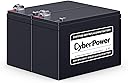
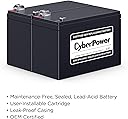
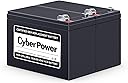
The CyberPower RB1290X2 UPS Replacement Battery Cartridge features two sealed 12V/9Ah lead-acid batteries designed for quick, user-friendly installation. Compatible with multiple CyberPower UPS models, it offers maintenance-free, leak-proof power with high surge capacity and up to 5+ hours runtime. Packaged for eco-conscious recycling and backed by an 18-month warranty, itโs the smart upgrade for professionals demanding reliable backup power.
| ASIN | B07QHG2JTF |
| Amperage | 9 A |
| Battery Average Life | 3 years |
| Battery Cell Composition | Lead Acid |
| Battery Cell Type | Lead Acid |
| Best Sellers Rank | #31 in Computer Uninterruptible Power Supply Units |
| Brand | CyberPower |
| Built-In Media | Battery |
| Color | White |
| Connector Type | IEC 320 |
| Customer Reviews | 4.6 out of 5 stars 392 Reviews |
| Enclosure Material | Plastic |
| Form Factor | Battery |
| Global Trade Identification Number | 00649532620975 |
| Input Voltage | 12 volts |
| Item Dimensions | 3.9 x 5.9 x 2.6 inches |
| Item Dimensions D x W x H | 3.9"D x 5.9"W x 2.6"H |
| Item Highlight | Maintenance-Free, User Installable, 12V/9Ah , Black |
| Lower Temperature Rating | 32 ยฐF |
| Manufacturer | CyberPower |
| Material | Plastic |
| Mfr Part Number | RB1290X2 |
| Model Number | RB1290X2 |
| Number of Items | 1 |
| Number of Outlets | 6 |
| Number of Packs | 1 |
| Output Current | 9 A |
| Output Voltage | 12 volts_of_direct_current |
| Product Dimensions | 3.9"D x 5.9"W x 2.6"H |
| Runtime | 5 hours and 15 minutes |
| UPC | 649532620975 |
| Unit Count | 1 Count |
| Upper Temperature Rating | 104 ยฐF |
| Voltage | 125 volts |
| Warranty Description | 18 Month Warranty |
| Wattage | 108 watts |
M**I
Great OEM Battery Replacement for CP 1500va!
Install was straight forward. Once they were installed I followed the instructions to make sure that the battery test completed with success. Battery capacity is back up to 100% and this stopped the occasional E02 error I was getting. I set a reminder to check the battery at 3 and 5 years going forward.
J**F
Identical to original
Fit perfect and directly replaced originals. No issues
S**K
Wish I knew how easy it was to replace batteries on these external batteries sooner
First, I want to say that most people (like myself) are hesitant to try changing their batteries on their own because they are not sure what model of batteries to buy. Also because they think that they are be hard to replace. Well, let me tell you right now that finding out which batteries you need is very easy, and actually replacing them takes no longer than 15 minutes. For people that don't want to read, these replacement batteries is for the CP1500AVRLCD model. Make sure the replacement batteries you get matches the serial number rule below (found this from doing a simple Google Search): RB1290X2 (for serial numbers that begin with โCTHโ or โCXEโ) RB1280X2A (for serial numbers that begin with โCPTโ or โCPAโ) Read on below for a much more detailed explanation on what to do if you're feeling hesitant... Let me tell you how to find out what batteries you need. Go do a simple Google search of your system's model. To do this, simply type what you see on the front end of your CyberPower battery. In my case, as seen in the images, I looked up "CyberPower 1500VA AVR". After that, you will come to realize that there aren't much similar batteries they sell, so my model only have one product code (CP1500AVRLCD) so i became sure this was what i have. Now, make sure to take note of your serial number because you are gonna need it to really confirm if the batteries you are getting is correct (check above for more details on this). Once you are sure that these are the batteries you need, then unscrew two screws on the bottom of the system, slide the front panel down... and it should come off. Beware that there is a flat cable that you need to unplug from the front panel first before taking the whole panel out. This is what connects to the screen. After doing so, unscrew the two screws in the middle, and you should be able to unplug the wires, and just pull out the batteries. Unplugging may take a little effort/strength because in my case i really had to pull hard, don't worry.. you won't break them. PLEASE remember which wire goes to where. There are only three wires total, so there shouldn't be any explanation on what to plug where needed. It's very straightforward... One word of caution is that these are live batteries, so whatever you do, don't touch both of the parts where we connect the wires at the same time with metal. It will cause a spark and you'll definitely be scared. But, Its fine to touch them with you hands one by one to be on the safer side. Now, just plop the batteries back into the case (same way how they were initially or look again on my images above to make sure). Screw the middle bracket back, and plug the flat wire back onto the front panel. put the front panel back on and don't forget the two screws you took off initially... Then you're good to go! plug it in and turn it on! Enjoy your fresh batteries, and be proud you saved around $100 for not having to buy a new system entirely!
H**D
works great
Just what I needed.
S**R
easy install, if you have this model, and cheaper than buying new unit.
There has been much discussion about how to install. This depends on the model of your CyberPower unit. There are many many models. I have the LX1500GU model. For this model, I have attached the step by step directions. They are different from what has been posted to date. I did receive 2 separate RB 1290 batteries. As the enclosed directions state, the old batteries were in the UPS individually, connected without a separator. They were then removed one at a time and then replaced one at a time and reconnected. The overall process was very straight forward and very easy. I would highly recommend these batteries. Of course I was disappointed to learn that I needed to replace the original batteries at all, but glad it was so easy. Apparently, the change process can be more difficult, depending on the model that you have.
J**C
slightly difficult to swap out, but works like a charm!
This dual battery setup and the one inside your UPS may vary slightly and have different middle-connectors to bridge the two batteries than shown in any instruction books. The batteries are compatible and do work, however installation is not easy. You may have to exert plenty of careful force to separate the old batteries and then securely install the new ones.
J**A
Check Serial # of UPS before ordering batteries!
IMPORTANT TIP: Before ordering replacement batteries for CyberPower UPS units, be sure to check their website and search by SERIAL NUMBER (not by Model Number!) or you may get incompatible batteries. I have two UPS units with almost identical Model Numbers, but they use totally different batteries! That said, they work as intended if you get the correct ones.
L**T
Those terminal wires...๐คฌ
Worked perfect for my cyberpower cp1500pfclcd pfc which the batteries held up well on for almost 5 years! NGL, getting the wires off the terminals almost resulted in a Christmas Story reenactment of Old Man Parker's colorful dialect, but I triumphed in the end. We'll see how well these hold up in this post-covid time where QC is lacking on almost EVERYTHING.
B**N
Replacement batteries for Cyberpower
Bought these batteries as replacements for my UPS LG1500. Easy to install and works very well. Did a few tests. Happy with my purchase.
M**.
It's working again!
My CyberPower LX1500GU seemed to have dead batteries, given the Self Test button in the CyberPower personal edition of the software caused everything to power off! Yet, batteries were listed as fully charged, etc. etc. when it was powered back up. After removing the old batteries, shaking them sounded like a maraca! Yes, I failed to test regularly and these were the original batteries. This time the Self Test button actually worked after replacing. It was also handy that these came charged! The only difficulty was one connector took a while to disconnect. I was worried about ruining the connector. and wire. But connecting the new batteries back up was easy.
A**R
Nice to have a good battery Again
When the battery went dead in backup unit and since installing these batteries the battery backup unit now actually functions better than it did.. They hold a charge Nicely and seems to last.. (Depending how much you have running off the battery) Very satasfied with it... Saved me from having to purchase a whole new unit...
I**N
It just works!
Follow directions and it installs just fine. Solved the "ups shutting off at random" problem - has been running for a couple of months without a glitch since I installed the new battery. BTW: Most UPS deaths are fixable just by changing the battery, not by throwing the whole thing into landfill!
L**C
The replacement I needed
Good price faster than local suppliers who donโt stock
Trustpilot
2 weeks ago
3 days ago