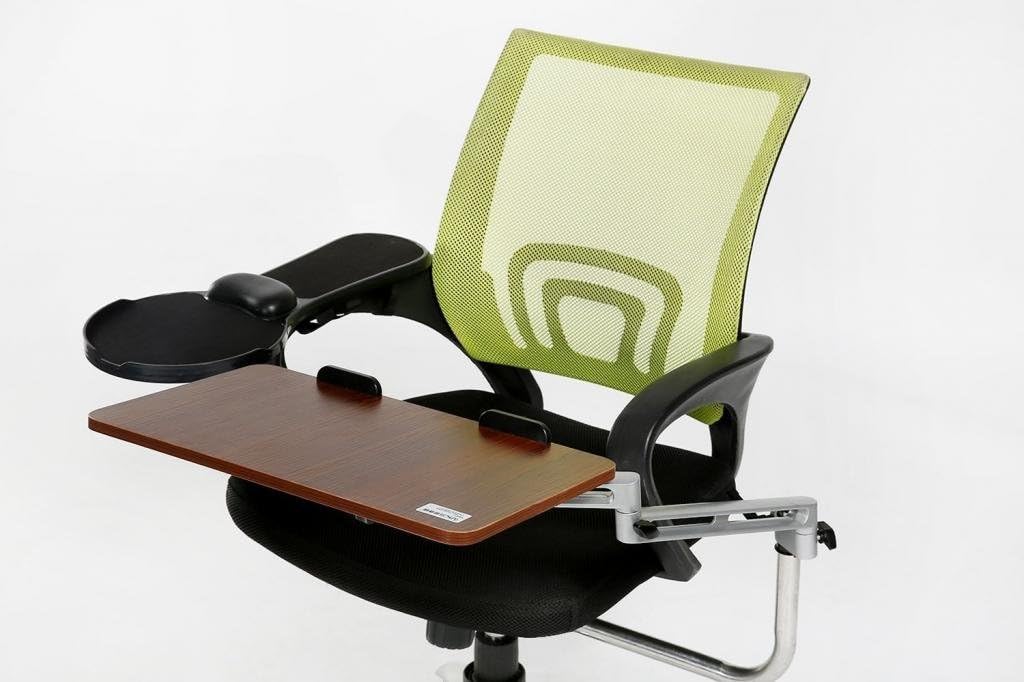


Chair Mount Ergonomic Keyboard / Laptop Tray System Plus Chair Mount Armrest/Mouse Tray _ Walnut
Product ID: 13097397
Buy eLink Pro Chair Mount Ergonomic Keyboard / Laptop Tray System Plus Chair Mount Armrest/Mouse Tray _ Walnut: Stands - desertcart.com ✓ FREE DELIVERY possible on eligible purchases Review: High end chair users beware! - If you are expecting a high end product for $130 beware. I have to admit I was very excited to get this for my Steelcase chair. I read the reviews, and knew the 28mm was not going to work. However, I figured with a longer screw + bolt it would do the trick. The problem is the design is flimsy. The mouse tray is tied with velcro and if you are a gamer, big mouse user, or use force it will fall apart. In particular with a Steelcase high end chair there is one way to attach the straps without force, which results in your $1000 chair being damaged. For the keyboard tray, even after 'jimmying' it, there are still issues in regards to mobility. What would make this a perfect product, would be: 1. If you could adjust the diameter of what it attaches to(or provide options). 2. Keyboard Tray had adjustments for being able to move it wider / shallower 3. Mouse tray attached to the chair. Really first these flimsy velcro straps are too short, and then if you move the mouse it's not stable. If anything just make the keyboard tray longer and not attached to your armrest. I really can't believe spent $130 on this. The problem is there us nothing really out there. I am going to try to make this work, but I don't see it happening. Review: It's more like a 3 - It's more like a 3.5. I do like it, but it could have been so much better. I've been using this for about a month; I was unsure at first, but it's a keeper. I had to hack it a bit to make it work for me. Issues: 1. The keyboard mount is wobbly. This is not fixable. They should have made a sturdier rod to hold the keyboard tray. There is too much give. If you are writing a novel this is probably not the tray for you. It wiggles. 2. The tray itself did not mount securely to the arm. I bought a wingnut and substituted it for the plastic disk they used and now it holds much better and it easy to tighten if it works loose (which it does). 3. The velcro to hold the mouse tray is too short. I bought some heavy duty velcro strips (not sticky back!) and extended the length of these strips and now it holds just fine. It also allowed me to move the tray forward to make it more comfortable for my particular reach. 4. I didn't like the gel pad in front of the mouse tray, so I popped it off. I stuck some paper on the leftover glue to cover it up. 5. If you swing around in your chair too fast the mouse goes flying. I bought a sturdier mouse. (really!) 6. You need a keyboard that doesn't have a big wrist rest. Mine does and it kind of makes the keyboard too big. Choose carefully. Pros: 1. You feel like Captain Kirk. It is deliciously nerdy. 2. The wife hates it. (that's pro?) 3. It really works. I have multiple monitors and now I just slide the chair and keyboard and mouse line right up with the monitor I'm using. This is great. 4. I have a glass desk and the built in keyboard tray was simply too small (bad design, cheap desk), so I needed a keyboard tray and there just aren't many choices. The last one I bought had clamps that didn't go small enough to hold onto the desk reliably, so this is a real solution if you have a desk with no room for a keyboard tray. With a few tweaks this could have been a 4 or even a 5. As it is, I find it usable and will keep it, but I can't help wishing for better, especially at this price.
| ASIN | B00Q5KY9LA |
| Color | Walnut |
| Customer Reviews | 2.7 2.7 out of 5 stars (32) |
| Date First Available | November 25, 2014 |
| Item Weight | 6 pounds |
| Manufacturer | eLink Pro |
| Manufacturer Part Number | KT001 |
| Package Dimensions | 20.5 x 12.5 x 3.8 inches |
A**R
High end chair users beware!
If you are expecting a high end product for $130 beware. I have to admit I was very excited to get this for my Steelcase chair. I read the reviews, and knew the 28mm was not going to work. However, I figured with a longer screw + bolt it would do the trick. The problem is the design is flimsy. The mouse tray is tied with velcro and if you are a gamer, big mouse user, or use force it will fall apart. In particular with a Steelcase high end chair there is one way to attach the straps without force, which results in your $1000 chair being damaged. For the keyboard tray, even after 'jimmying' it, there are still issues in regards to mobility. What would make this a perfect product, would be: 1. If you could adjust the diameter of what it attaches to(or provide options). 2. Keyboard Tray had adjustments for being able to move it wider / shallower 3. Mouse tray attached to the chair. Really first these flimsy velcro straps are too short, and then if you move the mouse it's not stable. If anything just make the keyboard tray longer and not attached to your armrest. I really can't believe spent $130 on this. The problem is there us nothing really out there. I am going to try to make this work, but I don't see it happening.
K**N
It's more like a 3
It's more like a 3.5. I do like it, but it could have been so much better. I've been using this for about a month; I was unsure at first, but it's a keeper. I had to hack it a bit to make it work for me. Issues: 1. The keyboard mount is wobbly. This is not fixable. They should have made a sturdier rod to hold the keyboard tray. There is too much give. If you are writing a novel this is probably not the tray for you. It wiggles. 2. The tray itself did not mount securely to the arm. I bought a wingnut and substituted it for the plastic disk they used and now it holds much better and it easy to tighten if it works loose (which it does). 3. The velcro to hold the mouse tray is too short. I bought some heavy duty velcro strips (not sticky back!) and extended the length of these strips and now it holds just fine. It also allowed me to move the tray forward to make it more comfortable for my particular reach. 4. I didn't like the gel pad in front of the mouse tray, so I popped it off. I stuck some paper on the leftover glue to cover it up. 5. If you swing around in your chair too fast the mouse goes flying. I bought a sturdier mouse. (really!) 6. You need a keyboard that doesn't have a big wrist rest. Mine does and it kind of makes the keyboard too big. Choose carefully. Pros: 1. You feel like Captain Kirk. It is deliciously nerdy. 2. The wife hates it. (that's pro?) 3. It really works. I have multiple monitors and now I just slide the chair and keyboard and mouse line right up with the monitor I'm using. This is great. 4. I have a glass desk and the built in keyboard tray was simply too small (bad design, cheap desk), so I needed a keyboard tray and there just aren't many choices. The last one I bought had clamps that didn't go small enough to hold onto the desk reliably, so this is a real solution if you have a desk with no room for a keyboard tray. With a few tweaks this could have been a 4 or even a 5. As it is, I find it usable and will keep it, but I can't help wishing for better, especially at this price.
A**N
If only it were meant for a decent chair
I bought this to install on a DX Racer King Zero Series chair. The most immediate problem is that the cross-extender (that immediate tube that goes from your chair stem and takes a 90 degree bend up) has two unequal lengths to it, with the shorter going up. On a chair with a significant seating platform (rocking, reclining, locking into a full reclined position, tensioner, etc.), plus steel tube frame and decent padding, the platform at its highest extent barely clears the highest part of the seat base cushion by 2". My thighs are >2" in diameter. That is a NO GO situation. Assembly directions are via pictogram and saying which letter parts are used. Pictorgram 2does not identify the chair stem, period. Pictogram 3 misidentifies part 'l' as part 'i' (part 'i' is a screw and nut, while part 'l' is a plastic washer). All parts are clearly labeled and they even sent another part 'i' along, which is good considering those are the first to be likely to strip out. Assembly took about 45 minutes for one person in a dimly lit room with much cussing trying to get the nuts on to the cross-attachment piece and then headscratching on just how a nut and bolt were supposed to work where the pictorgram did not identify they at all. Disassmbly went much faster. A quick placing of the cross-piece against my prior chair (also with controls and such on the bottom, although it was a cheap adjustable chair from years back) gives an apparent 2" of clearance over the worn seat. Still not enough for my thighs. For a standard office seat with relatively thin padding and no sophisticated controls giving elevation to the seat base, I can see where this system would work for me. The separate mouse platform does me no good without the tray, as this is a system level replacement for another keyboard/mouse platform I'm using on my desk. If one does not work, the other is mooted. PROs - Relatively easy to put together - Well labeled attachment parts, though packaged in a single bag - It would fit my extended size keyboard CONs - Tray does not clear seat by very much - Poor pictogram labeling - Functional for the right chair and person Am I sending it back? No. Why? The problematic piece can be replaced by 3/4 x 36 (or 3/4 x 48 if I have any future plans for more attachments, the OD being nominal 1" so 3/4" Schedule 40 pipe) pipe with a 90" bend in it (or simple elbow fitting). Drill a few holes in it and then the problem is fixed. Cosmetically it won't look great, true. What I get in return is an extra 4-6" of elevation. Yes this will have to be done by hand because I will not have an equal out and up, but more up than out. Sadly just using the piece sent won't do it as it does need a good 16" out to clear the seat and arm necessary for mouse use by this system. Plus something a bit better in the screw and nut realm, as the ones sent aren't what I would call 'heavy duty'.
W**T
Yes, yes, yes, yes, yes, yes, yes
Wow, I am soooo happy. I have so many chronic pain issues due to computers that I was about to switch careers and become like a therapist or something. That would have taken me ten years of school and training! Over the years I've tried nearly every ergonomic combination I could find - spare no expense. Some were hits - like my Kenesis keyboard. Most others were misses. I've tried saddle chairs, posture chairs, stand up desks, tilted keyboard trays, various mice, various braces, foot rests, etc. I was just about to buy an easy chair work station for $900. But then I found this thing. I paid for over night shipping because I was so excited. Installation was easy but I did have a problem where the key board trade was sliding down. I cut a sliver of rubber from a jar opener and stuck it in and that cured the problem. Another guy used rubber bands. Others have said it didn't fit their chair. I had that problem at first, but the support bar that sticks out from under the chair does not need to be at an exact 90 degree angle from the seat. You can rotate it forward from the base and then it fit my chair just fine. The key board tray has a very wide range of swivel so that minor tweak had no effect on the tray at all. Before trying this I thought I might remove the arm rest on the left side but I am glad I didn't. Both my elbows rest comfortably on they keyboard while typing. This saves my shoulder and back posture. At first I thought the mouse tray was a little wobbly. It attaches with velcro. But I gave the velcro a good tug and now it's tight. It might be nice if the keyboard tray was a little more solid, but this doesn't feel cheap or anything. The guy who made the video and said be careful putting your laptop on it was honest. It is definitely sturdy enough. It doesn't shake around while typing. But it can't handle much more weight than what it was designed for. To me that isn't a big deal. Others complained this was too expensive for ikea quality. One, it's much better than Ikea quality. I like iKea but this product exceeded my expectations for quality. I think the price is very fair. I'm so thankful for this. If in the future I find that my pain issues are not totally resolved, I promise to update. But I feel as snug as a bug in a rug at my desk right now! Thank goodness!! I was getting desperate. I just couldn't take the constant discomfort much longer. UPDATE: 10/11/15 I've had this thing since August and I am still so in love with it! I added a butt cushion and lumbar back cushion to my computer chair. I also attached a wrist pillow to the mouse pad using velcro because I like it when my hand is at a downward angle. And I was using a normal mouse for a while but I switched back to my verticle mouse. So wow....so thankful for this product!!
T**T
Am I the Only One with this Problem with the Keyboard??
Great concept. I'm only 5'1" and have always had problems fitting into a desk setup. I have chronic back, neck, and shoulder issues due to bad posture as a result of sitting in front of a computer. I recently converted my setup to a standing one and I would say that is my first choice. But my feet and ankles get tired after standing for so long so I also wanted a sitting option. That's why I purchased this. The concept is great. I can finally sit back completely in my chair and type (I do use a foot rest because my feet can't reach the floor). It's not as great for my back, neck, and shoulders as standing, but it's a nice short-term alternative. I do recommend this keyboard. My chair doesn't have arms so I don't use the mousepad that was included. But here are the cons: 1. Price. This is somewhat expensive given the quality. But I won't complain too much about that. Can't really put a price on good health, right. 2. The keyboard tray itself is a little on the small side. It would fit most keyboards just fine, but I use a keyboard as well as a Rollermouse, which is a long mouse pad which sits in front of the keyboard. As a result, I have about 2.5 inches of the top of my keyboard sticking off the tray. But I put a sheet of non-slip shelf liner between the tray and keyboard/rollermouse and that helps keep everything in place. 3. My biggest complaint, which nobody else seems to have mentioned making me wonder if it's just me, is that the keyboard tray doesn't sit straight. The side without the metal arm tilts down so one hand sits on the keyboard higher than the other. It's not a huge slant, but sufficient to be noticeably felt, which can't be good for long-term use. 4. On par with #3 is that the arm to the keyboard tray does not firmly attach to the chair bar. It keeps sliding down the bar. I had to use rubberbands to keep it in place. Did I just get a bad piece?? UPDATE: I've changed my rating of the keyboard tray to 4 stars. Here's why: My biggest complaint about this product was #3 above--that they keyboard tray didn't sit straight for me but would rather angle downward on the side without the bar attaching to the chair. I finally figured out the problem and it was my fault for setting it up improperly. There is a little black handle thingy that screws in to connect the bar which extends out from under the chair to the rotating arm that holds the tray. I didn't realize it mattered which direction you screwed that black thing in. Basically, if I was sitting in the chair, I had the black handle part facing away from me but it needs to face towards me (this is shown in the product image). When I switched the direction, the tilting problem was solved. #4 above is still a problem and shouldn't be considering the price of the setup but the rubberbands are working for the most part, though they need to be adjusted periodically. I have also had a chance to try the mouse pad but it didn't work with the Amazon Basics chair I had purchased. The mousepad has 3 strips of velcro underneath which strap around the arms of the chair. Most chairs have arms that connect to the sides of the chair. That means the vertical part of the arms extend down from the center of the arms. That vertical part of the arms got in the way of the mousepad straps so I could not secure them properly. Basically, take a good look at the product image and see how the arms of the chair connect to the chair from the back. So there is nothing sticking out from under the arms that would prevent you from strapping the mousepad in securely. Most office chairs aren't built that way. I guess if I really wanted to, I could have tried getting some really long ties and just strapping the bejeezus around the chair arms and mousepad to hold it together that way but the new mouse I was trying wasn't really working out anyway so I didn't bother. I've gone back to my armless chair and stored away the mousepad since I'm still using my Rollermouse which does not require a mousepad. So 5 stars for the keyboard tray, minus a star for the fact I have to use a rubberband to keep it from sliding down and for the awkwardness of the mousepad. Side note: You can buy the mousepad separately. As of the writing of this review, the price was just under $40 for the pad alone when buying under the eLink Pro but there are many other brands being sold on Amazon for less than $20, and I'm betting they are all the same or very similar. When you buy the mousepad separately, it comes with a clamp so you can connect it the mousepad to the edge of your desk rather than use the velcro straps to connect it to your chair arms. The mousepad included in this package has the notch that fits the clamp, but the clamp itself is not included. I purchased that mousepad separately so was able to try it with the clamp attaching to the desk and it really doesn't work with the setup of this keyboard. Attaching the mousepad to the desk would work more for those who sit their keyboards on their desk and not a keyboard tray, unless you have a longer reach because the mousepad would be sitting too far away.
H**0
It's Pretty Terrible
This proved to be too unstable to be useful. I found myself adjusting my typing habits just so I wouldn't cause the tray to bounce up and down. Beyond that, I had to move the chair back just to get the contraption out of the way. I was also upset when I purchased it because the product description at the time (not sure if it's still that way) said that the mouse tray wasn't included. I ordered, what ended up being, an extra one. The mouse tray was largely useless anyway because it didn't extend nearly far enough. I found myself having to pull my arm back to an unnatural position just that ended up straining my arm. You may have noticed I've been using past tense; that's because I've relegated all of this to my closet - that is, all but one small portion. I'm using the two small pieces of metal that clamp together to hold the arm of the device to the chair piston. My chair's been slipping for quite some time and those keep it up by an inch - handy considering the problem. That's all I'm getting out of it at this point, though.
R**S
Despite some problems, the only thing that works for my desk setup
I almost didn't buy this because most of the reviews are obviously fake, however, it was the only product I could find that provided a solution for a desk that is not deep enough to put my face far enough away from my large monitor if I have my keyboard on the desk. It does what I hoped, however, there are several issues with it that left me wishing there was an alternative out there. The keyboard holder barely clears my lap and I'm a fairly tiny person. The knob for controlling the tension of the keyboard tray (which juts between my legs as I sit in my chair) comes loose every few hours and needs to be tightened or the tray starts to spin freely as I type. The straps for attaching the mouse pad to the arm of the chair are way too short - and the arms on my chair are not particularly thick. I had to attach two of the straps to each other to make one big strap, which worked, but means the pad is only attached in one place instead of two, leaving it fairly unstable. Given these drawbacks, the price felt way too expensive, however, I kept the item because I couldn't find anything else that offered the same solution.
R**E
Good Concept, Bad Implementation
Good concept, bad implementation. As one person said - and I completely agree -Price is absurd for Ikea quality construction. - I feel like I got ripped off. -Keyboard tray shakes while typing. - had to add additional support -Mouse pad's Velcro straps are too short. - think I'll throw the mouse pad in the goodwill. Doesn't fit, and I don't know when and where I'll use it.
Trustpilot
1 day ago
1 month ago