Buy anything from 5,000+ international stores. One checkout price. No surprise fees. Join 2M+ shoppers on Desertcart.
Desertcart purchases this item on your behalf and handles shipping, customs, and support to South Africa.
๐๏ธ Elevate your iPad game with the ultrathin keyboard cover that means business.
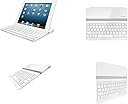
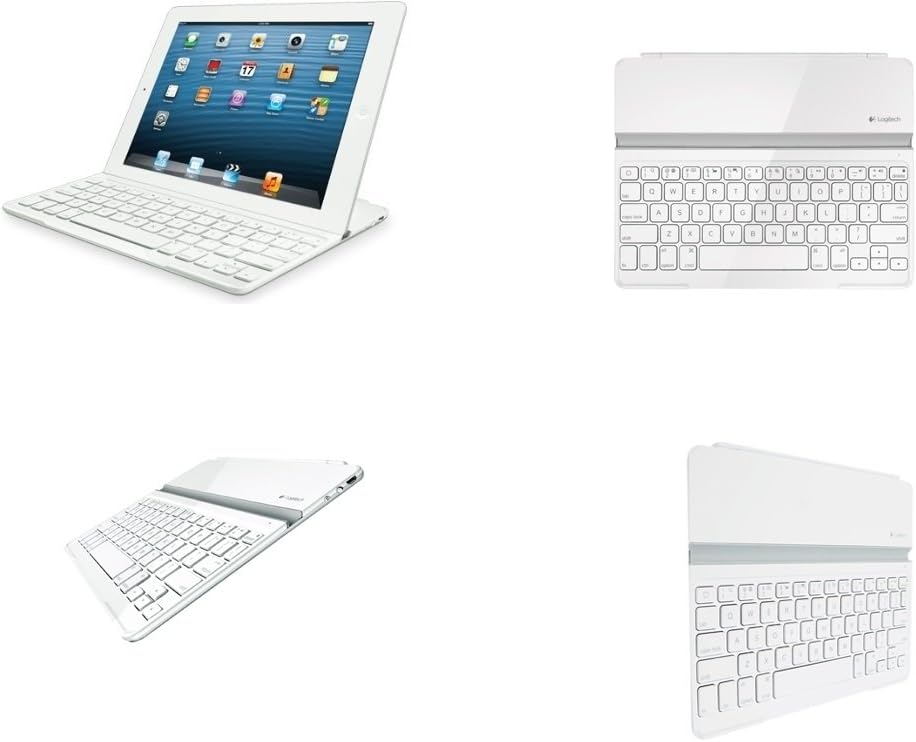
The Logitech Ultrathin Keyboard Cover for iPad 2 and 3 combines a magnetic clip for secure attachment, dual viewing angles for versatile use, and automatic wake/sleep functionality to enhance productivity. Lightweight and slim, itโs designed to perfectly fit your 9.7-inch iPad, making it an essential accessory for professionals on the go.
| Standing screen display size | 9.7 Inches |
| Brand | Logitech |
| Item model number | 920-004723 |
| Hardware Platform | Tablet |
| Item Weight | 15.8 ounces |
| Product Dimensions | 7.6 x 0.87 x 9.8 inches |
| Item Dimensions LxWxH | 7.6 x 0.87 x 9.8 inches |
| Color | White |
| Power Source | Battery Powered |
| Batteries | 1 Lithium Ion batteries required. |
| Manufacturer | Logitech |
| Language | English |
| ASIN | B009P2S8NK |
| Is Discontinued By Manufacturer | No |
| Date First Available | October 11, 2012 |
J**Y
Changed the way I use my iPad
I purchased this out of curiosity, to see if it would change the way I use my iPad 4th generation. Frankly, I bought the red one (used) only because it was cheaper than the black.I now understand why so many folks love this keyboard case.The special shortcut keys are very convenient (something my Apple Bluetooth keyboard lacks).The keys are necessarily a bit cramped compared to the Apple keyboard, but that is a reasonable trade-off for the portability, and built in stand.If you expect this to protect your iPad, you will be disappointed. That is not what it is designed to do. I use a soft-sided zippered case to do that job, but only need it when travelling. For around the house this keyboard case alone is sufficient.Also, if you see the magnetic latch as simply a quick, convenient way to align and attach the keyboard you'll be happy with this. If you expect it to clamp the iPad so solidly you can be rough with it, well, you'll be disappointed and perhaps have a damaged iPad.I mount my iPad both in Portrait (tall) and Landscape (wide) modes in the slot. Landscape is a bit sturdier due to magnets and the geometry, but the portrait mode works fine as long as one is carefull. It's very convenient to be able to operate in both modes, depending on the app one is using. I tend to prefer the Portrait mode for document creation and other typing / editing tasks.By the way, my previous case was a MoKo Slim-fit which I really liked, and still use occasionally. It gives more protection but of course no keyboard.If you are interested in a high quality, innovative device that may change the way you use your iPad, this Logitech Ultrathin cover is worth your consideration.
B**E
Logitech ultrathin keyboard. Love it.
I've tried previous keyboards for my iPad, mostly ones that I could get off ebay for a cheap price. Let's just say that you get what you pay for. This one is higher priced, but it works far better than the keyboards I previously bought and used. This product was delivered very quickly. It has a magnetic strip on one side to clip onto the keyboard when you are not using the keyboard function. Be cautious; the magnet is not very strong and your ipad will most likely fall off if you try to lift your ipad up by the keyboard. That being said, its not a major problem, since the product is not meant to function as a ipad cover, but as a ipad keyboard. The keyboard itself is very sleek. The ipad sits on the white strip you see in the picture. It fits perfectly in your lap, making typing on your ipad very easy. Something to note is that when using the keyboard, autocorrect is automatically turned off. I'm fine with this, since I don't use autocorrect. However, the ipad will not underline words that are misspelled when you are using the keyboard (at least not in imessage). It's not a huge deal breaker for me, but be wary of it. I use multiple keyboards on my ipad (e.g., english, chinese, emoji). You cannot change which keyboard you are using from the attachable keyboard itself. It was a little frustrating wondering why my numbers weren't working, until I realized I wasn't in the English keyboard. If you don't regularly change keyboards, than it shouldn't be a problem for you. If you do, you will have to turn the attached keyboard off, change keyboards on the ipad, and then turn the keyboard on again. Again, its not a huge deal, but it was something that I noted.Overall, the keyboard functions very well for a keyboard, and if I could go back, I would save myself the time and money spent finding cheap keyboards, and get this one from the get go.
M**Q
Almost Perfect.
I think this is perhaps one of the best keyboards out there for the iPad in terms of function and design. I am typing out this review using the product as a matter of fact. It claims to have a 6 month battery life but I have yet to find out. I doubt it will last that long considering I use the device more than two hours a day. Charging does not take longer than 2-3hrs so it is not a big deal for me. This keyboard "cover" I feel serves no real protection to your device. It will break off from your iPad when you drop it and you will probably see dents as a result. Be that as it may, the main purpose of this product is the keyboard. It does make holding your iPad when the cover is closed seem like you put two iPads together. In fact, that is about how thick the entire set up will be. The magnet attaching the device to your iPad is strong and will hold its own weight. However, in the close position, it is easy to slide apart the two devices so you still have to be careful. The slot that mounts your iPad in an inclined position is perfect in terms of the angle and how secure it holds the iPad. It has many useful function buttons controlling volume, pause/play, mute, cut and paste and word highlight. Minor gripes that made me give a star short of perfect is perhaps the keys which make considerable noise when you type. So, it could be annoying to people around you especially if you are doing work in quiet places like the library. THe keys feels cheap in terms of how it feels pressing down, although that is a very personal opinion. The texture of the keys being made in plastic, may contribute to that cheap feeling. Also, there is no indicator light whatsoever to show that you have pressed the caps lock on.All in all, I am very satisfied with this product because ultimately it gets the job done and it looks great. It makes the iPad look like a netbook/ultrabook. I do not think you will find a better keyboard out there that is designed for the iPad. For the price I paid here on Amazon which was on 50% off, it is really a steal.
Trustpilot
3 weeks ago
1 week ago