🎞️ Turn your vintage tapes into viral moments—digitize, edit, and share your legacy today!
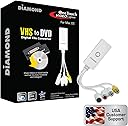
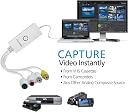
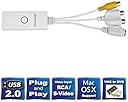
The Diamond Multimedia VC500MAC is a compact, USB 2.0 video capture device designed for Mac and Windows users to effortlessly convert analog VHS, Hi8, and V8 tapes into digital formats. Supporting composite RCA and S-Video inputs, it offers one-touch conversion, compatibility with iMovie for editing, and easy sharing on social platforms. With plug-and-play installation and US-based customer support, it’s the ultimate DIY solution to preserve and modernize your treasured home videos.


| Brand | Diamond Multimedia |
| Item model number | VC500MAC |
| Operating System | Mac OS X - 10.9 and Later |
| Item Weight | 7.2 ounces |
| Product Dimensions | 3.7 x 0.4 x 1.1 inches |
| Item Dimensions LxWxH | 3.7 x 0.4 x 1.1 inches |
| Manufacturer | Diamond Multimedia |
| Language | English |
| ASIN | B007QCIBX8 |
| Is Discontinued By Manufacturer | No |
| Date First Available | March 30, 2012 |
K**Y
Simple to use and worked great
Very simple to set up and use. I used my MacBook and downloaded the software from online since I didn’t have anywhere to insert the cd.Once I downloaded the software it was very simple to get started. You connect your camcorder using the yellow and red cables to the diamond media device. Push the record button on your computer and push play on your camcorder. You can record as much or as little as you want (snippets of videos or the entire tape).It’s kinda like a screen record. You’re using your laptop as a monitor to play back your video and screen recording it while it playing.The picture quality was what I expected it. It looked how it would look if I played it on the camcorder or connected it to a tv to watch.When you stop recording you save it.I used a flash drive to save all the videos so I wouldn’t use a ton of space on my computer.One problem I had only a few times was a glitch of when I was recording sometime it wouldn’t save so I would have to playback the entire thing and re-record it, that didn’t happen too many times.Overall it was super simple and I really loved that I was able to digitize our home videos without paying a ton. I’m glad I decided to get this device instead of a $200 one. It worked out great
H**D
Great Product!!
Using a 27" iMac with Mac OS High Sierra 10.13.6. Received this last week, and have already digitized over a half-dozen old VHS tapes!! Pretty much plug and play! Software was easily downloaded from their website, and as long as you follow the set up instructions regarding video, sound, length, it's AWESOME!! Keep in mind the picture quality is only as good as those old, grainy VHS tapes are, but it's a snap to convert them to digital files, that you download, and can then edit using iMovie and save to iTunes or where ever you want. I did have a couple questions and emailed the company and received a reply within MINUTES!!! The user interface isn't the fanciest, but it definitely gets the job done! Well worth the money.
Y**R
This little guy is totally worth it.
I figured that the price was too good to be true, or that it would turn out to be a cheap piece of junk. I mean, the system requirements on the box were obviously written by someone who's never used a Mac in their lives (Pentium IV or higher?! Sound card?! Graphics card that supports DirectX?!). However, I can honestly say that this is a great product, and its ease of use perfectly matches the Mac experience.The enclosed VideoGlide software consists of two programs: Capture and Exporter. Capture will record directly from composite or S-Video (with mono or stereo audio, of course) to QuickTime format using one of several compression options, or uncompressed (approximately 50 GB per half hour). You can then use Exporter, if desired, to take the recorded videos and re-encode them to practically any other video format QuickTime supports, such as MP4. (It may be worth mentioning: I don't know whether applications besides VideoGlide--iMovie or otherwise--can record directly from the device, so don't assume that this is possible. However, iMovie should be able to easily import VideoGlide videos, so that shouldn't be a big deal.)Setup takes just a few minutes. I used the device and software on two different Macs: a mid-2010 Mac Mini powered by a Core 2 Duo and running OS X 10.6...and a late 2005 Mac Mini using a 1.5 GHz PowerPC G4, running OS X 10.4! I was amazed to find that even the G4 had the horsepower to record compressed S-Video in real time without any noticeable lag. Of course, on older machines with smaller hard drives, you'll have to keep a watchful eye on the amount of disk space you have left...but the fact that this even runs on old PowerPC architecture is pretty nice.Of course, there are some shortcomings: it's not HD, obviously. You can ask VideoGlide to record the videos at higher resolution than 640x480 if you want, but it's just going to be stretched. The recorded videos show visible signs of deinterlacing--especially during fast action scenes--but I'd expect that from an inexpensive device of this sort. And, also falling into the "well, it's not magical" department: the Exporter can take a long time to encode videos. As an example: on my 2010 Mac Mini, encoding a half-hour 640x480 video--going from uncompressed, to H.264 MP4 with a total bitrate of about 1.25Mb per second--took around another half-hour. Of course, this time will vary; if your finished product is lower-res and lower bitrate, it will be much quicker. On old hardware? Set it up before you go to sleep! Again, if you've ever worked with video, you probably already knew this.I did have one other problem that prevented me from giving this five stars: I noticed that it gets really hot when in use, and after about five straight hours, the video feed got all choppy and the sound scrambled like an egg. Basically, it was unusable, even after disconnecting and reconnecting it. After allowing it to cool off for a few days, I was able to record a half-hour video without any issues...but it would appear that this is designed to be used for short periods of time, like a couple of hours, rather than for days straight.Overall, I would say that if you're in the market for a device like this, it's definitely worth the asking price.
Trustpilot
1 month ago
1 day ago