โก Unlock Your Storage Potential with Speed & Style!
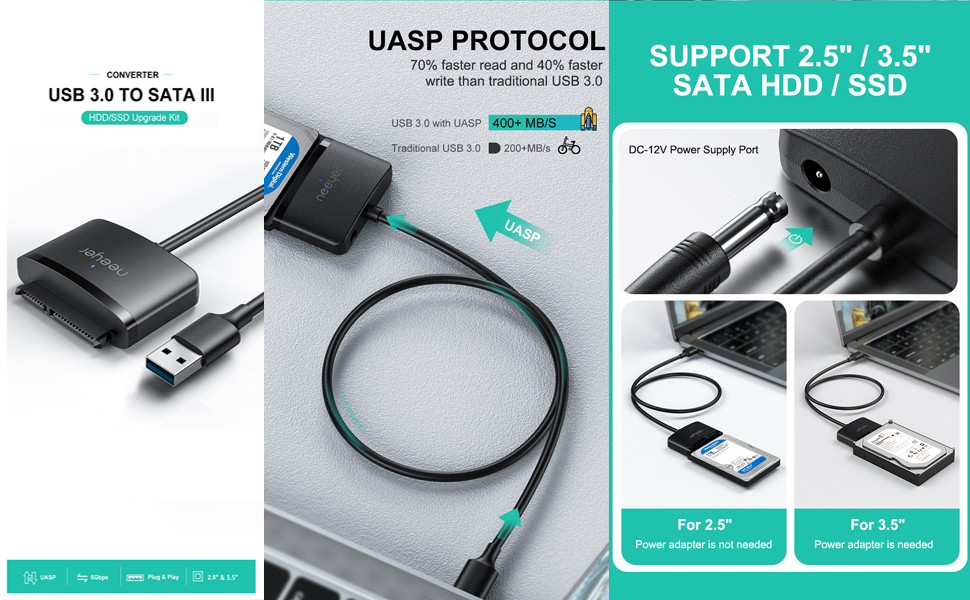
The Neeyer USB 3.0 to SATA III adapter cable delivers fast, reliable connectivity for 3.5 and 2.5 inch HDDs and SSDs. With a 12V/2A power input and plug-and-play design, itโs the perfect tool for professionals needing quick access to large external drives. Backed by thousands of positive reviews and a sleek matte finish, itโs a must-have for anyone serious about efficient data management.


| ASIN | B07PVX682Q |
| Best Sellers Rank | #2,560 in SATA Cables |
| Brand | Neeyer |
| Color | 3.5 |
| Compatible Devices | Personal Computer,Laptop,SSD |
| Connector Type | USB 3.0 to SATA |
| Current Rating | 2 A |
| Customer Reviews | 4.6 out of 5 stars 6,178 Reviews |
| Finish | Matte |
| Finish Type | Matte |
| Input Voltage | 12 volts |
| Item Weight | 0.27 g |
| Manufacturer | Neeyer |
| Model Number | 711202922280 |
| Nominal Power | 24 watts |
| Number of Items | 1 |
| Number of Ports | 1 |
| Package Quantity | 1 |
| Power Plug Type | Type A - 2 pin (North American) |
| Specific Uses For Product | PC |
| UPC | 711202922280 |
| Unit Count | 1 Count |
| Warranty Type | Limited |
C**E
So Far, So Good โ An Inexpensive Way to Be Able to Keep Using My Seagate 8TB External Hard Drive!
I got this Neeyer SATA to USB 3.0, SATA III Hard Drive Adapter Cable for 3.5/2.5 Inch HDD/SSD after the connection port on my Seagate 8TB Expansion Desktop External Hard Drive became loose, and neither my laptop (a mid-2012 MacBook Pro 13 inch) nor my momโs laptop (an early 2015 MacBook Air 13 inch) nor the Mac Mini (a late 2012 Intel i5) was recognizing the hard drive. At first, I was worried thinking that it was the hard drive itself that was the problem, that it had failed/crashed and that the probably 5 TB worth of mostly videos, but also eBooks, music, pics and other stuff had been lost, and that, not only would I have to pay probably hundreds of dollars to try to recover that data, but worse, with so many videos & other files on that drive I would not be able to recall offhand every single thing that was saved on it. So, whatever data which was on there that I couldn't remember and was, for whatever reason not recoverable (or even just not known about!) would be lost, and it was possible, if not even quite likely that Iโd never even know what was missing from whatever data WAS recoveredโฆโฆโฆโฆโฆโฆbut on the other hand, I was NOT convinced that it was the hard drive that was the problem, and rather, that it might be a problem with the internal part (whatever cannot be seen from the outside) of the connection port. Because the hard drive would still light up and I could hear the motors going, but the computer(s) just werenโt recognizing it. Not to mention that, at least initially, whenever Iโd press the Micro-USB sync/connection cord tight inside the hard driveโs connection port, the computers WOULD recognize the hard drive and I could access all of the files within it โ yet, as soon as I let go of the cord that I was holding inside the connection port, the hard drive would disappear from the desktop and then, once again, I could not get any computer to recognize it. But the very fact that the hard drive worked when I held the Micro-USB connection/sync inside the connection port, is why I was sure that the drive itself was fine, and if only I could just bypass the Seagate connection port & connect directly to the hard drive via the SATA port, Iโd no longer have a problem with it showing up on/being recognized on the computerโs desktop. Since there was no visible way to remove the hard drive in order to access the SATA port, I searched online and on YouTube, I found THIS video (tinyurl dot com/seagateremoval) about how to take the Seagate Expansion Desktop hard drive out of its casing. Although the title (and intention) of the aforementioned video is for the viewer to use the removed hard drive as an internal drive in their PC, first off, I donโt have/use PCs anymore I have Mac, and secondly, this hard drive definitely wonโt fit in my Mac laptop and would probably not fit in the Mac Mini either. As such, Iโm going to keep using this Seagate drive as an external hard drive, just WITHOUT its outer black plastic housing. However, by the same token, I donโt want the SATA hard drive completely unprotected from accidental bumps & bangs, or even just dust, dirt, lint, or other stuff that could potentially damage it. The problem is that, I couldnโt decide whether to put this Seagate drive into a singular hard drive enclosure OR in a multi-drive dock (like a RAID array) OR to just use a SATA-to-USB bridge like this Neeyer SATA to USB Hard Drive Adapter Cable . Ultimately though, this hard drive is only 8 TB and that is just NOT enough, given that Iโve already used up about 5TB or so, and I still have TONS of music, eBooks, pictures/photos and other files to transfer, and HUNDREDS (if not more!) videos on VHS cassettes that I have yet to digitize. Not to mention, the dozens, even hundreds of DVDs and Blu-Rays that I want to copy or โripโ to my computer, in order to consolidate ALL of my movies & TV series on a couple (or a few!) high-capacity, multi-terabyte hard drives (and backed up preferably on the cloud and/or online storage) so that Iโm not only able to access my entire collection of videos when away from home, and in areas without free Wi-Fi, or even just reliable Internet WITHOUT the added weight & space of having to carry the physical DVD & Blu-Ray discs along with me, BUT ALSO, to save the wear & tear on the physical discs themselves by watching it from the hard drive or streaming it from an online service when at home or a Wi-Fi hotspot. In other words, in the end, Iโm going to need a LOT bigger hard drive (or hard drives, plural) than just 8 TB. So I decided that since Iโll be needing to upgrade to a bigger drive (and likely multiple drives!) in the near future, instead of buying a singular hard drive enclosure, Iโd rather just get a SATA-to-USB bridge for this single SATA drive, and then later on, when I upgrade to a 16TB, or 18 TB or even 20 TB hard drive, Iโll get a multi-drive hard drive dock, like a RAID array for both this Seagate 8TB hard drive and whatever others I get in the future.......................but in the meantime, I got this Neeyer SATA to USB Hard Drive Adapter Cable and Iโm VERY GLAD I did! Because, this is a GREAT device and I have had NO problems whatsoever with my hard drive ever since I got it. Granted, I have only had this Neeyer SATA bridge for a few days, but its very easy to use and so far, it works very well. Its purpose is mostly self-explanatory. Basically, this device is designed to connect hard drives with a SATA port to the USB port of a computer, and like I said, its also pretty simple to use. Just plug the electrical cord into the power port of the adapter on one end, and electrical outlet (like a wall socket) on the other end, and then, connect the SATA plug to the SATA port on the hard drive on one end, and plug the other end of the cord into the USB port on your computer, and if it works as it should, then this Neeyer SATA bridge should start flashing with a blue light and within a few seconds or minutes, the connected hard drive will show up on your computer desktop. Or at least thatโs what it did with mine โ and since then, I have had ZERO problems with the hard drive disappearing from my desktop like it did CONSTANTLY when it was inside the Seagate plastic casing and connected via its Micro-USB port. Nor have I had ANY of the โDisk Not Ejected Properlyโ error messages that I kept gettting every time Iโd let go of the cord connecting the Seagate hard drive connection port to my Mac. Other than that thereโs not much else to say about this bridge. Although, for the time being, this Neeyer SATA bridge is sufficient, since I still have about 3 TB or so left on the drive, depending on how much more data can be accommodated in the remaining space, at some point in the future, Iโll probably have to upgrade to a multi-drive dock (or more than one!), and one or more multi-terabyte hard drives, eventually totaling as much as 100 TB or more, to store my entire video (including TV series, movies, and family/home videos) music & eBook collections, as well as photos, documents and other files. As of now, though, Iโm VERY satisfied with this Neeyer SATA bridge . For just $18 or so, its a reasonably-priced way to continue using โ and more importantly, be able to access the existing data (particularly the IRREPLACEABLE photos & videos!) on my 8 TB Seagate external hard drive despite that the original Micro-USB port connection no longer works. All in all, I highly recommend this Neeyer SATA bridge , for anyone who wants to connect their SATA hard drive to the USB port of their computer easily and relatively cheaply. โญ๏ธโญ๏ธโญ๏ธโญ๏ธโญ๏ธ 5 STARS!!!!!!!!!!!!
S**L
My everyday good tool as an Software IT
My daily work involves software repairing, Data Recovery, Data Management, OS Installation, and the like and I have to say this tool removed the boundaries of the 2.5in Hard Drives Because in Kigali, 3.5in are also many and need to be made use of. Even now It's been a week, this tool helped me to recover 4TB of Data from my External 2.5in Hard Disk because I had access to another 4TB but which is 3.5in. So even though this item helps with my normal 2.5in, I am happy that I can connect 3.5in as well. It's the first time to ever have an item of this kind. I have never even thought that it exists. The other thing I like is that it is cheaper than the slower options that I found here in Kigali before buying this one. The transfer speed is around 116MB/s on a USB 3.1
A**A
Easy Setup and Performed Flawlessly!
I bought this adapter to format and partition a new hard drive to replace a failing one in my Linux workstation. I had considered hooking the drive directly up to my motherboard's SATA port and power supply, but I've always wanted an adapter like this, so I figured I'd give it a shot. I just plugged the adapter into the drive, then plugged in the adapter's power supply, then plugged it into my PC's front USB3.0 port, after booting from a Live USB install. The drive was recognized just like any other USB drive. Disk utility and GParted both showed the drive as unformatted and unallocated. Using badblocks showed the new drive was fine, then I used GParted to allocate, format and clone the partitions (which I had fixed the sectors via e2fsck and badblocks - the bad sectors kept showing up, hence this process) to the new drive. All of these operations went perfectly, over an 8-hour period of testing and cloning (and waiting while playing apps on my phone - lol). One thing I did note, and I think this is typical of USB drives, is no access to SMART data on the drive. Once I verified the drive a final time, then plugged it into my PC via SATA, rebooting with the Live USB install, I could see the SMART data fine (which revealed to me that the drive was an actual brand-new drive, and not a refurb or such, thankfully). The system booted, and the adapter was packed away for another "save the day" moment!
E**N
Works like a charm
A bit of background: My brother crashed our PC back in 2018, at the time I didnt have much knowlegde on pc's (or any money to be spending to get it fix) so our harddrive containing all my old artworks had been lost. Fast-forward to yesterday, I managed to find the PC and do a quick search and saw one of these being used. I was very much hoping my drive wasnt dead, and crossed my fingers once everything was plugged in. Now on to the actual review: If you buy the right one, it should work fine. Its easy to set up, and if all goes well, your drive should appear in whatever device you use it in. Of course unless you drive is really messed up, you'll probably have to do further research. I was able to retrieve all my old files rather easily. There was some problems with opening administrator files, but changing the owner helps with that. All in all, if your drive aint dead in the dusk or your product isn't faulty- this is great
A**N
Works like a charm! Be thorough when using multiple hard drives, though.
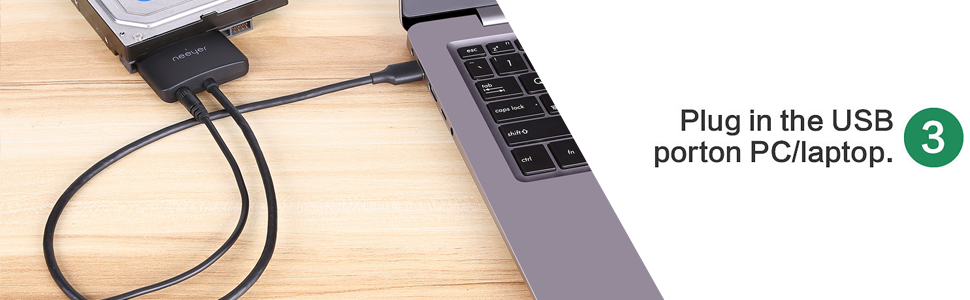
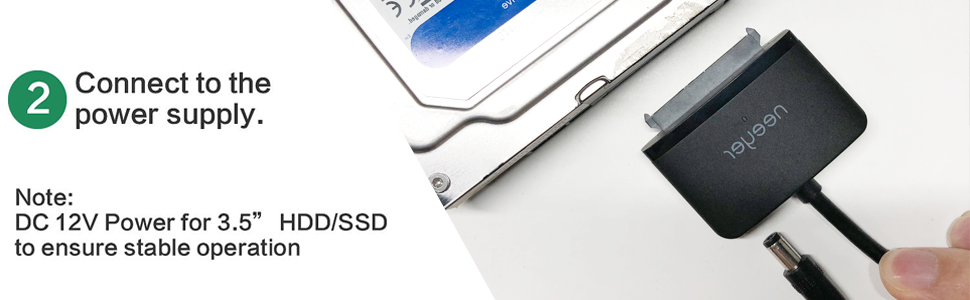
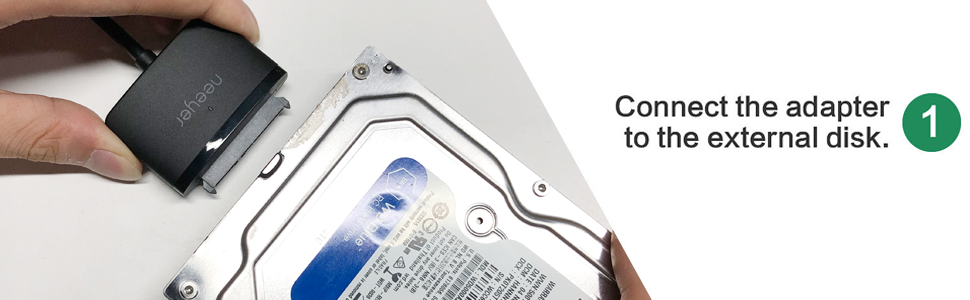
It works easily and is a convenient size--no bulky cables or enclosure. I do want to offer a tip to people who are using it with multiple hard drives: I ran into a problem on Windows 10 where I tried to save time by simply unplugging the first hard drive and plugging in the second. However, Windows couldn't see the new hard drive and still reported seeing the new one, even after rebooting. Even weirder, the old drive appeared in Device Manager and even Disk Management, but not in Explorer or anywhere else. To fix the problem, I had to unplug EVERYTHING--from my computer, from the hard drive AND unplugged the cable from the wall--then replugged it back in, in the order specified on the product page. (1. Plug in the hard drive. 2. Plug in the power cord. 3. Plug into the computer.) I think because I hadn't fully unplugged everything, Windows couldn't quite figure out that even though the plugged-in device was the same, the hard drive wasn't... so fully unplugging everything, then fully plugging it back in again forced Windows to acknowledge it as a different drive. So don't try to cut corners--fully unplug everything before switching to a new hard drive!
C**T
Recovered our pics from a crashed hard drive!
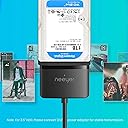
The hard drive in our desktop lost it's boot sectors and the computer would not start. We did not realize until the hard drive failed that our weekly back-ups were not working due to an unrelated issue with the system image. We thought for sure that all of our pictures and documents were lost. This cable works great! Plug it into your functional machine and your damaged hard drive and you can recover anything that wasn't in the damaged sectors. You have to use the included power supply for 3.5" form factor drives as they are 12V and USB is only 5V. Your files will also be mostly jumbled up too so don't expect to be able to drag and drop entire folders all of the time. The cable is USB 3.0 so the transfers go quickly. The overall quality is really good and it comes well packed but easy to open. Save yourself from having to pay a computer shop to recover your files (and having to worry about them snooping through them!). If you own a computer you need one of these at the ready! Well worth the money!
B**Y
Worked as advertised
Considering the cost to functionality of this product I feel I got a great deal. The most important take away I got from the reviews was to be extra gentle when attaching the adapter to the hard drive and to plug things in, in the correct sequence. I've transferred over 40,000 pics, docs, etc... between by PC and 2 older (2006) full size SATA drives in the last few days without a single hiccup or error. I'm using a mid-line I7 PC with USB 3.0. I plugged the adapter into the old drive, then plugged in the external power cord to the adapter, then with windows fully loaded, I plugged in the USB adapter to the PC and it was instantly recognized by windows like a USB Flashdrive was added. For prudence, after all my data was transferred, I shutdown the PC and removed the connections since it did not give me the "Eject" option in Windows like flashdrives do. I would recommend shutdown and then removal regardless. One of my 2 drives was slow to spin up so I gently repeated the process and successfully got it running and recognized.
R**O
If you own a Computer with SATA drives, this device is a necessity!
I run an Internet Radio Station and recently, the main Windows PC which houses the station's automation, and actually more importantly, the music files, the station's database and all of the production work I created had an issue and failed. I was looking for a device that I could quickly connect my hard drives to so that I could make sure that all of the data was safe. Enter this SATA to USB 3 device. As soon as it arrived, I plugged it into my Macbook and connected the SATA drives one at a time to access the data. Everything was there, and I was able to copy all of this data to my Mac! It worked flawlessly, it's simple to use, you need no special experience to use it, and it took away all of the fears I had about data loss. Anyone who keeps data on a SATA drive, whether it's SSD or HDD, this device should be in our toolkit! You NEVER KNOW when you might need it!
Y**B
ุนู ูู ูุฌูุฏ
ุฑุงุฆุน ููุงู ุจุงูุนู ู ุงูู ุทููุจ ู ูู ุงุณุชุทุนุช ููู ุจูุงูุงุช ุงููุงุฑุฏ ุงูุฐู ูุฏู ุจุณูููุฉ ุดูุฑุง ููู ุงูุตุญ ุจุดุฑุงุกู
A**S
nice data cable with fast data transmission.
Trustpilot
2 weeks ago
3 weeks ago