Buy anything from 5,000+ international stores. One checkout price. No surprise fees. Join 2M+ shoppers on Desertcart.
Desertcart purchases this item on your behalf and handles shipping, customs, and support to South Africa.
๐ธ Capture. Print. Impress. Anywhere, anytime.
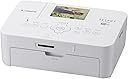
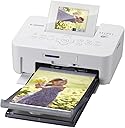
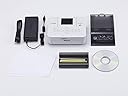
The Canon SELPHY CP900 is a compact, wireless dye-sublimation photo printer designed for on-the-go professionals and creatives. It prints vibrant, water-resistant 4x6 photos in just 47 seconds, with a built-in 2.7-inch tilt-up LCD for easy previewing. Compatible with iOS, Android, and PC devices, it offers seamless wireless printing and enhanced image optimization, all in a lightweight, portable form factor perfect for quick, high-quality prints wherever inspiration strikes.
| ASIN | B008FYGJ3A |
| Additional Printer Functions | Scan |
| B&W Pages per Minute | 20 ppm |
| Best Sellers Rank | #1,041,996 in Office Products ( See Top 100 in Office Products ) #272 in Desktop Photo Printers |
| Brand | Canon |
| Built-In Media | Printer |
| Color | White |
| Color Pages per Minute | 1.2 |
| Compatible Devices | Camera, PC, Smartphones, Tablets |
| Connectivity Technology | Wi-Fi |
| Control Method | App |
| Controller Type | iOS |
| Customer Reviews | 4.0 out of 5 stars 245 Reviews |
| Display Type | LCD |
| Dual-sided printing | Yes |
| Duplex | No |
| Global Trade Identification Number | 00138031459082 |
| Hardware Interface | USB |
| Initial Page Print Time | 50 seconds |
| Ink Color | Cyan, Magenta, Yellow, Black |
| Item Weight | 1.8 Pounds |
| Manufacturer | Canon Office Products |
| Maximum Copy Speed Black and White | 20 ppm |
| Maximum Media Size | 4 x 6 inch |
| Maximum Print Resolution Black and White | 300 x 300 |
| Maximum Sheet Capacity | 50 |
| Maximum print Resolution Color | 300 x 300 dpi |
| Model Name | CP900 |
| Model Number | CP900 |
| Model Series | CP |
| Number of Trays | 1 |
| Other Special Features of the Product | Network-Ready |
| Output sheet capacity | 20 |
| Paper Size | 4 inches |
| Print media | Glossy photo paper |
| Printer Connectivity Type | Wi-Fi |
| Printer Output Type | Color |
| Printer Type | Inkjet |
| Printing Technology | Inkjet |
| Resolution | 300 x 300 |
| Scanner Type | Photo, Portable |
| Series Number | 900 |
| Special Feature | Network-Ready |
| Specific Uses For Product | Photo, Office |
| Total Usb Ports | 1 |
| UPC | 013803145908 088020703613 138031459082 |
| Unit Count | 1.0 Count |
| Warranty Description | 1-year limited warranty.1-year toll-free technical phone support |
| Warranty Type | limited warranty |
R**K
fantastic small dye sub printing
wow! what a surprise and delight this printer has been. i am a long time user of dye sub printers for pictures. if you are looking to print out a few things here and there...or even have a crafty project...this is a great alternative to using a digital print house service. sometimes i just want to give my mom a few pictures of the kid, or make a card or a quick gift for a friend. this printer can more than meet those expectations. it is FAST! i am coming off of using a sony dye sub printer which was very slow, large and clunky. the tech has come a long way. i spent $300 on my original dye sub printer, now $63 for this pretty canon is unbelievable. also the canon replacement cartridge and papers are extremely reasonable. it comes to about .20ยข a print. you can print wirelessly over your network once you connect the printer and download the canon selphy app to your phone. easy. the only drawback to using your phone vs computer is that you can not adjust the size of the image to be printed. in other words, my square hipstagram pictures get chopped off. but the regular sized iphone pictures look just fine. so for the fancy square images or experimentations, best to stick with printing from the computer. but that said, wireless printing from mobile is flawless, fast and dead simple. did i mention it's pretty. it is. it is small and takes up hardly any space at all. i bought a white one. did i mention is quiet? it is. you could easily do some last minute, late night printing. i mentioned printing those retro-square images. you can easily do this when you plug the selphy into the computer using USB and using your iPhoto app, or the canon app. you pick the 4x6 /PAPER/ size and then you can select a preset for the /IMAGE/ size or create a custom size to fit the paper. for example, i print my hipstagram images at about 3.8x3.8 to the canon and then just trim the edges off. you can even make them slightly smaller and print 2 images to a page. i like to experiment this way making cards, so this is handy. bottom line: the images look very good. as most home-use printers, it's never going to be a full on replacement to the bigger services, but it's darn close. you can adjust using iPhoto or photoshop to warm the image and sharpen it a bit and then print. they look very good. again, this printer is a very good alternative to sending your prints out to a digital service. it probably won't take their place, but it sure is great in a pinch, or for crafts. heck, it's plenty fine for your photo album too. but i don't want to say it's a replacement for pro prints and obviously print sizes beyond 4x6.
K**2
Great for the price!
First off, this does not include the portable battery pack so make sure that you buy one separately if you are planning to use it outside or on the go. That said I'm really happy with this purchase. My husband and I tend to take a lot of photos with our iPhone/iPad and this printer is perfect. Pros: 1. It hooks up to the iPhone quick and easy. Just download the free app and quickly connect using adhoc feature (you don't even need wifi, but it connected to our wifi quickly as well.) 2. Great quality. Not excellent, but for taking a pic with your iPhone and then printing it instantly you really can't complain. I've even framed some of the pics. 3. Fast. It takes less than 20 secs from when I tell my phone to print to when the pic is ready. 4. Convenient. I love that it has the battery pack option (purchase separate) and I love being able to print quick pics for my friends if they come over and we take a couple pics of the kids. Cons: 1. My biggest complaint is that the ink cartridges don't last long at all. Maybe 8 pics. Although I print all pics on the highest quality setting. You could prob get more pics if you lower the quality setting. 2. You can't make a full sized 4x6 from an iPhone pic. This really is more of an iPhone issue because iPhone photos are not exactly compatible to that size. You can set it up so that it just make a small border though which is fine for me. You can make a full size pic if you work with it and have enough space around your main focus in the picture because it will crop quite a bit It also doesn't show you a preview on the printers screen when you are printing from the iPhone 3. It didn't come with the battery pack. I know I have mentioned this several times, but I was really bummed about this. Overall, I find this printer to be very useful and I recommend it to my friends
S**.
Prints great if you solve major compatibility issues
This printer is an awesome idea - very portable, so easy to print your own pictures at home whenever you want them and use them right away. In my experience, the print quality is comparable to that of prints you can get at Target/CVS/wherever you go to instantly print photos. When you work out the price of the paper and ink, it's also pretty much the same price per photo. You do have the up-front cost of the printer, but to me the convenience is worth it. One drawback is that, as others have said, you have to print 18 at a time (the number of ink sheets in a pack), because turning the printer off and on again wastes one ink sheet. This is annoying, but I usually print a bunch for Project Life, so I just make sure to have 18 ready to go. The main problem I have had is compatibility. The printer supposedly prints in 3 ways: 1) from your SD card that you can insert into a slot, 2) from your laptop when connected with a cable, and 3) from your phone via an app. Here is my experience with these 3 ways. 1) The printer will only print from an inserted SD card if the images are SOOC (straight out of camera) and not edited. I edit my photos, mainly to combine two 3x4 photos to print as one 4x6, and these absolutely will not print from inserting the SD card. 2) I have a Lenovo laptop running Windows 10 (previously had Windows 8 and have tried with both) and I absolutely cannot get the printer to print via my laptop. There is a free Canon program for the printer, but no matter what I do with the program or messing with settings and devices, my laptop says the printer is not connected. 3) The app worked great when I had an iPhone. I had a folder on my laptop that I synced to my phone via iTunes to print. However, then I got a Samsung phone (Galaxy S6), and although I followed the same steps, the app would not send my photos to print. I spent a long time troubleshooting and finally someone at Canon customer service told me to get a different app, not specifically for the Selphy printer, called Canon Print. This app does send my photos to print, but inexplicably, they are incredibly blurry. I am infuriated that I have this great piece of technology that I cannot use, and I have a bunch of ink sheets and photo paper that I bought in bulk that are being wasted. I will continue to pursue this issue with customer service and will post if I have a solution. tl;dr I am very happy with the printer itself and the print quality, but have only had luck printing via an iPhone, which I no longer have, so I cannot currently use this printer. UPDATE! Jan. 2019: When I got a new phone (Samsung Galaxy S8) I tried to print from my phone and it works!!! The app is called Canon PRINT Inkjet/SELPHY. I have found the easiest way (for me) is to upload 18 photos at a time to a folder in my Google Drive and connect the app to my Google account. You can also select photos from your phone gallery, but I can't figure out a way to choose a folder (for example, if I mark them all as favorites, it would be easy to open the favorites folder and select them all instead of having to scroll to find them). Changing from 3 to 4 stars because I believe compatability has improved (but it could be just my specific experience). Hope this helps someone with an Android phone! I am still very happy with the printer (now that I can use it again)!
T**K
Product not quite developed
This has got to be the most aggravating product I have purchased in a long time. This product advertises that it can print from a smart phone. The problem is the software that allows for this does not exist yet. I installed the Canon Easyprint App on my Samsung phone, but it is not compatible with the printer. The instruction manual that came with the printer says check the Canon web site for the App. However, the Canon web site says use the EasyPrint App, but the App does not list the printer as being compatible. In fine print on the Canon web site it says the printer is compatible with the Easyprint App, but the updated version for Android will not be available until "December 2012, or later" As for the rest of the unit, Canon really cheapened out over the previous unit. While the CP800 is slightly larger, it allowed you to print from multiple sized cards. If you have a Canon DSLR that uses Compact Flash Cards then this printer will be useless for you. It only accepts SD cards. In summary, if you plan to use this with a smartphone don't buy it. Maybe the iphone will work, but my Samsung phone won't. If you have CF cards it won't work for either. Don't even think of using a usb adapter card because Canon designed the unit to refuse the adapters.
K**U
Great little printer
I bought this printer for my craft room so I can print out pictures at my convenience for use in my Smash books. So far I have printed about 20 photos, and I am pleased with the results. It was easy to load the app and use it to connect to the printer. That being said, I've had a couple of minor difficulties. The printer didn't find my regular account on my wireless router, but found my guest network. Basically, this means that I have to switch my wifi from my regular account to my guest account in the settings on my iPhone before the phone can connect to the printer wirelessly. Also, after submitting a photo (or group of photos), I have to completely close out of the app and reopen it again to send the next selection of photos to print. This was frustrating at first when I couldn't figure out why my phone and the printer weren't communicating. These being the biggest issues I've had, I still gave the product 5 stars because these things take me seconds to do and I still get great photos printed easily at home. As far as photo quality, I think it's great. The photos are crisp and clear. I love that there is no drying time like with an ink jet printer. It's very cool watching the printing process and seeing each color get laid down. If you are printing sensitive photos, you have to decide how to dispose of the ink roller because there is an exact negative of your photo left behind as the ink is used. You can't burn it because the ink is heat reactive, so other disposal options are necessary. You also get the exact number of photos it says on the refill packaging - there is no "leftover" ink. Prints cost about 27 cents each. This means I'll still be going to Costco for large orders of prints, but for those few I need right now...this is the printer for me.
C**E
Very limited WiFi functionality.
The main advantage of this product over the CP800 is the WiFi support. If you want to print from a smartphone (I used Android) then you are in luck. The application is simple and intuitive and with Android you can send the image from any application using the Share feature. However, if you are using a recent model Mac (7.5 and higher) or Windows 8 than forget about the WiFi. You need to connect a cable just like the EP800. Canon's support of this printer is disappointing. Other problems 1. Very bulky external power adapter. 2. Paper tray is large and is external to the printer. 3. The Selphy printers print great until the head gets damager. From that point you get a horizontal (landsacpe) line on each print. Pros 1. Good print quality. 2. Ink does not dry (compare to Epson's ink jet technology) 3. Water proof and smudge free (try it, print a photo and place it in a glass of water. The print stays intact). I would like to give it 5 stars but dropping one start from the non working WiFi and one start for the low reliability of Selphy printing heads.
J**Z
Excellent for the purpose
My mother-in-law, who is 92, just bought a digital camera. She knows how to use the kiosks in the local stores, but we thought she would want to be able to print pictures at home. This printer is ideal. It is tiny: smaller than a shoebox, by quite a bit. If you look at the picture, bear in mind that the photo it is ejecting is 4x6; that gives you a sense of scale. The output was amazing. I don't know how accurate the color reproduction is, because I didn't get to play with the originals on the SD card, but the pictures certainly looked nice. (I'm the only one in the family who might care about color calibration.) The LCD display is reasonably large for such a tiny machine, and it has a number of ways to manually adjust the images but we didn't try any of them. It does red-eye and lighting correction automatically. We wanted this to be plug-and-play, and that's the way we used it. We didn't try the built in Wi-Fi, for much the same reason. You can buy a battery pack for the printer if you want instant gratification when you're on the road. The "ink" system is interesting. You buy an ink/paper set (Canon KP-108IN, 108 pages) and it comes with cartridges (almost like toner cartridges) that deliver precisely that amount of dye. There's no running out of ink in the middle of a picture: the ink and the paper run out at the same time, every time. This is not a printer for the picky photography buff who wants to tinker with each picture for hours, but for someone who just wants to get the gol-darned picture out of their camera and onto paper it is an excellent choice. Add the optional battery and you have the closest thing you can get to an old Polaroid instant camera, but the results will be vastly superior. At current prices the cost per picture is about $0.27.
I**E
Dye sublimination ROCKS!
For an affordable per-print cost of $0.28-$0.34 this is an outstanding little printer! Prints look and feel like what you get commercially made at photo retailers (4x6 borderless size only). The finish is a clear coat that is smudge and moisture resistant and is instantly dry to the touch. No dots or banding that you sometimes see from ink jet or color laser style printing. Dye-sub uses RIBBON to distribute the color in a smooth 4-pass system. First pass is yellow, second is magenta, third is cyan and fourth is clear coat. Takes approximately 45 seconds to produce a single print. So, it is NOT fast, but the prints make ink jet or laser prints look amateurish and vulnerable to moisture and smearing. If you don't want or need photos larger than 4x6 this is the way to go. Be forewarned, DUST is the enemy of dye sub technology. So, keep the paper tray in a zip lock bag when not printing and keep the whole unit out of dusty environments. The printer can be connected by USB cable or accessed via WiFi for cordless printing for direct printing from an iPhone, iPad or other smartphone or tablet device with WiFi capability. And with a retail price under $100 it is quite affordable (sometime sales have it in the $75 range). Each package of paper and ink ribbon cartridge can print 36 prints and are sold in sets of three for a total of 108 prints per box. All-in-all a VERY nice printer with outstanding results.
M**E
Brilliant
nifty little machine, does great photos and you can play around with the sizing, and with it being wifi makes life so easy.
D**N
... than anticipated when you want to print but overall good product with good quality prints
a little more set up than anticipated when you want to print but overall good product with good quality prints.
T**S
Four Stars
Very easy to use and prints great pictures.
R**.
canon selphy
We had a canon selphy before so we knew what was coming so no surprise. very pleased. Reason we needed a new one is because the old one started to miss feeding the paper and canon wanted $75.00 to service it.
S**Y
Five Stars
Absolutely love this. So convenient.
Trustpilot
2 weeks ago
5 days ago