


Desertcart purchases this item on your behalf and handles shipping, customs, and support to South Africa.
โ๏ธ Stay cool, stay aheadโbecause your CPU deserves the best chill.
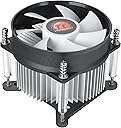
The Thermaltake Gravity i2 is a compact, low-profile 92mm CPU cooler optimized for low-power Intel processors. Delivering 31.34 CFM airflow at a whisper-quiet 21.3 dB noise level, it supports a wide range of Intel LGA sockets (1200/1156/1155/1150/1151) and offers easy installation with included mounting hardware. Designed for efficient cooling in sleek desktop builds, it operates at up to 95W power and comes with a 2-year warranty for reliable performance.


| ASIN | B00O4UIZ86 |
| Air Flow Capacity | 31.34 cfm |
| Best Sellers Rank | #73 in Computer CPU Cooling Fans |
| Brand | Thermaltake |
| Brand Name | Thermaltake |
| Compatible Devices | Desktop |
| Cooling Method | Fan |
| Customer Reviews | 4.6 out of 5 stars 2,403 Reviews |
| Global Trade Identification Number | 00841163056608 |
| Included Components | Air Cooler, Brackets, Screws, User Manual |
| Item Dimensions L x W x H | 4.25"L x 4"W x 4.25"H |
| Item Weight | 11.36 ounces |
| Manufacturer | Thermaltake |
| Material Type | Aluminum |
| Maximum Rotational Speed | 2500 rpm |
| Model | CLP0556-D |
| Noise Level | 21.3 db |
| Number of Items | 1 |
| Number of Packs | 1 |
| Part Number | CLP0556-D |
| Power Connector Type | 3-Pin |
| Product Dimensions | 4.25"L x 4"W x 4.25"H |
| UPC | 841163056608 |
| Unit Count | 1 Count |
| Voltage | 12 volts |
| Warranty Description | 2 years |
| Wattage | 95 watts |
B**T
Great Cooler for the Money!
If you need a great, basic cooler for your Intel chip thatโs slightly better than the default cooler, look no further! Make sure you check to ensure your motherboard/processor are < 95W (so most of the relevant intel chips) and are one of the compatible sockets (again, most recent sockets) - once you do that, this CPU cooler is easy to install (install the backplate then screw in the 4 screws and plug in the fan header. Done. Couple of quick notes - first, this does use a backplate (unlike the push-pin based default included cooler) which means youโll need to access the back of your motherboard. Not an issue if youโre installing a new motherboard in a new case, but if youโre replacing an existing cooler in a complete build, you may have to remove the motherboard if you donโt have access to the back of the board in the case. I actually like this as the install is much more secure that the push pins - and you know you have the right tension - but it is something to be aware of. Second, this does have pre-applied thermal paste which makes it easy to use. The thermal paste seems to be of reasonable quality and is well applied - I used it as is for the initial install, but ended up moving the chip to new board and having to use my own. Expected and no issues - but if youโre looking for a bit more performance, you might want to think about changing the paste. If youโre running stock clocks and not running at max all the time, the included paste should be just fine. Third and final consideration - this is not a cooler for overclockers. It can probably handle a minimal overclock - but itโs really designed to be cool and reasonably quiet at stock settings, voltages and the like and it does well at that. With those considerations out of the way, if you have a compatible chip and donโt mind the above caveats, this is a great cooler and highly recommend!
B**L
I recommend this one. Thermaltake hits another home run.
All I can say is once this is installed it will last forever. If you do not have threaded holes in your motherboard you'll have to remove your motherboard and install the circuit board nuts. You'll only have to do this once. This is a really well made CPU cooler and well worth the price. 1/23/2026 I have ordered a second one. This one is installed in a Dell Optiplex 7060 tower and fits perfectly. It is twice the size of the Dell cooler. I am well satisfied with the performance of these CPU coolers.
E**C
Best Bang For Your Buck, Solid And Inexpensive
Just some background, I have little experience working on my computer, so I was nervous going into this. Thankfully it was easy to install, and thermal paste is already applied on the bottom of the cooler. I was lazy to clean it off and use arctic silver, but if temps start to run high I may replace the stock paste. When installing the cooler, you have to hold the bracket in place on the backside of the motherboard while screwing the cooler in from the front. It's nowhere near as complex as the Hyper 212 (it looks complicated) so I'm thankful for that. I have the i5-3570k with a relatively small case with 2 case fans (1 in, 1 ex) and a GTX 760. I was running Intel's stock cooler and the highest I've gotten on stock settings (not planning to OC) was 79C (100% load), which was too high my for liking. With the Gravity i2, 66C (100% load) is the highest so far, so it dropped 13C which is much better. On average it's about 11C cooler (around 75% load) which works for me as the Gravity i2 is only a $12 upgrade, and for that price it's a great value, or the best bang for your buck as they say. I was going to get the Hyper 212, but my case was too small and so this is an excellent alternative. I'm extremely thankful and happy for this cooler. Thank you Thermaltake for a solid, inexpensive product.
V**.
Cheap, decent cooling, and it looks alright
I bought this for the cheapest stream PC out of old parts my siblings and I had laying around. Well it so happens to be the only thing we didn't have was a cooler with the appropriate bracketry for the LGA 1155 socket. So I resorted for for this unit! For under $15 it keeps an overclocked I7 3770K at 4.4ghz 1.2 volts under 95C in 29C/90F ambient temps on a 30 minute Cinebench R23 run. It does exactly everything we need but now the CPU is now too slow for the load we're throwing at it LOL! Not the coolers fault at all in that case and of course is the reason I threw a mild overclock at it. Now what I don't like is how it has a 3 pin fan connector. The ASRock P67 Extreme does not have a way to control DC powered fans. So the fans are on full blast in the case. Spins around 2200 RPM and isn't great to be next to. Thankfully in my case I am using Windows remote desktop and running headless so the PC can be on the common area. Keeps my room nice and quiet! The mounting bracket is kind of a pain in the arse but now that I think about it, if you have a case that has an opening on the back of the motherboard tray, you can try setting up a pillow or small box behind the pc and laying it down. I did it with the PC standing upwards which wasn't enjoyable. Nonetheless for the money, I am happy and the PC stays cool during 6 plus hour streams. PC Specs: ASRock P67 Extreme Intel i7 3770k 4.4Ghz @ 1.2v 16gb DDR3 @ 1600Mhz GTX 1060 6gb Fractal Meshify C mid-tower case
A**R
Dropped Average CPU temp ~ 20 degrees celsius
The CPU fan in my computer started growling a few days ago, a sure sign it was on its last legs. The program "Speccy", (great app for looking under the hood of your computer), informed my my average CPU temp was ~ 60 degrees celsius. I learned several things in my quest to replace my cpu fan. 1st, the motherboard has a number fairly prominently displayed. That number is used to find the correct cpu fan, they are apparently not interchangeable. There are both 3 and 4 pin fan plugs. Check which you have before purchasing a new fan. The way the fan was attached to the motherboard was not readily apparent to this non-geek. I watched a youtube video that indicated push-pins. The new fan used screws. It was hard for me to see exactly how the old fan attached. I reached into the tiny space around the head of what appeared to be the fastener. Unlike the video I watched, these were push-pins, but they did not have a tab sticking up, they were flat. My fingers quickly discovered that they were in fact push-pins and pulled up easily. The new fan uses screws instead of pushpins. Again, to this non-savey, non-geek, it was not readily apparent that the mounting plate provided with the fan had to go on the backside of the motherboard. Fortunately, both sides of my tower case come off and the motherboards backside was readily accessible. Once I discovered that, the installation went quickly and smoothly. The fan comes with heat paste pre-installed. There is no need to lift the bracket that holds the cpu in place. I did, while trying to figure out how the new fan attached, with the cpu clamp unfastened, I inadvertently removed the cpu. My stress level instantly went sky-high. There was two tiny indentations, barely discernible, that insures proper orientation. Whew!! Anyway, the new fan installed easily once I made all of these discoveries. I sweated a little when I turned the computer on... did I get the cpu re-installed correctly? The computer booted up flawlessly. Speccy now informed me that my cpu temp had gone from averaging around 58 - 65 degrees celsius (with little load), down to 32 - 42 degrees celsius. I am very pleased. I took on this daunting project because I live in a very rural community, Ocean Shores, Wa. The nearest city, Aberdeen is 35 minutes away and Olympia (the big city) is an hour plus. Good computer techs are great. Sadly, it is very hard to find one who is both competent and affordable. Changing the cpu fan was daunting, but easily do-able by anyone with moderate mechanical skills. Hope this review helps another non-techie.
J**N
Quiet, Thermal paste pre-applied, Easy Install
Great heat sync and fan! I was thinking it was going to be noisy because itโs a 3-pin, but surprisingly itโs not! It came with thermal paste pre-applied (Great to know because I didnโt need any extra or to apply any at all). Installation took about 5-10 minutes, fits perfectly into the bracket. Solid price for the product, hoping it lasts until 2030.
M**O
This thing is amazing for the price and performance.
I've built about 80-100 computers in the last 30 years. I've used dozens of different air coolers over stock. With the exception of some high performance zalmans in Oc'd computers, I have to rate this as exceptional for the cost and performance of an air cooler. I mean I have put in $60-$80 air coolers for pretty typical computers that were only ok, heavy and loud. I did not over burden this cooler by overclocking. But seriously, $9, you wouldn't be looking here - but if your are in between - I'd buy it again with zero reservations. If you want even more quiet buy an adapter to reduce voltage for a couple dollars. I only bought this one because I bought a i9700k without a cooler and a Corsair H100i pro radiator cooler. The Corsair was not installing properly to the point I was ready to return it. I bought the Thermaltake cooler as a stop gap to get the computer running, loaded and then troubleshoot the Corsair. I think it took me only a few minutes from unboxing to booting. I was nervous and monitored temps in bios, they were in low 30's degC. I had the case open in my face and it was a bit louder (but not bad) than my silent case fans so I installed an adapter to drop voltage to 7V to lower noise while I was working on software. The temps never rose even with the reduced fan speed and now really quiet cooler. I can't say how impressed i am with a cooler that costs so little, is of high quality and is really pretty quiet. For me it was a stop gap until I go my Corsair water system running ( I did and well it's amazing but still) I'd never buy a stock intel cooler again. I did an i3 HTPC build not long ago and figured the stock would be good enough. Well, I'm pulling the stock cooler and replacing with this because I KNOW it will out perform it for the same sound level.
K**O
Not Bad - Not Great
The good: Keeps a i7-4790 @full 84w around 65C (24C ambient) The bad: 3 Pin, runs @2150 rpm constantly, a bit noisy if computer is ide. 4 Pin with PWM ist a must if your mainboard id gen2 or newer (2013-to today) because they cant control speed on the CPU fan.
F**.
El mejor por el precio
Tengo este disipador desde hace unas semanas montado en un i7-2600, las temperaturas comparadas con el de stock realmente no han mejorado mucho, siguen siendo las mismas cuando esta en reposo pero cuando le meto un poco de estres tarda mas en llegar a su punto mas caliente. Aqui el detalle por el que le doy las 5 estrellas es por la cuestion del sonido, el disipador de stock hacia mucho ruido cuando tenia una alta carga de trabajo y este thermaltake no hace absolutamente nada de ruido manteniendo la misma eficiencia, un punto a considerar si quieres tu setup lo mas silencioso posible, ademas de el costo (Que realmente es muy bueno) y ni hablar de los materiales y acabado, es elegante, bueno y eficiente, no le hace falta el rgb para verse bien. El unico pero que le puedes poner es que no es PWM, pero con los resultados que te da, no te importara mucho. Si tu procesador tiene un TDP menor a 95w, es una opcion que debes considerar, creo yo que es el mejor costo-beneficio.
A**R
Easier to install
I bought this Thermaltake Gravity heatsink fan for my CPU long ago for my LGA 1155 motherboard, but recently needed to buy another one for my other LGA 1155 motherboard. The Thermaltake heatsink fan works good. Definitely quiet. It replaces my other heatsink fan(Intel) that uses those plastic knobs that requires turning counter-clockwise followed by forcibly pulling up those knobs to remove the heatsink fan from the motherboard. Well, in my case, those knobs(or whatever they're called) got stuck, likely due to wear-and-tear and age, and I almost physically broke my motherboard in the process of removing that Intel heatsink fan. With this Thermaltake heatsink fan, I don't have to worry about using any physical pulling force because it uses plain screws to keep the heatsink fan in place on the motherboard. The only negative about this heatsink fan is that you need access to the other side of the motherboard to secure it in place using the plate it comes with for reinforcing the heatsink fan to the motherboard. I prefer to use a screwdriver to secure and to unsecure the heatsink fan, so this product is a good fit for my needs. I have a second Thermaltake Gravity arriving soon to replace a broken heatsink fan(also Intel) on my other LGA 1155 motherboard, which broke because it got so stuck(despite properly turning counter-clockwise and pulling up each knob) that I had to physically to rip it off my motherboard with so much force that the plastic knobs shattered, thus needing to replace it. I have expectations that the Thermaltake Gravity(both the one I'm currently using and the one that is arriving soon) will last much longer than my previous heatsink fan(Intel), and I don't think I will be disappointed.
ใ**ใ
็ดๆญฃใใใใใใใใฎใฏ้้ใใชใใ
็ดๆญฃใฎCPUๅทๅดใใกใณใไฝฟใฃใฆใใพใใใใ7ๅนด้ใกใณใใใณในใใฆใใชใใฃใใใใซใๆใใใชใตใผใใใผใใฃใผๆงใฎๆฌ่ฃฝๅใ่ณผๅ ฅใใพใใใไบคๆใฏใฝใฑใใใใณใใผใ้้ใใชใใใใซใปใฌใฏใใ็ฐกๅใซใงใใพใใใใใใใ็บ้ๆใซใคใใใใใ็ฎฑใฎๅทใๆฐใซใชใๅไปใซๅใๆใใฃใใจใใใงใใฝใฑใใใใณ4ๆฌใฎใใก1ๆฌใๆฒใใฃใฆใใใฎใงใใณใใงไฟฎๆญฃใใฆไฝฟใใพใใใๅทๅดๆง่ฝใฏใใกใณใฎ้ณใใใใใๅๅนๆใใใใใใงใใใ้้ใใชใ้ณใฏๅคงใใใชใฃใใฎใงใ็ดๆญฃใฎ้ณใฎๅคงใใใ็ฅใฃใฆใใๆนใใพใใฏ้ใใชใใกใณใๆฑใใฆใใๆนใซใฏใๅงใใงใใพใใใ
S**F
Good
Good.
W**E
Great
Just as in pic
Trustpilot
2 days ago
2 weeks ago