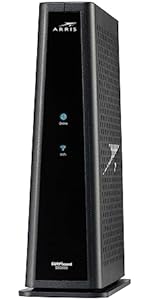
![ARRIS (SBG7600AC2) - Cable Modem Router Combo - DOCSIS 3.0 & AC2350 WiFi, [Check with your provider for compatibility]Four 1 Gbps Ports , 800 Mbps Max Internet Speeds](https://m.media-amazon.com/images/I/81n2+RSpTzL._AC_SL3840_.jpg)


Buy anything from 5,000+ international stores. One checkout price. No surprise fees. Join 2M+ shoppers on Desertcart.
Desertcart purchases this item on your behalf and handles shipping, customs, and support to South Africa.
🚀 Upgrade your home network — because buffering is so last decade!
The ARRIS SURFboard SBG7600AC2 is a DOCSIS 3.0 cable modem and AC2350 dual-band WiFi router combo designed for U.S. cable providers. It supports internet speeds up to 800 Mbps, features four 1 Gbps Ethernet ports, and offers easy app-based setup with parental controls. Ideal for professionals seeking reliable, fast home connectivity while saving on rental fees, it combines trusted ARRIS technology with broad compatibility and solid performance.


| ASIN | B07H4VJHB9 |
| Antenna Location | Business, Gaming, Home |
| Antenna Type | Internal |
| Best Sellers Rank | #7,567 in Electronics ( See Top 100 in Electronics ) #24 in Modem Router Combos |
| Brand | ARRIS |
| Built-In Media | And 2-Year Warranty Card, Arris Surfboard Sbg7600Ac2 Cable Modem, Power Supply, Quick-Start Guide |
| Color | Black |
| Compatible Devices | Personal Computer, Laptop, Gaming Console, Smartphone, Smart Thermostat, Smart Television, Tablet, Printer, Security Camera Compatible Devices Personal Computer, Laptop, Gaming Console, Smartphone, Smart Thermostat, Smart Television, Tablet, Printer, Security Camera See more |
| Connectivity Protocol | DOCSIS, Wi-Fi |
| Connectivity Range | 2200 Square Feet |
| Connectivity Technology | Ethernet |
| Control Method | App |
| Controller Type | App Control |
| Coverage | 2,200 sq ft |
| Customer Reviews | 3.9 out of 5 stars 5,702 Reviews |
| Data Transfer Rate | 2350 Megabits Per Second |
| Frequency | 2.4 GHz |
| Frequency Band Class | Dual-Band |
| Global Trade Identification Number | 00612572215418 |
| Has Internet Connectivity | Yes |
| Has Security Updates | Yes |
| Is Modem Compatible | Yes |
| Item Dimensions L x W x H | 9.72"L x 4.06"W x 9.5"H |
| Item Type Name | Cable Modem & Wi-Fi Router |
| Item Weight | 2.64 Pounds |
| LAN Port Bandwidth | 1000 Mbps |
| Manufacturer | CommScope |
| Maximum Upstream Data Transfer Rate | 304 Megabits Per Second |
| Mfr Part Number | SBG7600AC2 |
| Model Name | Surfboard |
| Model Number | SBG7600AC2 |
| Number of Ports | 4 |
| Operating System | Linux |
| Other Special Features of the Product | Access Point Mode, Parental Control |
| Router Firewall Security Level | Basic |
| Router Network Type | cable |
| Security Protocol | WPA2-PSK |
| Special Feature | Access Point Mode, Parental Control |
| UPC | 612572215418 |
| Unit Count | 1.0 Count |
| Voltage | 115 Volts |
| Warranty Description | 2 years |
| Wireless Communication Standard | 802.11ac |
| Wireless Compability | 802.11ac |
S**D
Great product
Great product. Ethernet speeds on the 2.5g port is great and wifi speeds are good too. Doesn't create too much heat. Some people I've noticed say they are dropping signal constantly on other reviews and here's what I would recommend doing on the ip4 setting when you are logged into your router. For some reason arris has the DHCP scan at every hour as it can drop signal while doing so. Ip6 is defaulted at once a week. Change the ip4 setting to once a week as well and that should help. Once an hour which is default setting on this would be good for like guest wifi at restaurants and coffee shops but is not necessary at your home. I originally purchased the G54 as it is a monster of a modem/router combo but it had a faulty coax jack and had to return and chose the G36 as the G54 was just overkill for me. Don't let the others fool you. Arris DOES make good product.
F**K
Theft with your cable supplier before purchase
This cable modem would not connect to my security system, streaming tv, and leak detectors. I will be returning this item.
J**F
CAVEAT EMPTOR! This thing is BASIC!
I was originally impressed with this product, because what it does, it does well. If you connect to it (directly) and have fast Internet service, it's quick, and very easy to set up and activate, IF you have an iOS or Android device with cell service. Good luck otherwise. The Family controls don't work well AT ALL. Especially now that Apple devices use private MAC addresses. Plus the interface is awfully slow. Also - the support is REALLY hard to get a hold of. You can't email them. Live chat is almost never online. So you have wait on hold. Fortunately, it's not usually more than 10 minutes. That being said, there is a real show-stopper with this device. From day 1, I had a hard time getting it to work with my 2.5GB desktop switch. Usually, I can't even get a DHCP address - or if I do, I get 80-90% packet loss. If I hook up the switch through the 1GB ports, it's fine. But the 2.5GB is unusable. I swapped out the modem, but the new one was still having the same issue. So I swapped out the switch. Same issue! Since, at the time, I only had the switch as a 2.5GB device, I couldn't really test anything else. Flash forward 2 months, and I got a new computer, with a 2.5GB NIC. The modem works fine directly plugged into my computer, but with the switch - unusable. I made another call to Arris support, and the tier 1 guy is like: yeah - sorry - these don't handle switches on the 2.5GB very well. I asked if there was a fix, and he said he'd get me to the next level of support. Still waiting to hear back, an hour later. It would have been good to know that when I had trouble on day 1! Before I spent $10 shipping the switch in to be replaced, when nothing was wrong with it! Bottom line: caveat emptor! If you only have 1 thing to hook up at 2.5GB, this thing will do the trick. But if you have an actual network, and you want to use the 2.5GB port, this is not going to do it for you. Get something else. I am now waiting for a refund or firmware update. I'll edit the review with the results. Easter 2022 update: Return was refused because it's been so long. Still no firmware update, and tech support took days to get back to me. I'm stuck with this thing. If you have more than one 2.5GB device, don't get this modem! December 2022 update: The device started dropping the cable connection. Arris forced me to have the cable company come out to verify the cable (which cost me $20) before they would swap it out. FURTHER - there is no way to update the firmware on this P.O.S. Arris says the DOCSIS protocol won't allow them to allow ME - the owner of the modem - to update the firmware: only the cable company can. Cable company says that's hogwash, and they can't update firmware on MY modem. A year later, and I *still* completely regret buying this device, and feel totally ripped off. DON'T DO IT!
H**N
First impression - Not a bad purchase
First off, it was super easy to install. I unplugged my old modem/ router combo that COX provided and plugged this one in. The system booted up and my computer recognizes the internet almost immediately. The only downside was trying to get COX to register the unit. I provided them will all be info and they said 30 minutes. It ended up taking over 2 hours on chat with them to get it squared and in their system for activation. Pro: Easy to install and the setup UI system is straight forward and makes configuring it a breeze. Connecting directly to the router itself is actually providing faster speeds than what I’m currently told I will get by my ISP. Can’t complain there. A con I’m seeing so far with this is the WiFi. It supports 2.4g/ 5g - i have my television in the living room downstairs right below where the router is and the signal strength is “marginal”. The speeds at 2.4g are quite slow given what my ISP provides. Good thing I don’t really need WiFi outside of small items in my home. I’m giving this a 4 as its easy to install and configure. I’ll update again once I’ve had more time with it.
K**.
Great product
I’ve been using the ARRIS SBG7600AC2 for just over a month now, and I can confidently say—it worked great from the moment I set it up. This all-in-one cable modem and router combo has been a solid upgrade for my home network. Installation was straightforward, and it synced with my Xfinity service without a hitch. Within minutes, I was up and running with fast, stable internet. The DOCSIS 3.0 modem technology combined with AC2350 dual-band WiFi gives me reliable speeds throughout my home. Streaming, gaming, video conferencing—everything runs smoothly, even with multiple devices connected at once. I consistently get speeds near the 800 Mbps max (as advertised), which is impressive for a device in this price range. The four 1 Gbps Ethernet ports are a great bonus, giving me flexibility for wired connections to my desktop, gaming console, and smart TV. It’s also great not having to pay monthly rental fees for ISP equipment anymore. Overall, this is a dependable, high-performing modem/router combo that delivers fast internet speeds and wide WiFi coverage. If you’re looking to simplify your setup while boosting your home network performance, the ARRIS SBG7600AC2 is absolutely worth considering.
A**R
Works on Shentel Internet
This modem/wifi combo works on Shentel fios with cable connections. Easy to set up and smart phones are connecting better.
H**E
Xfinity couldn't activate - probably not the fault of the modem
I had to rate this modem in order to post my comments, so I have no user experience with this combo modem, so I gave it 5 stars all around. I chose the Arris product because it uses less power and generates less heat than comparable Netgear and Motorola combo modems. I purchased two of these open box/refurbished combo modems, and had to return both of them. I don't think this was the fault of the modem combo, and probably, they were all functional. It's likely that the issue with these modems is that they had been previously activated with an ISP. What I eventually learned was that in order to have a previously activated modem reactivated, it needs to be "released" from the account of the original user, and this can only be done by that account holder. Xfinity clearly knew this but never revealed this to me. After seven trips to the Xfinity store attempting to activate four different modems combos, I watched an Xfinity rep search a modem database by modem serial number when I went in to the Xfinity store to activate my brand new modem combo. That's when I learned that every modem activated by anyone appears in a database (shared among the various ISP's), which shows the ISP that originally activated this modem, and if it has been released by it's previous owner. Perhaps Amazon doesn't know this. Several Xfinity reps (both in the store and on the phone) concealed this important fact from me, probably in attempt to rent me one for $15/ month. I finally bought a new modem combo (for quite a bit more money). Because it was new and had never been activated previously I was able to activate it without a hitch. Here's another interesting fact I came across. In addition to the modem combos, I was unsuccessful in activating a modem that I had previously used with another Xfinity account. I was eventually told that in order to use this modem with another Xfinity account, it had to be released from the old Xfinity account in order to activate it on my new account.
C**R
0 STARS. Wi fi speeds of 1 mb/s great product..Ethernet connection been fine. Scam product.
Step1. Connected Ethernet cable to the Desktop. Wifi network was not working/available off the get go. Step 2. All i had to do, after researching internet, is to manually type in the Desktop's browser on Desktop 192.168.0.1 and then login onto device and just save information, and magically Wifi network appeared available and started working. Feedback of wasted 2 hours: just like everything one else i got frustrated with 3 different apps neither of which had worked or were helpful. Useless Xfinity installer and support were giving trash feedback saying software on the G36 device needed to be updated and i had to contact the manufacturer. And this is Day 1. My return deadline is June 26th, if i experience any connection drops like other customers i am returning this in a heartbeat. Headache by design from Comcast like this is not worth saving 15 bucks a month on a rental. I wish i had experienced joy from this purchase like in the old days before getting fleeced by corporation Additional feedback after 12 months of use: wi fi speeds are atrocious so something is wrong with router or software, which i found impossible to correct and there is zero actual customer support besides Amazon reviews from other customers. If you buy this after all the reviews, you might as well set your money on fire now and save yourself some headache My experience basically echoes this customer. I purchased this modem on the advice of my ISP to increase my internet speed. Right from the beginning, I had issues with the WIFI portion of the device. Because the cell service in my new home was also issues, I made the wrong assumption that my WIFI would be the same, so I lived with the issue for a few months. I finally purchased some ethernet cables to plug my devices directly into. The speeds were where they should be. Plugged in, my download speeds were in the 600 – 900 mbps range. Using the Wifi, my speeds were in the 1 – 40 mbps. I see there is a problem now. I have attached pictures showing speeds when plugged in and on WIFI I contacted my ISP and they came to my home for some analysis. The tech who was here believed the modem was good, but the router was defective and needs to be replaced. He recommended I contact Arris to verify his findings. I contacted them and spent 90 minutes on a live chat session. At the end the agent recommended, I contact my ISP to have the modem reprovisioned, which is a fancy word for downloading updated firmware. After that was done, I checked again and no changes to the issue. I contacted Arris again, after 40 minutes on a chat with the tech, he ran out of ideas and told me I needed to call and discuss with a live agent on the phone. If the tech could not find any issues, then maybe they would replace the modem/router. When I called Arris with a phone call, I spent another 30 minutes with a tech. Low and behold, the tech finally found another issue that they could deflect yet again, sending me a new modem. I finally concluded that Arris was going to do whatever they could to not send me a new modem. Thank you, Arris, for the stellar customer service. In the end, I decided to eat the $300+ I paid for the product and purchase another modem/router. I am a prime member but let the date elapse to return the modem for a refund without a hassle. Live and learn. Lesson here. If you purchase this product and you have any doubt there is an issue, send it back for a refund. The problem is that you need to purchase a new modem/router before you can send the old one back, if you do not want to be without internet service for at least a few days. Plan ahead and do not get stuck and frustrated like I did.
Trustpilot
2 weeks ago
2 weeks ago