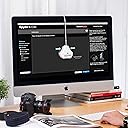
🎯 Nail your true colors, every time — because your vision deserves precision.
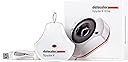
The Datacolor Spyder X Elite is a cutting-edge monitor calibration tool designed for professional photographers and motion imagemakers. Featuring a groundbreaking lens-based color engine, it delivers rapid, highly accurate color calibration in under two minutes. With multi-monitor and projector matching, room-light monitoring, and an intuitive interface, it ensures your displays reflect true-to-life colors for flawless creative work. SpyderProof functionality offers instant before-and-after comparisons, making it the fastest, most precise, and user-friendly calibration solution on the market.


| ASIN | B0076A620Y |
| Battery Description | battery not included |
| Best Sellers Rank | #213,785 in Electronics ( See Top 100 in Electronics ) #698 in Motion Detectors (Electronics) |
| Brand | datacolor |
| Built-In Media | Calibration Tool |
| Color | White |
| Compatible Devices | Desktop |
| Customer Reviews | 4.4 out of 5 stars 1,376 Reviews |
| Global Trade Identification Number | 00875720001510 |
| Item Type Name | Color Calibrator |
| Item Weight | 290 g |
| Manufacturer | Datacolor |
| Manufacturer Warranty Description | 1 year manufacturer |
| Mfr Part Number | SXE100 |
| Model Number | SXE100 |
| Mounting Type | Ceiling Mount |
| Number of Items | 1 |
| Power Source | Corded Electric |
| UPC | 875720001510 |
| Unit Count | 1 Count |
S**P
So thats what the true color is?
Does exactly as is billed. Needed to color adjust 2 laptops, one of which is about 10 years old. This older model just would not allow me to see or adjust the real colors is video or photos. I mean the colors were WAY off. This device is easy to use, by just following along as instructed through the guided calibration process. Walla!!!! Finally true colors and great calibration results. One thing I would change/suggest during the calibration process is for the software to identify your exact details of the computers graphic card with the recommended settings or allow the user to select or use alternate settings if they choose to. Highly recommended.
I**X
Is Good & Easy To Use
Installing the software and doing the calibration was easy and quick. I did look up some info on calibrating my screen before-hand which helped, and also informed me about the drawbacks of screen calibration. Such as how the color shift might look strange at first and the brightness of you screen might need to be taken down. Personally, I kept my screen brightness up intentionally, but the calibrations to the color didn't take very long to get used to at all, and it's a serious peace of mind to know that my photos and videos will be a lot more consistent when viewed out in the world.
D**J
Works fine on Windows 10
Well after reading reviews with varying degrees of good and bad things said about it, I decided to take the plunge and order one, in this case the SpyderX Elite. installation was painless and consisted of downloading the install program from a link included in the box, then running the install program, and lastly plugging the SpyderX in. the calibration program worked fine, but in order to get the most out of it you'll definitely need to spend some time with it. I've dual monitors, one an HP and one a Samsung, and for the first time ever the two actually look pretty close to each other after calibration. not identical by any means but way better that what it was before I started. The calibration process is going to take some time for anyone to get the most out of it. the best results was obtained by resetting the monitor to factory defaults, followed by adjusting the brightness levels whenever the calibration program says so. if results are weird or not quite good enough you then need to tweak the monitor to use a different light temp level. so far I've not gotten off the 'assistant' part of the install, and so far its done its job. The elite version is a wee bit on the pricy side, but if you do any photography work it is definitely something you ought to consider.
M**.
A must have for Photographers!
This is a must have products for photographers and video professionals who needs color-perfect output. This device works like a charm and calibrates the monitor so you know how the output of your work will be. I tried it on my ASUS PA329C, which came factory calibrated. Turns out the monitor is properly calibrated except I need to lower the brightness to 30. Once I did that, it reached perfect calibration. A great device, and highly recommended for photo / video professionals.
Z**N
Works flawlessly out of the box and does exactly what I wanted it to!
I have two monitors on a Mac Pro that have always looked slightly different no matter how much time I spent on calibration. Though they are the same model, they were purchased a year apart, and their differences in brightness and color temperature were not small. About fifteen minutes after installing the Datacolor software and calibrating both with the Spyder X Elite, both of those monitors now look absolutely IDENTICAL. I can take a photo and enlarge it across BOTH monitors and it looks no different than if it were just on one or the other. I had tried to achieve that same effect manually for literally years with no success; five minutes on each monitor with the Spyder X Elite and it's done! The best part is I also have a newer iMac, and after calibration it looks identical to the monitors on the Mac Pro! This device does exactly what it says it will with no issues whatsoever. The only note is that the software warns you to only connect the device to a USB port on the computer, but that's simply not possible for computers with external monitors, but as long as your monitors have a GOOD built-in hub that can supply the Spyder X's power needs, it all works as it should. VERY highly recommended for anyone that does design, photography or video editing. The downside is now I can see how far off photos I processed in Lightroom previously are. :-)
G**.
AMAZON AGGREGATES PRO AND ELITE REVIEWS
Unless a reviewer specifies, you can't tell if a review is for Elite or Pro.. This review is for both. I've been using colorimeters since CRT days, with good results. My discontinued X-rite Eye-One worked fine until I installed Windows 11. After that the software would always report that there was no profile for either monitor. I recently purchased the cheaper Pro version, which didn't work for me at all. When calibration completed, the monitor would shift to a green tint. Both monitors did the same thing. The old X-rite could do better job with it's outdated software. Then they went on sale. The Elite was now the same price that I paid for the Pro. So, I switched with Amazon, hoping fancy software would make a difference. Devices are both the same Spyder X. I used the same procedure previously used with the Pro software and calibration was perfect on the 1st try. I didn't use any of the extended Elite feature set. I expected to be able to make a software comparison, but now suspect that my 1st Spyder X was probably defective. Addendum: Now that I've had the Elite for a few days, I can see that the Elite software is necessary to make 2 different monitor types look exactly the same.
B**R
Well worth the money 👍🏻
I recently picked up two LG 32UL950-W monitors and was a bit underwhelmed with the out of box picture compared to the other LG 4K monitors I have owned. I did a lot of research and tried calibrating manually, but after quite a bit of effort, it still wasn’t right. This colorimeter was delivered next day, and within 20 minutes of unboxing I had both displays calibrated and looking amazing, giving me the performance I had expected. The option at the end of calibration to show some reference images with calibration on/off to see the difference is nice as well. Overall, if you’re spending the money on high end displays, make sure to spend a little extra on this colorimeter to get every bit of performance out of them. It was a night and day difference once calibrated, and both displays match perfectly. Highly recommended!
K**H
Silly that a $200 piece of hardware needs a software key...
It does what a color meter should and does it well. I especially like that I can leave it on my desk and let it auto adjust throughout changing lighting conditions; that's a really welcome innoavtion for this kind of product (don't know when it happened, but when I was in art school, color calibrators didn't do that and I always thought they should be able to; it was always a one-and-done thing and if you were doing very sensitive color work, you did it in a dark room with no ambient light. Anyway... The software is lacking in usability. It works, but it's slow and a little cumbersome. It was frustrating for me to go through and manually calibrate each monitor, thinking that the calibrations would be used to sync all three, but just make adjustments, only to have to entirely redo all the calibrations and then sync them. It's an example of somewhere they could be a little more clear about what does what. Not a big deal, but it did eat an entire afternoon to get comfortable with it--the actual calibration process is fairly slow. My biggest gripe is that fact that I need a software key for when I just bought what is essentially a $200 **hardware** key. If I didn't own your expensive device, I wouldn't even need this software... what the hell? This is the kind of thing that is usually done to prevent people from buying and selling the product as used, but there's no other verification, other than to link it to an email, but if that's already been done...? All you have to do is tell the person you sell it to what the key is. If they forget, they have to go to you rather than Spyder, but whatever. I don't think that's Spyder's intention, necessarily (please don't get any ideas!), but rather just some kind of delusion from the software engineer. It's still completely unnecessary and you may not think it matters, but it caused me problems. Yeah, they include one in the box, but you have to link it to an email. And after a year of forgetting the key was in the box, the box got recycled in a cleaning phase. But blessed be! The good lords at Spyder have blessed me with an alternative: I can send a request to have the key that was registered to my email sent to my email! Or can I... It was Friday night when I first requested my activation key. They tell me my key has been sent right away! Not in my inbox. Not in spam. Not in any of Google's auto categories. Wait until Saturday night, still no sign of the email, so I request it again. Again, I look and cannot find it. I must wait. And wait is what I do. Sunday morning, no sign. I send the request again. And again 2 more times that day. No answer. They must have a human manually verify these requests, I ponder. It is the weekend; maybe I'll have better luck Monday. Monday morning. Request sent. No response. All day I wait and all night. 10 PM monday night. I try to request the key One. More. Time. before ultimately giving up. 2 seconds later, the key is in my inbox. What the hell. Please remove the need for an activation key. It is absolutely silly.
E**G
Fast Speed & Easy to Use
The colour of my monitor is not factory calibrated and I love doing photography and videography. I was expecting like a 30 minutes process. But, the Datacolor SpyderX Elite took me by surprise by how fast and easy the process is with accurate the results.
T**I
良いと思います
今まで、適当にモニター調整していましたが、この商品を購入して画面の明るさが随分違う設定になり目の疲れなどもなくなりとても使いやすくそれとプリントした時の差もほとんど無くなり買って良かったと思います。おすすめです
L**.
Datacolor SpyderX Elite: La Soluzione Definitiva per la Calibrazione del Colore
Quando ho deciso di migliorare la qualità del mio lavoro fotografico e video, uno degli investimenti più sensati che ho fatto è stato acquistare il Datacolor SpyderX Elite. Avevo bisogno di uno strumento di calibrazione del colore affidabile e preciso per il mio monitor, in modo da essere sicuro che i colori che vedevo durante l’editing corrispondessero fedelmente a come sarebbero apparsi nella stampa o su altri dispositivi. Dopo aver provato diversi prodotti, posso dire senza dubbio che lo SpyderX Elite ha superato le mie aspettative. Prestazioni e Precisione La prima cosa che mi ha colpito quando ho utilizzato il SpyderX Elite è stata la sua incredibile velocità. Rispetto ai modelli precedenti o ad altri dispositivi che ho usato, questo calibra il mio schermo in una frazione di tempo. In pochi minuti, il processo è completato, e il risultato finale è un monitor perfettamente calibrato con una fedeltà cromatica sorprendente. La precisione dei colori dopo la calibrazione è decisamente migliorata, con una gamma di colori più ampia e toni più naturali, che è esattamente ciò di cui avevo bisogno per il mio flusso di lavoro professionale. Inoltre, la tecnologia di calibrazione avanzata del SpyderX Elite è stata progettata per adattarsi a una varietà di monitor, anche quelli a alta gamma dinamica (HDR) e a schermi a risoluzione 4K. Questo significa che non solo la qualità del colore migliora, ma anche la resa del contrasto e dei dettagli nelle aree più scure e chiare è più equilibrata. Software Intuitivo e Facile da Usare Il software SpyderX Elite è davvero ben progettato. L’interfaccia è pulita e facile da navigare, anche per chi non ha esperienza precedente con la calibrazione del colore. Durante il processo di calibrazione, il software guida passo passo l’utente, rendendo tutto molto semplice e intuitivo. Ci sono anche opzioni avanzate per chi ha bisogno di personalizzare i profili di calibrazione, come la possibilità di regolare manualmente la luminosità di base o di testare il comportamento del monitor in diverse condizioni di illuminazione ambientale. Una delle caratteristiche che apprezzo di più è la possibilità di salvare profili multipli, che è utilissima quando lavoro con più schermi o devo fare test con impostazioni diverse. Inoltre, il software permette di monitorare e mantenere la calibrazione nel tempo, offrendo promemoria periodici per rivalutare la calibrazione ogni tanto, in modo che il mio monitor continui a mantenere la sua precisione. Design e Qualità Costruttiva Il SpyderX Elite è un dispositivo molto compatto, ma costruito con materiali solidi e di alta qualità. La sonda di calibrazione è piccola, leggera e facile da posizionare correttamente sul monitor grazie al supporto regolabile che si adatta a diverse configurazioni di schermo. La durabilità è evidente: anche dopo diverse calibrazioni, il dispositivo non ha mostrato segni di usura e si sente ben costruito. La facilità con cui posso spostarlo e usarlo su più schermi è un altro aspetto che ho apprezzato. Nonostante sia piccolo e facile da trasportare, è incredibilmente preciso e performante, rendendolo ideale per chi, come me, lavora su diversi dispositivi. Profilo Colore Professionale Essendo utilizzato principalmente per lavoro fotografico e video editing, avevo bisogno di uno strumento che mi permettesse di ottenere una calibrazione di livello professionale, non solo per la visualizzazione su schermo, ma anche per la stampa e la distribuzione su altri dispositivi. Il SpyderX Elite non mi ha deluso: la sua capacità di generare profili colore accurati e affidabili è davvero impressionante. Il supporto per la calibrazione dei profili AdobeRGB e sRGB è fondamentale per garantire che ciò che vedo sul monitor corrisponda a ciò che viene stampato o visualizzato su altri dispositivi. Inoltre, la modalità di calibrazione per il lavoro HDR mi ha dato una marcia in più nella gestione dei contenuti a gamme dinamiche più ampie, che è cruciale per il mio lavoro nel settore video. Conclusioni In sintesi, il Datacolor SpyderX Elite è uno strumento essenziale per chiunque lavori con la gestione del colore e desideri garantire una visualizzazione precisa e affidabile su schermo. È incredibilmente veloce, preciso e facile da usare, e il software offre una serie di opzioni avanzate che consentono di personalizzare la calibrazione in base alle esigenze specifiche. La sua capacità di calibrare monitor HDR e di supportare diverse modalità di colore come AdobeRGB lo rende perfetto per i professionisti che lavorano con contenuti ad alta fedeltà cromatica, come fotografi, videomaker e designer grafici. La qualità costruttiva è eccellente, e il dispositivo è estremamente compatto e facile da usare, anche se non si è esperti di calibrazione. Se siete alla ricerca di una calibrazione del colore di alta qualità e precise per il vostro monitor, il Datacolor SpyderX Elite è una scelta che consiglio senza esitazioni. La differenza nella resa cromatica che otterrete sarà subito visibile e, soprattutto, tangibile nel vostro lavoro quotidiano.
J**E
Excelente relación de calidad, utilidad y precio
En fotografía y video digital es esencial calibrar el color de las pantallas y ahora tenemos la suerte de disponer de hardware especializado para realizar esta calibración a precios asequibles. Estuve dudando entre X-RIte o SpyderX y finalmente, después de leer artículos y opiniones en revistas e internet, me decidí por el SpyderX Pro Elite. Lo estoy utilizando para calibrar una pantalla de 27 pulgadas de un iMac Retina 2019 y el resultado ha sido fantástico y rápido. El proceso es sencillo y bien tutorizado (hay videos y tutoriales en la red abundantes). He confeccionado sin dificultad tres perfiles de color en espacios sRGB, video Rec 709 y DCI-P3 que puedo alternar fácilmente desde la aplicación SpyderUtility. El dispositivo óptico de medida esta conectado continuamente al iMac por USB de tal forma que mide constantemente la luz ambiental: alerta si esta cambia respecto al perfil de calibrado que se este usando en ese momento.... genial!! La calidad del dispositivo es buena robusta. Me parece que es una buena compra y por supuesto mas que recomendable, en especial para usuarios de iMac con pantallas retina P3.
T**L
Good but not that useful for personal user
Great product, but consider the price of this, if u are not a professional designer that need to calibrete ur monitor once a month or have a ton of mobitor need to calibrete then might just get a secondhand one which might be a lot cheaper. However, u can search up the color file online from some website which should able to improve the color accuracy of the monitor. its the last option for any personal user to buy one of this. However, a great product but not for personal user.
Trustpilot
4 days ago
1 month ago