Desertcart purchases this item on your behalf and handles shipping, customs, and support to South Africa.
❄️ Keep your tech chill and your space sleek with silent, smart cooling.
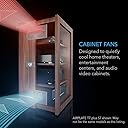
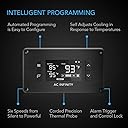
The AC Infinity AIRPLATE T7 is a premium 12-inch cooling fan system designed for AV cabinets and enclosed electronics. Featuring a powerful 104 CFM airflow and ultra-quiet 19 dBA noise level, it includes a digital thermostat with programmable fan speed and energy-saving modes. Its CNC-machined aluminum frame offers durability and a modern aesthetic, while easy installation and USB expansion make it perfect for maintaining optimal temperatures quietly and efficiently.


| ASIN | B00QFWWZQO |
| Air Flow Capacity | 104 cfm |
| Best Sellers Rank | #124 in Computer Case Fans |
| Brand | AC Infinity |
| Brand Name | AC Infinity |
| Compatible Devices | AV Cabinets, Desktop, Gaming Console, Receiver |
| Cooling Method | Air |
| Customer Reviews | 4.8 out of 5 stars 1,348 Reviews |
| Included Components | AIRPLATE T7 |
| Item Dimensions L x W x H | 11.69"L x 6.3"W x 1.3"H |
| Item Weight | 2.3 pounds |
| Manufacturer | AC Infinity |
| Material Type | Aluminum |
| Maximum Rotational Speed | 1800 rpm |
| Model | AI-APT7 |
| Noise Level | 19 db |
| Number of Items | 1 |
| Number of Packs | 1 |
| Part Number | AI-APT7 |
| Power Connector Type | 4-Pin |
| Product Dimensions | 11.69"L x 6.3"W x 1.3"H |
| UPC | 854759004389 |
| Unit Count | 1 Count |
| Voltage | 240 volts |
| Wattage | 12 watts |
M**T
Works Great! Just what I needed!
This thing rocks! I needed something to cool my new home theater rack with a glass door. It is now much warmer inside the unit than the previous "monster" rack I had with open shelves. I looked quite a bit but kept finding all kinds of fans for computers. I needed one like this that didn't need me to wire anything and I could plug into the wall. An added bonus to me is the thermostat controller. I didn't do anything fancy. I just drove a couple of finishing nails into the back of the shelf above my receiver and hung the fan assembly on the nails. The package does come with nice plastic templates to cut precise holes for the fan assembly and the thermostat if you want to mount them in a totally enclosed cabinet. Mine has open shelves in the back, I just wanted to move some air. The USB cord between the fans and the thermostat is long enough that I could place the thermostat controller on the top shelf next to my Monster Power supply with some leftover. The power cord from the thermostat with the little brick or wall mushroom is long enough to make it to the wall outlet with no problem. I set the thermostat controller on the shelf and it looks fine. There is a temperature probe wire attached to it that I hung down the front of the shelves to measure the temperature inside the cabinet. The first time I used it while watching a movie, I was not satisfied with the amount of cooling. Reason, I had the fans blowing into the cabinet over the receiver. This was maybe cooling the receiver like I wanted but it was just blowing a lot of hot air up over the rest of the electronics stack. I pulled the fan housing off the nails, turned it around and hung it back on the nails in the opposite direction to exhaust the hot air off the receiver out the back of the cabinet. That did the trick. I was able to set the temperature down to 76 degrees (my choice for now) and it easily holds that temperature. The temperature probe by the way is hanging just above the receiver. I am confident that it is being cooled like I want now. I've watched 4 or 5 movies since installing this unit and it does not make any perceptible noise when my home theater is blasting away. It maintains the set temperature steady as a rock! I keep it running after I finish watching the movie to allow the unit to cool down after I shut everything down and the fans are very quiet. Then I just have to unplug it from the wall. I am very satisfied. This thing was easy to set up, cools adequately and is quiet. The thermostat controller does have 2 USB ports so that you can add up to two more fans if you need more cooling power. I have had no problems with this quality product. If I do decide I need another fan, I would not hesitate to order another one.
D**R
Get this brand! This is the one!
These are incredibly high quality fans and these are almost completely silent. They have a finish that makes you feel like the cabinet came with them. It holds the tempuratures perfectly and as long as you are strategic with them (I've found thats really easy to do in most cases) they work really well, the screen is nice and readable and doesn't light up the room at night (also has a screen-off mode) amd the power draw on them is negligible. The packaging is simple and makes these feel even more premium and they come with templates for easy installation. As seen in my photos they do work on metal cabinets too (though it's difficult to cut and make it look good but I think it turned out nice.) I highly recommend watching some videos on installation to avoid screwing it up and making it look bad. They keep my servers cool to a point where the fans don't run as hard and that saves money there too. I actually use these on my entertainment center to cool my ps5 that's enclosed in there too and it's perfect! This is the high quality brand you're looking for! My ONLY complaint, is the alarm feature is kinda confusing and I'm not sure if the alarm even works at the same time as the fan curve... (edit: it does work. You have to set it in alarm mode then switch it to the desired mode you want)
D**N
Excellent cooling for cabinets — smart control could be improved
I’m using two AC Infinity AIRPLATE T7 units — one for a NAS in a cabinet and another for a PS5 in a TV unit — both due to heat build-up in enclosed spaces. They work extremely well and have made a noticeable difference to temperatures. Setup is simple and build quality is excellent. The fans are quiet, effective, and ideal for cabinet or entertainment unit cooling. I also reversed the fan direction on both units, which was fairly simple to do and makes them very flexible depending on whether you want to exhaust hot air or pull cooler air in. I run them using the temperature probe in SMART mode, which works well overall. The only minor limitation, similar to the AIRCOM T9, is that you can’t set independent upper and lower temperature limits, so the fans can occasionally cut in and out as temperatures hover around the trigger point. Proper temperature band control would make these perfect. That said, they’re an excellent solution for heat from consoles, NAS units, or AV equipment in cabinets. Highly recommended.
A**N
Well-build, exactly what I needed!
Upgraded my under-desk computer system, and it was getting warm under there. This had always been a minor problem in the past, but upgraded CPU and a massive GPU required a way to get the heat the computer was successfully exhausting under the desk, to somewhere else as fast as possible. Just remember that you will absolutely need to cut a hole in the installation surface, at least for the fan. I'm actually 3D designing and printing a simple enclosure for the controller, so it can sit on my desk. It's perfect! I'm very good at tech, but I am not exceptionally handy. Cutting the hole in the back of my desk was a pain. But it was so worth it! With the computer up and idling, I'm seeing a 3-5°C difference with the system in smart mode. Anything below...75°F?...and the fans are off. Automatically! Out of the box, it's set to be at max fans when you reach 85°F, which is perfect for my application. By the time the computer is running hot, the AC Infinity fan system is already in full gear at 100% fans. When the fans are at 100%, because I reversed them (exhaust versus intake), they are a little louder than when they're in the factory stock position (intake). But it's on-par with the 10 fans inside of my PC, so we're good. If they ever release an upgrade to this system, which has more powerful and quieter fans, I'll probably do that. But for now? Perfect! Once I got the fans installed in the desk, and the cables routed where I needed them to be, the system simply "just works." You can set it to Alarm, which is probably fine, but I prefer Smart mode. I do wonder if Alarm is basically Smart but with the Alarm enabled. Might be nice to have a "top end" temperature I can set, where it beeps or something. But I don't want to give up the Smart mode where they turn off. The packaging was awesome, with serial numbers on the outside of the box, so I don't have to remove the installed fan to get the serial number if I ever need it. Everything arrived in perfect condition, with a plastic cover for the controller screen, a fantastic manual, and AWESOME plastic templates for both the controller and the fan unit itself. Made drawing the hole on the desk as easy as tape and a magic marker. I'm VERY picky about the things that I buy, and I have to say that this is like the iPhone of the exhaust fan world. Solid metal fronts, high density plastic backs, and cables that are the perfect length for most applications. I can't imagine a better fan solution for what I needed it for. And, as fans die eventually (did I mention it has dual-bearing fans, which are rated for 67,000 hours!?), I can't wait to eventually buy the next generation of fan system from this company. If you need a way to move air, at 104 CFM, from one place to another, inside a cabinet, or under a desk, as long as you can cut a hole, this is the product for you!
S**M
Addresses my needs perfectly, great product
I recently switched from an open shelf system to an enclosed cabinet and of course the temperature inside the cabinet very quickly skyrocketed to unsafe levels for my electronics. My cabinet contains: UPS/Power conditioner - always on, surprisingly small amount of heat generated DVR - always on, constantly records on 4 channels, significant heat generated A/V reciever - Significant heat generated when on Cable box - generates surprising amount of heat even in standby mode XBOX - significant heat generated when on Wii - moderate heat generated when on Squeezebox music player - minimal heat when on Before installing the fans, I plugged in the controller and set the temperate probe inside the cabinet after the A/V Receiver had been running for about 30 minutes. The temperature inside the cabinet at that time was 95 degrees F. Since installation, the temperate inside my cabinet has not exceeded 80 with just the A/V receiver on, and 82 with the A/V receiver and the XBOX on. With everything off that can be off, the temp never exceeds 79. I have the fans in 'Auto' mode so they turn off below 78 degrees. During the night when only the DVR and the UPS are running the fans are usually off. The fans have 3 speeds, low, medium and high, and 3 modes which are easily set: On: Constantly running at the speed you set until you turn them off Auto: Fans come on at a temp you set. Fans turn off when the temp is 4 degrees (can be changed to 2 degrees) below the set temp. Fan speed is set by you Smart: Fan speed varies according to the measured temp. You set the temp when the fans should be on HIGH. The fans will be OFF if the temp is more than 8 degrees (or 4 if the 'variation buffer' is set to 2 degrees) BELOW this value. They will be on LOW if the temp is between 8 and 4 degrees lower, and MEDIUM if the temp is 4 degrees or less lower than the set temp. For example, I have mine set to a 2 degree variation and my temp is set to 82. Below 78 degrees the fans are OFF. At 78-79 the fans run slow. at 80-81 they run medium and at 82 or higher they run on high speed. Since I have components always running, I found I was not able to get the temp below 77 degrees at any time even with the fans running constantly so these settings seemed to me to be the most efficient for my setup. Installation: The kit comes with 2 plastic templates, one for the fans and one for the control unit, which double as gaskets to help reduce vibration (I have no noticeable vibration). These templates make it very easy to cut the correct size hole in the cabinet as well as drill holes for the mounting screws. The kit comes with a choice of 2 mounting screw options, machine screws with bolts or wood screws. Simple instructions are included. The power adapter plugs into the back of the control unit. The fan unit plugs into a USB port on the back of the controller. The temperature probe is already attached to the controller, place it in a suitable spot in your cabinet and secure it with the provided self sticking cable manager. The whole process including cutting the holes took less than 30 minutes. Take some time to experiment with fan speed and mode to find out what works best for your specific setup. I arrived at my current settings after several days of trying different settings to see what worked best. Overall, I could not be happier with this product! It keeps my cabinet cool even when everything is on. Fan noise is unnoticeable on slow speed, barely noticeable on medium and even on high speed is not intrusive.
N**C
Good product for a good price
I really like this concept for cabinet cooling. In the past I've just used computer case fans to cool a home theater cabinet but this guy makes it easier. There are other versions/variations of the AC Infinity series that don't have the thermostat control but they aren't much different in price so I went with this one and an additional single fan. You can plug any of the standalone units into the thermostat so that they can also be controlled based on temp. For the piece of furniture that I was working with I actually installed the controller on the inside of the cabinet as there wasn't a nice place to do it on the exterior and not ruin the look of the piece. The way that it is currently implemented for me may shorten the lifespan of the fans just a little bit as there isn't much of an intake when the cabinet doors are closed. I plan on installing a small vent on the bottom floor of the cabinet underneath the amplifier to allow for greater airflow. So that is something to keep in mind with any sort of ventilation, you will need an intake as well as the exhaust that the fans provide. The price point is also pretty good. I had seen similar systems in the past but they were pre-set temp limits with basic PC case fans attached. I really like that this gives you the ability to set your temp limit. I wouldn't say that the price is unbeatable but the ease of install and how nice it looks when installed is a big plus in my book. Oh! Last thing that was almost a problem for me: Know the depth of your equipment and cabinet. This fan will protrude into the cabinet space a little bit and it was almost too much for my amp/receiver. Luckily for me my receiver stills fits, but only by about a centimeter, phew.
W**L
Additional Ventilation for my Xbox One.
Received this product yesterday (2/22/2016) in new condition. Right out of the box the electrical connections and thermostat interface seemed intuitive and easy to grasp without reviewing the documentation. Testing the unit out of the box, it worked as advertised. BTW, it is very quiet. If I'm not within two or three feet of it, I can't hear the quiet whisper that the fans make when set to high speed. Recommend to all!!! I may be making another purchase soon for the top of my receiver of my A/V system. UPDATE: (2/24/16)I tried to turn the fans around in the housing to redirect the airflow to accommodate laying the metal face plate down on top of my Xbox One exhaust fan port but I was stymied by the plastic housing and the wiring. I didn't see a way to conveniently accomplish this task without drilling holes in the plastic housing and I didn't want to do that. So, I reassembled the fans in the original configuration. I scrounged around and found eight common electronics equipment rubberized feet (size of about a dime and about 5mm in depth). I removed the feet from the tape backing and stuck them on the fan intakes (plastic housing side) near the eight mounting screws but not on top of the screws. I want to maintain easy access should I need to open the enclosure later. Next I placed the unit with the metal face plate up and the rubberized feet down on top of the Xbox One centered over the right side exhaust vents of the Xbox One centered over the exhaust fan port. I connected all the AC Infinity connections and plugged the power supply into the wall. The thermostat powered easily. I retested the system to make sure everything was working properly. It was. I had full control. I have set the thermostat to 86 degrees Fahrenheit in smart mode and placed the temperature probe on top of the Xbox One right side exhaust vent edge next to but in between the AC Infinity fans intake. The thermostat probe is not wedged under the fans simply lying next to them atop the Xbox One. This location seems to be the best location for the thermostat to measure the exhaust air temperature and control the fans in smart mode. I've noticed that the fans only come on at the low level and manage to continue to pull the exhaust air temperature down enough that the medium or high fan speed levels have not been reached. I'll keep an eye on the system and post another update later. Needless to say, I really like and highly recommend this set up for electronic equipment that may need additional ventilation or power exhausting due to any number of factors. Final update: 3/3/16 The AC Infinity Airplate T7 is working Great!! I'm very happy with this unit and highly recommend to anyone else looking for a high quality cooling product for the Xbox One. There are other cheaper after market solutions to augment the onboard cooling fans internal to the Xbox One but I highly recommend this solution keeping in mind that you get what you pay for.
T**D
Fantastic product, even better customer support
I installed these with relative ease, including a 2 fan expansion for the other cabinet AC Infinity AI-CFD120BA Dual 120 Quiet Cabinet Fan, Black , for 4 fans total. The control unit is simple to operate. So far the performance seems to be good enough but the noise is troublesome. At low and medium, both pair of fans have a bit of a rattle, grinding sound. At high all you hear is the purr of the air (which is still quite loud). I've built PCs before and fans should not sound like this, especially at low speed. I couldn't put the thermal sensor directly over the hottest part of my amp, as it would reflect a higher temp than the ambient air and constantly run on high ("smart mode"), so probe placement is important. My entertainment center is very much enclosed, so I feel like the performance is a bit hindered without an intake. It seems like it has to run a little harder than I expected to keep the temp around 75, even without pushing my amp. I have an Onkyo receiver, XBox, AppleTV, modem, and router in one cabinet (with the probe). A DirecTV box, bluray player, and XBox Kinect in the other. In all, I'm somewhat satisfied, but am left wishing for a quieter system that doesn't have to run as hard. With quieter fans, I'd rate 4.5 stars. *****UPDATE March 2, 2015***** AC Infinity has just shown some of the most incredible customer service I've received in many years. After posting my initial 3 star review on Amazon, I was contacted (within just a couple of days) with information that they had discovered a hardware bug in the thermostat controller that is the cause of the grinding fan noise, and that they have the updated model rolling out of the factory. They immediately shipped me one priority mail, which I installed today when I got back from my vacation. I am pleased to report that the low/medium speed fan noise is resolved and the only noise I now hear is the whir of the moving air. It sounds exactly as I would expect it now. As a bonus, the back-light on the display (which was always on even if the system was idle, and is quite bright) now has a timeout function. Although I didn't note this as an annoyance in my original review, after having it for a while, the bright light at night was a bit distracting. This product improvement is just another example of a company paying attention to what reviewers have to say about their products and making it right. Oh, and Jeremy with AC infinity sent a letter with the replacement apologizing for the inconvenience and also left me a voice mail while I was on vacation asking how the updated unit worked. I think that's pretty incredible in this day and age. Needless to say, I'm updating my review to 5 stars.
B**3
Smart cooler
Sistema súper probado que funciona de manera autónoma para mantener a temperatura correcta los dispositivos electrónicos dentro de un sitio cerrado
B**E
Au Top
Impeccable
K**D
👍
👍
J**N
Quiet and efficient cooling
Very good, works perfectly even on hot summer days. Installation was easy, it’s very quiet, and the airflow is excellent for my two cabinets (with a hole between them). Great value for the price.
M**S
Sehr gute Qualität
Sehr gute Qualität von der Verpackung bis hin zu den Geräten. Bis jetzt laufen die Lüfter ausfallfrei und funktionell. Negativ: leicht erhöhter Geräuschpegel bei Lüfterlauf
Trustpilot
1 day ago
3 weeks ago