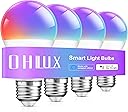
💡 Light up your life, smartly and stylishly!
OHLUX Smart Light Bulbs offer 16 million customizable colors with dimmable brightness, controlled via Alexa, Google Assistant, or app. These energy-efficient 10W LED bulbs replace traditional 80W incandescent bulbs, feature smart scheduling, group control, and require no hub—perfect for modern smart homes.


| Brand | OHLUX |
| Light Type | LED |
| Special Feature | Smart bulbs |
| Wattage | 10 watts |
| Bulb Shape Size | A19 |
| Bulb Base | E26 |
| Incandescent Equivalent Wattage | 80 Watts |
| Light Color | Warm White |
| Voltage | 110 Volts |
| Unit Count | 4.0 Count |
| Color Temperature | 2700 Kelvin |
| Number of Items | 4 |
| Brightness | 900 Lumen |
| Shape | a19 |
| Material | Aluminum, Plastic |
| Indoor/Outdoor Usage | Indoor |
| Power Source | AC |
| Color Rendering Index | 85 |
| Power Consumption | 10 Watts |
| Item Package Quantity | 4 |
| Light Source Type | Light Emitting Diode (LED) |
| Item Weight | 2.4 ounces |
| Light Source Wattage | 10 Watts |
| Product Dimensions | 2.4"W x 2.4"H |
| Accepted voltage frequency | 100 to 120 Volts and 60 Hertz |
| Control Method | App |
| White Brightness | 600 Lumens |
| Efficiency | High |
| Style | A19 Smart Bulb |
| Manufacturer | OHLUX |
| Part Number | bling |
| Is Discontinued By Manufacturer | No |
| Color | A19 |
| Special Features | Smart bulbs |
| Batteries Included? | No |
| Batteries Required? | No |
| Wattage | 10 Watts |
J**Y
Cheaper solution good quality
I've been using these for a couple years. They work great and we're half the price of expensive options. I honestly think they're better than the more expensive Govee ones I have, but I do love Govee too. Colors seem the same or similar. Just about to buy another 4 pack to replace one that has gone bad. I thought it's was all very easy to setup.
�**�
Awesomeness
This is so nice that it connects to the Amazon Alexa/echo dots.It’s so cool to change the color in an instantThis was extremely hard for me to install other friends that have this it was seamless but for me for some reason it would not connect… So what I did was I had to fool the app and didn’t go by the exact instructions as those were not working… It kept saying I might need to downgrade my Wi-Fi megahertz but I never did that and I ended up getting it up and running… I was so happy I did a happy dance.So do not give up if it’s not connecting there are different settings with fast blinking and slow blinking even though it was fast blinking and it was not working I chose slow blinking and low and behold it connected to the special Wi-Fi inside the bulb.Once it’s up and running it’s pretty awesome I just wish it connected to Amazon Alexa immediately without having to go through the app… But the app is what makes it where you can change your desired color other than telling Alexa to make it red orange yellow purple green… Etc.… The app lets you literally choose any color on the spectrum that you like
S**N
Great Value! Close to Perfect But Software Has A Few Irritations (Not Deal Breakers)
The best thing about these bulbs is they don't need a hub. But you need to have a Wifi router than can broadcast the 2.4Ghz channel under it's own network name.It appears the Smart Bulb industry has matured to the point you can get a decent quality, reliable product that is easy to setup at a low price now. The white color can be fine tuned to your liking (warm to cool) and the color mode colors are vibrant with very fine tune controls.It appears this bulb is sold under several different names (they all come in the dark blue boxes) and they all use the "Smart Life" app which I believe is made by Tuya, which may also be the manufacturer of the bulb (not sure).Why no 5 stars? I am a Software Developer of 20 years and the app, while functional, has some issues, none of them deal breakers but a bit irrirating. Like most things these days, it's all about the software (from our phones, to our cars, to our TVs) You can have a well-engineered hardware product with great specs, but if the software is poorly designed it doesn't matter how good your big screen LED panel is, for example.Here are the things you may find frustrating about the software app to control the lights, at least at the time of this writing:#1 You can't create scenes (aka scenarios) or automations that change the color of the bulb! You can only switch between white mode and color mode in which case it will use the settings you used the last time you were in color mode and the only way to change the color is manually in the app. So there's no way to create a scene that changes the bulbs to red if the color they were last on was green (like if you wanted to switch between your sports team colors and Christmas colors with one button push.)#2 If you create a scene, or automation that changes the brightness or color temperature of the bulb when the bulb is in color mode, the bulb will change to white mode. So there's no way to control the brightness via a scene or automation for any colors other than white. You have to do it manually. If you use the group function to group the bulbs in groups, it makes it easier to do this than changing each bulb individually while in color mode.Other than that, the app works pretty well. What is interesting is that my Google Home / Assistant CAN change my bulbs colors and color brightness using voice commands like "Hey Google, change the lights to red" or while in color mode, "Hey Google, set light brightness to 40%"One other flaw in the software is that, you can create a scene/automation that gradually dims or increases the brightness over time using the time lapse/delay function, BUT, it doesn't work for a wake up light sunrise effect very well. if you wake up before it's gone through all the steps in increasing the lighting and you use the app to turn off the bulb (if your sleep mate is getting up later), the automation keeps running and the light briefly flashes each time the next brightness step is executed. So the automation isn't aware you turned the light off, and even though it's only running a step to increase brightness, not turn the light on, it flashes and the app remembers after that you turned the light off and turns it back off. Very strange.The other thing is there are at least three versions of this app: Smart Life, Swift Smart Life, and Tuya Smart (or something like that) they are all the same app. The main one that most people use, Smart Life, the manufacturer must have not paid their translators well because the time delay step in the automation is called "Time Left" and scenes are called "Scenarios" where on the other two versions they got the wording more correct.I think for the average person these are a better value for the money then the more expensive well-known name brand smart bulbs. Hopefully they will improve the software down the road, resulting in a 5-star instead of 4-star rating (at least from me.)
W**S
Absolutely wonderful, a life-changer!
First: I bought two packages of the smart lights: the two pack and the four pack. Upon further research I discovered that OHLUX sells a six pack, but it was easier for me to differentiate the placements of the lights with the separate boxes. The two pack, I placed in two standing lamps at opposite ends of my bedroom, and the four pack, I placed in the fan lights overhead in my bedroom (four fixtures, of course).These are very easily controlled with my voice using my Amazon Echo Dot, or interactions with my phone, in the Alexa app in connection with the Smart Life app (needed to actually connect the lights to my network) produced by Tuya. You can adjust brightness and color, as well as the "color temperature" of the white light. You can assign names to the lights, and place them into groups within the Alexa app as well as Smart Life, as well as create scenes for controlling brightness and temperature within Smart Life and, again, control them with Alexa. You can also create Alexa routines for fine tuning brightness and color per lite.I honestly do not know many technical details about this kind of lighting in general, but I am very much pleased with what I'm seeing here. There seems to be a hardcoded four-scene limit within the Smart Life app for animated display of lighting. I believe that there wouldn't be many calls to display animated lighting unless I were to put on a rave in my room, but I can see other uses such as more immersive gaming – I have created a couple Alexa routines for this purpose, which are limited to static displays. For more dynamic animated displays, I may wish to look for LED strips I can mount on the upper sides of my room.In any case, that does nothing to lower my final score of these lights – absolutely perfect and beautiful for my current needs. Thank you, OHLUX! The most affordable smart lighting I've experienced (to be fair, the only smart lighting I've experienced so far), and while I would not go so far as to say that the Phillips Hue lighting system is not worth the money one would pay for that (it can interface in many more tantalizing ways with various systems that I may look into in the future), it does have a more complex setup process (Bridges, Smart Switches etc.). These bulbs are definitely a fast, easy smart lighting solution that you should definitely consider.
Trustpilot
2 months ago
2 months ago