Desertcart purchases this item on your behalf and handles shipping, customs, and support to South Africa.
🖨️ Print smarter, faster, and greener—because your office deserves the best.
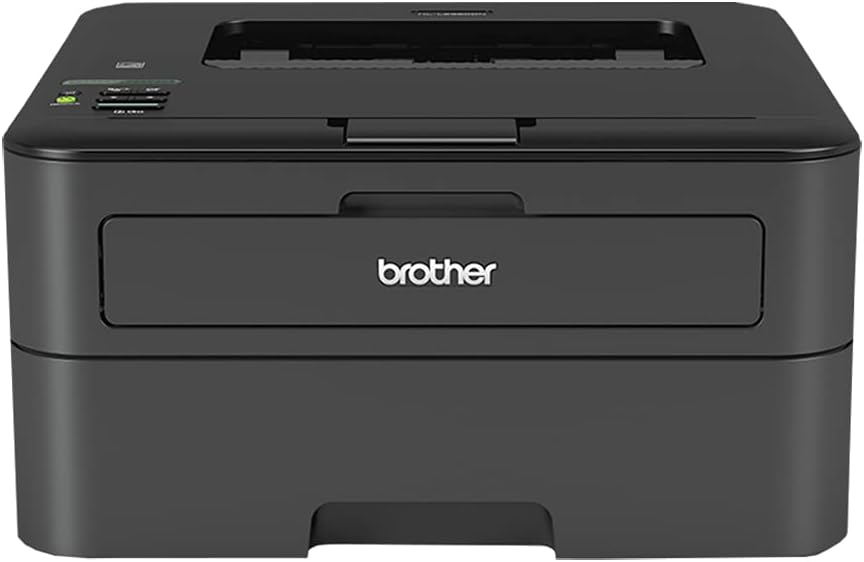
The Brother HL-L2360DW is a compact monochrome laser printer delivering reliable, high-speed printing at 32 pages per minute. Featuring wireless connectivity and automatic duplex printing, it supports mobile printing via AirPrint, Google Cloud Print, and Brother iPrint&Scan. Designed for home and small office use, it combines efficiency with convenience, including Amazon Dash Replenishment for seamless toner management.
| Additional Printer Functions | All In One |
| Asin | B00LEA5EJM |
| B W Pages Per Minute | 32 pages_per_minute |
| Best Sellers Rank | #152,055 in Office Products (See Top 100 in Office Products) #179 in Laser Computer Printers |
| Brand | Brother |
| Built In Media | Printer |
| Color | Black |
| Color Depth | 1 bpp |
| Color Pages Per Minute | 30 pages_per_minute |
| Compatible Cartridge | Brother Toner Cartridges for HL-L2360DW |
| Compatible Devices | PC, Smartphones |
| Control Method | App |
| Controller Type | Vera |
| Customer Reviews | 4.2 4.2 out of 5 stars (595) 4.2 out of 5 stars |
| Display Type | LCD |
| Duplex | Automatic |
| Global Trade Identification Number | 00012502638834 |
| Hardware Interface | USB 2.0 |
| Initial Page Print Time | 8.5 seconds |
| Ink Color | Black |
| Item Dimensions D X W X H | 7.2"D x 14.7"W x 14"H |
| Item Type Name | Printer |
| Item Weight | 16.8 pounds |
| Manufacturer | BROTHER |
| Maximum Copies Per Run | 32 |
| Maximum Copy Resolution Black And White | 600x600 dpi |
| Maximum Media Size | 8.5 x 11 inch |
| Maximum Print Resolution Black And White | 600x600 dpi |
| Maximum Sheet Capacity | 250 |
| Model Name | L2360DW |
| Model Number | HLL2360DW |
| Model Series | HL-L |
| Number Of Drivers | 2 |
| Number Of Ethernet Ports | 1 |
| Number Of Trays | 1 |
| Other Special Features Of The Product | Auto Document Feeder |
| Paper Size | 8.5x11 |
| Power Consumption | 546 watts |
| Print Media | Envelopes, Fabric, Labels, Paper (plain) |
| Printer Connectivity Type | USB |
| Printer Output Type | Monochrome |
| Printer Type | Laser |
| Processor Count | 1 |
| Resolution | 600 x 600 |
| Scanner Type | Sheetfed |
| Series Number | 2300 |
| Specific Uses For Product | Home, Office |
| Total Usb 2 0 Ports | 1 |
| Total Usb Ports | 1 |
| Upc | 012502638834 |
| Warranty Description | Brother |
| Warranty Type | Limited Warranty |
| Wattage | 546 watts |
User
Connecting to the Router was Challenging
I struggled with the setup and had to call Brother for help. The woman who helped me with setting it up and connecting to my router was great. Even with the setup instructions and Gemini AI help, I still could not make the connection without her help. Brother should provide better instructions on connecting to one's router. Otherwise, the printer is great. I had the same model for about 7 years and am happy I could replace it and use the ink cartridges I had for the old printer.
User
Works Well, Even After Sitting
I think this Brother unit is the best value in a B&W laser printer. It has worked fine for years. It's always ready to go with no issues even if it just sits for a while ie. no dried up inkjet cartridges.
User
Your B&W printer for Spring of 2018. Brother is a flawless name brand.
This is a very good printer in 2018. It physically took 4 minutes to put it where I wanted it and hooked up the Ethernet cable to the router, didn't install drivers, and it was found and in use in less than 2 minutes after that. It's safe to say you can be printing with this in 10 minutes (plug it in first, let the fuser start warming up...it's a laser printer after all).I don't see the deep sleep problem but I know of it from the reviews so I'm curious about that as well. I only print on this every 3 days or so and why I bought it and it prints when I hit print, out of the box. It's not instant, but it's faster to print than my inkjets that don't sleep and cook their ink just sitting there clogging jets. It's slow to start but first to finish, compared to the color photo inkjet. So sleep was fixed or I'm just not demanding things get printed quicker than the $36,000 unit at work. This is about $100 and doesn't take a maintenance staff or contract to keep it running...Brother just runs!The starter ink in the one prior printed 2 pages a day and lasted 2 years. I'm well within that timeline and only had it about 4 months and on a newer model for sure, but I expect the same. It'll be a cost I'm sure when that day comes, but I know the powder will be much lower cost and longer running than any inkjet I've owned. This includes EcoTank color laser jets below $300. Above $300, then we have to talk color laser.The pricing is what it is and as lower models go out of production, they raise in price due to Tech Rarity and suggestions on the intertubes. I'm sure a Pentium 4 is being bought right now for $427 because they need it and it was suggested on the webs. Older stuff rises in price, this is better than the last, it's cheaper but it doesn't mean it's worse. However, there is a new model now so shop and compare. That's your shopping, not this review...this is a good unit and I hope you see it lower price than the new guy and not go up!
User
Fantastic little work horse!
Iv'e had so many printers (both color and black and white) break or start printing poorly. I can't believer this little thing works so well when it was so cheap. It is simple and relatively quiet. It isn't the fastest but it's fast enough that I don't notice myself waiting on it. it's light weight and takes up very little space on the table or a desk. Just a fantastic little printer. Oh. . . ink isn't overly expensive either.
User
Just arrived
Decided to gamble on buying a used Brother HL-L2360DW, because we were previously using the same model and had a surplus of ink and a drum. Paid 119.07 with tax and shipping compared to over $400 for a new unit. Arrived in about a week, with paper in the trey and a drum and ink cartridge already installed. Unboxed and plugged the unit in and so far it has worked perfectly. Looks like a situation where a company closed and the seller bought their inventory and resold as is. Very positive experience so far. If I have problems with the used unit in the future, I will update, but so far so good.
User
Does not stay online...EVER
I bought this printer because it was a more compact laser printer that had wifi and decent reviews. I've dealt with it for over 3 years, but now that I am printing more the fact that it NEVER stays online has driven me crazy. No matter what setting you put it on, it puts itself into sleep mode fairly quickly, and the only way to get it out of sleep mode is to turn it off and on. When you just put the button that is supposed to make it "ready," it does say that it is "ready," but it won't be recognized on the wireless network until it's been turned off and on. We have searched and had it looked at and there is nothing we haven't tried. It just prefers to sleep than to print. Not helpful.
User
Better buy toner right away
Pros: small, quiet, quick.Cons: skimpy manual feed tray, initial toner cartridge almost empty.In general, I'm liking my new printer. It's nice and small, and prints really quietly. The print quality is fine (we do almost exclusively text, not graphics).If you are a heavy manual feed user, you'll be frustrated with the manual feed tray. Actually, calling it a "tray" is too generous. You open a little flap (maybe 2" deep) and then stick the paper into the printer maybe another 2". But there is a lot of paper hanging out. The result is that the paper often pulls in crooked, or pulls further in than expected, making the printing start 1/4" lower than expected. I can no longer use manual feed to print checks.Even worse, the manual feed can only take one sheet at a time. So you can't, say, drop 6 sheets of letterhead in there and print 6 letters in a row. You have to stand there and feed the sheets one at a time, and you'd better pull out the paper tray below, so that the printer doesn't grab a page from there before you get the next page positioned in the manual feed slot. Manual feed is almost completely useless.Brother should be ashamed of themselves shipping the printer with an empty toner cartridge. We printed 636 pages (text, not graphics) before the cartridge ran out. OK, the printer's only $99, and high-capacity toner is $50, but still, 636 pages?! So if you're ordering this printer, you'd better order the toner right away. (The good news is that this printer has cheap toner cartridges because the drum unit is separate.)I wouldn't buy this printer again, because of the manual feed shortcomings. But if you're not a manual feed user, it's a good value.
User
Great Printer BUT, please note it is NOT a copier or scanner
I had no trouble setting up this printer. It is quiet and the print quality is crisp. HOWEVER, until Amazon fixes the website description--please note it is NOT a copier or a scanner. I thought maybe I didn't understand how to feed the paper to have it scan/copy so I got a hold of Brother and they confirmed it doesn't have that capability. So, if you need copying/scanning capabilities, try the HL-L2380DW. It has a larger footprint, but it definitely can copy and scan. I must say that Amazon ROCKS when it comes to customer service. I've never received better.
User
Excelencia es sencillez... a un costo muy bajo.
Para productos como estos en donde lo que se busca utilidad y buen funcionamiento me gusta ser muy claro y conciso por lo que aquí les van todos los pros de esta excelente impresora:- Super facil de instalar y utilizar (interfaz sencilla)- Conectividad wifi, airplay, cloud print, etc.- Bajo costo de toner- Muy buena velocidad de impresión- Compacta- Buen almacenaje de papelEsta es una impresora de la cual ya tenia recomendaciones y tenia ganas de probar para tener ahorros en la oficina, sin duda cumplio con mis expectativas.Espero les sirva :)
User
Great printer, excellent value
I just received this printer. Set up took all of 6 minutes (using a Mac). Also the AirPrint feature to print from my iPhone and iPad worked like a charm. So far so good. The double sided print also works well. The printer is fast, quality seems decent (totally fine for printing text which is what this will be used for - no graphics/photos etc). It's a touch on the noisy side, but it's fine.Update - similar to other users, I had problems with the printer turning off or not responding after not being used for some time. It would go into sleep mode and then not recover, required me to turn it off and then back on. Obviously very annoying especially if you aren't printing with regular consistency. I emailed Brother customer service (their website for support is not very user friendly - had to re-enter info a few times) but anyway, got a response the next day and it's worked brilliantly so far. I've printed with multiple hours and days gap and the printer responds without a hitch. Awesome customer service and precise problem solving. Here's the solution they provided:This can be normal depending on certain factors. We have a few tricks to prevent this from happening though. First you'll want to make sure the printer isn't on sleep, so you can try this right after you printed something.On the printer go to Network -> WLAN -> TCP/IP -> IPv6 -> Select On and press ok to confirm. Once it's been turned on, disconnect the power from the printer for about 30 seconds. Do not press the off button, disconnect the power from the wall please.When it's done you can go on the computer, click on the Apple at the top left, go to System Preferences -> Print & Scan. Delete any copy of the HL printer there. When it no longer shows up click on the little plus(+) button and click on Add other printer or scanner, a new window will appear. In that window you should see the HL printer with the word Bonjour next to it. Click on it once and make sure it says Brother HL-2360DW CUPS at the bottom in the Use box.When you see it you can click on Add. The printer shouldn't go offline anymore, at least not because of the sleep mode.Please let us know if you run into any issues during the procedure.Thanks and have a great day.
User
Funciona bem
Funciona
User
Simple. Tough. Reliable.
Solid printer! Automatic double side a super plus. Really easy to set up. I use It in my office and the wireless information made it too complicated to set up wireless printing for me. But I suspect that would work too! I have to say it doesn't provide much warning on low toner! And it doesnt let you run the printer with low toner. It just refuses to print until you replace, even thought it is still printing clear!
User
Manda a imprimir desde cualquier lugar
Es una buena impresora, silenciosa buena resolución y de muy fácil uso. Se conecta con un click mediante WPS. Es de fácil uso sobre todo con el IPad o Iphone donde la impresora se detecta automáticamente. La impresión desde Android requiere un poco mas de configuración y descargar una App.Es compatible con Linux, sobre todo con Ubuntu donde un script instala el driver en pocos pasos.Lo mejor es enlazarla con google driver. Puedo imprimir desde la oficina o un cafe internet o en mi celular y al llegar la impresión esta lista.Compartirla con mi familia e imprimir cualquier documento desde google Drive.
Trustpilot
4 days ago
1 month ago